What is an AI-powered intranet?
An AI-powered intranet is only as reliable as the content behind it. Learn how governed, scoped knowledge makes AI answers trustworthy, and how to evaluate any platform before you buy.


An AI-powered intranet uses AI to help employees find answers and get things done, such as requesting time off or raising an IT ticket, while helping communicators create and deliver content, all from one governed content system. An AI-powered intranet builds its answers from the company’s own policies, pages, and documents, which means outdated or conflicting content produces wrong answers, delivered with the same confidence as right ones, however advanced the model is. If reliable answers at scale matter to you, choose a platform that scopes and governs the knowledge its AI draws from.
Staffbase, a Leader in the 2026 Gartner® Magic Quadrant™ for Intranet Packaged Solutions for the fourth consecutive year and one of the top five scoring platforms in the independent ClearBox Intranet & EX Platforms Report 2026, is built as a curated knowledge environment. If you are ready to compare specific platforms, see our guide to the top AI-powered intranet platforms in 2026. If you want to know what makes an AI-powered intranet’s answers trustworthy, and how to evaluate one, read on.
What makes an AI-powered intranet trustworthy?
Nearly every vendor calls its platform “AI-powered,” which these days tells you roughly as much as a restaurant calling its food “fresh.” Whether employees get the right answer depends on the content the AI reads, and on very little else.
We have all been there: typing “travel policy” into the intranet search box, getting fourteen results, opening the third one, noticing it is from 2019, and typing “travel policy CURRENT” a little harder than necessary. Search-era intranets were built on accumulation. Every document was indexed, every draft stored, every version kept, and that worked well enough, because search hands you a list and lets you do the filtering. Employees expected ten to fifteen results, some of them conflicting, and they used their judgment (and a small sigh) to pick the right one.
AI changes the deal however. When an employee asks an AI chatbot “What’s our current travel policy?” or “What are the safety procedures for this shift?” they don’t want fifteen results and a scavenger hunt. They want the answer, now, ideally before their coffee gets cold. They have stopped browsing and started delegating judgment to the system.
Search tolerates ambiguity. AI does not.
Now picture an intranet that holds three conflicting versions of the travel policy, a handful of outdated PDFs, and a draft called “final_v2_USE THIS ONE.” The AI cannot reliably tell which one is current, so it blends them, summarizes the outdated guidance, and confidently delivers the result. A human colleague would at least say, “I think it’s this one?” but the AI just answers. The content determines the answer, and the model plays a supporting role.
That is the precondition for trustworthy AI that the industry keeps underestimating: a better content environment. Governance is an AI-readiness requirement. If your intranet is a content warehouse, your AI will produce warehouse-quality answers. If it’s a curated front door, the AI has something reliable to work with.
Governed content is also what makes a single source of truth possible. Cladtek, a manufacturer with more than 2,000 employees across international facilities, had a workforce in which 70% had no access to email. Once authorized HR, Operations, and Safety teams could publish their own real-time updates within Staffbase’s governed framework, everyone had one place to work from, and around 72% registered, with 80% using it every month. Any AI assistant added to an environment like that has a single body of approved content to draw from.

Why the “connect AI to everything” approach produces unreliable answers
Most enterprise AI plans start with the same idea. Connect the model to “all your enterprise knowledge” and let it sort things out. Nearly every vendor presents this as a strength, but an AI assistant can only be as right as the sources it is allowed to read, and every outdated draft left in scope is one more chance for a wrong answer.
In a Forrester Consulting study commissioned by Staffbase (October 2026) of 189 US frontline workers and managers, 35% said they run into conflicting, outdated, or unclear information at least once a week, and another 36% a couple of times a month. One in five were at best moderately confident that they know which source is accurate or approved. The same study found that 80% said their organization had already provided an internal AI tool, and its authors warn that this leaves room for shadow AI, with governance and privacy risks. They recommend delivering AI with governance and guardrails grounded in company context.
Without those guardrails, an AI assistant pointed at conflicting or outdated information inherits the confusion. Imagine Lena, who works on the factory floor at a manufacturing plant, asking an AI assistant a safety question. The assistant has been set up to read only the plant’s approved safety procedures and local HR content, so she gets a fast, accurate answer she can act on. Now imagine she asks an AI agent that pulls from the company’s entire knowledge base, including outdated policy drafts, three-year-old onboarding guides, and unsupported HR FAQs. She gets confident-sounding noise. The same question can also have a different correct answer by country and role, so a warehouse worker in the US asking about benefits should get the US policy, and nobody should have to explain why they didn’t.
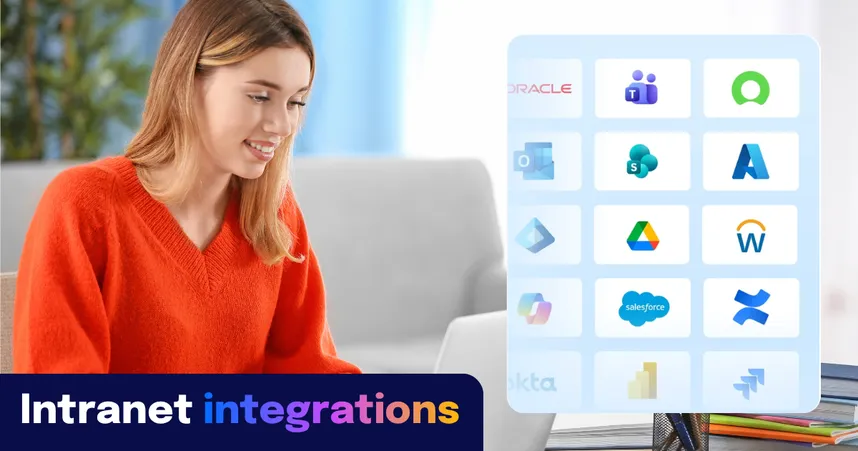
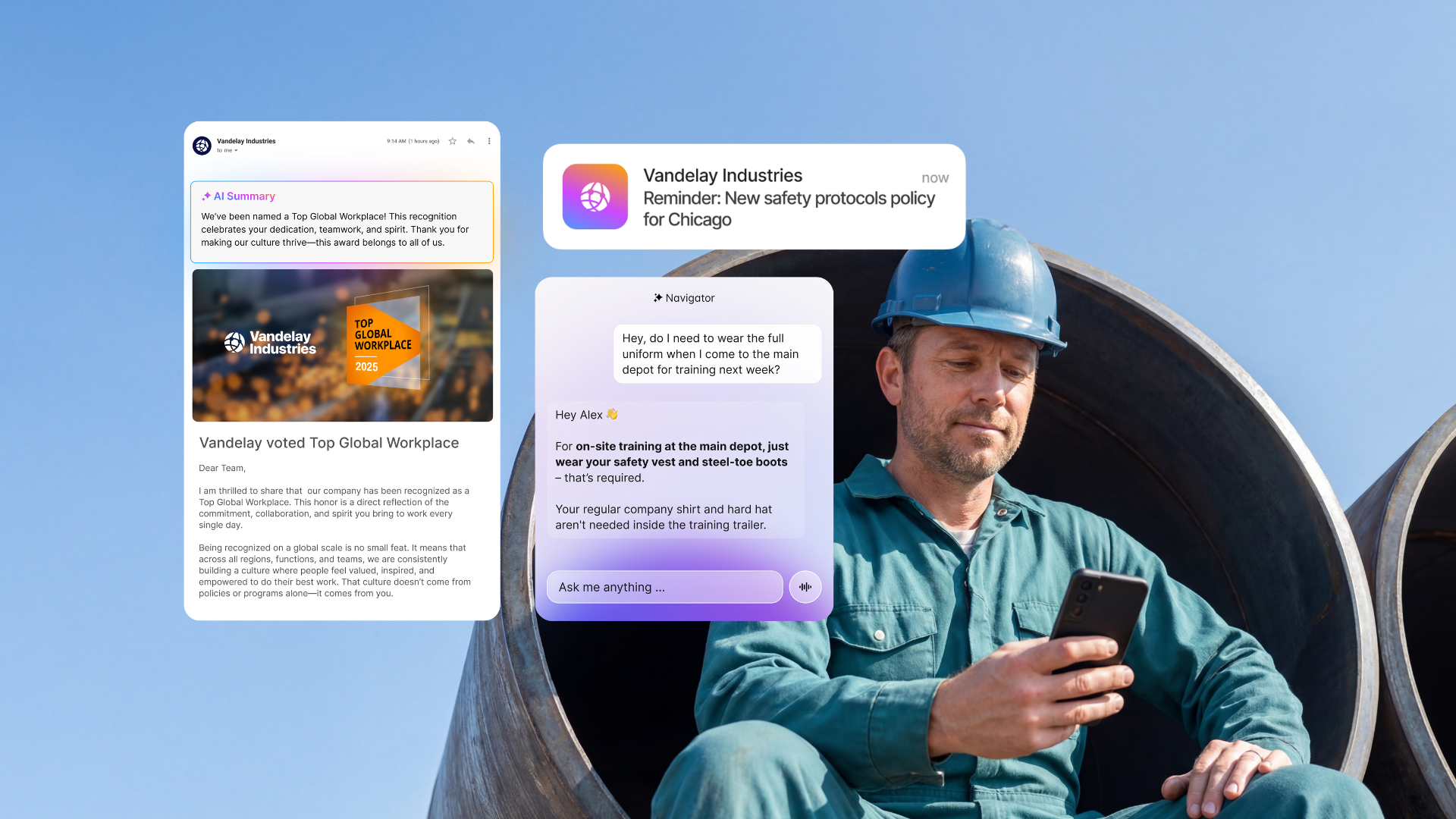
Navigator, Staffbase’s AI assistant, is built around that limit. It connects to systems like ServiceNow, Workday, and Atlassian (Jira and Confluence), but it draws from them only within the scope an admin defines. Admins choose exactly which Spaces, Pages, and News channels it can read and can set a content-freshness window, so an outdated policy PDF never reaches an answer. Navigator Experts go a step further, since each one is a purpose-built assistant for a priority topic, team, or department, with its own instructions and its own knowledge base of pages and PDFs, which keeps HR, Safety, and IT answers precise. When a question falls outside the approved sources, Navigator does not improvise a fluent answer. It points the employee to a person or the right resource, and every answer it does give cites its source, so employees and IT can check it. The goal is one trusted interface.
Safe AI vs. good AI: why governance alone isn’t enough
The enterprise technology industry has built an impressive governance layer around one question: Is the AI safe? Data access controls and permission management are necessary, and every vendor offers them. The harder question is the one almost nobody asks: Is what comes out actually good? An assistant can be perfectly secure and still wrong, and secure and wrong is not much of a selling point.
Almost right is wrong at work. In your personal life, almost right is fine. At work, almost right creates risk. It erodes trust. It makes people stop using the tool altogether.
Martin Böhringer, CEO & co-founder of Staffbase
Staffbase addresses both questons. The AI Trust Hub is the central point where administrators control and oversee every AI capability, governed by the T.R.U.S.T. principles (Transparency, Responsibility, User in the loop, Security, and Traceability). AI Quality and Governance is the system between the AI model and the employee. It grounds every AI response in the organization’s own trusted, permission-scoped knowledge and governs how the AI behaves, so trust is established before the answer instead of checked after it. The AI Trust Hub sits underneath all of Staffbase’s AI, and AI Quality and Governance determines whether employees trust and adopt the answers.
What is the difference between an AI-powered and an AI-native intranet?
An AI-powered intranet is a platform with AI features such as search, writing help, or an assistant, while an AI-native intranet is one that vendors say was built around AI from the start. Neither label has an agreed definition, and vendors apply both freely.
That makes the label a weak guide. “AI-powered” covers everything from a chatbot added to an existing intranet to a platform with AI woven through its core features. “AI-native” is a claim about architecture that vendors make about themselves, and a buyer cannot verify it from a brochure. Neither term tells you what an employee most needs to know, which is what the assistant does when two policies disagree or a document is three years out of date.
Those behaviors come down to content. Ask what content the AI is allowed to read, who approves it, and what happens when a question falls outside it. A platform that can answer all three clearly is far more likely to give employees answers they can trust, whatever it calls itself. The five checks in the FAQ below turn those questions into a short evaluation list, and the best way to test them is a demo run on your own content.
6 key features of AI-powered intranets for enterprise organizations
1. How does AI personalize the intranet for each employee?
AI-driven personalization gives every employee their own version of the intranet. It adapts content to role, preferences, and behavior, and puts the most relevant information in front of people at the right moment.
To do that, it watches how employees use the intranet: what they search for, what they read, what they engage with. It also picks up on context, priorities, and patterns of work, which lets it make suggestions before anyone asks. A frontline worker might get a quick mobile update that fits a shift, while an office-based colleague gets the longer report to read at their desk. Language, communication style, and update frequency count too.
The payoff is mostly subtraction. By filtering out what is irrelevant, AI keeps content overload down and leaves employees with more confidence that nothing important slipped past them. The result is a company intranet that adapts to the person using it, which tends to improve efficiency and satisfaction along the way.
2. How does AI-powered search work on the intranet?
AI-powered search lets employees ask in plain language. With natural language processing (NLP) and semantic understanding, they can type a question instead of guessing the right keywords or wrestling with filters, and the system works out the context and intent behind it. What comes back is a precise result with next steps, where the old search returned a list of links and good luck.
The most reliable AI search systems scope the knowledge they draw from by role, location, and department, so a frontline employee in a factory gets a different answer than a corporate HR manager asking the same question. Whether the employee is after a document, a policy, or an update, the intranet’s AI assistant can surface summaries, related content, or the next step.
One of the most useful parts of AI-enhanced search is federated and secure search. It lets employees query multiple approved data sources at once, within governance-defined scope and while respecting access permissions and data-protection policies. Knowledge bases, document libraries, and connected platforms all answer through a single interface, so nobody has to search each system separately. That saves the time otherwise lost to switching between tabs, and it gets employees to what they need wherever they are and however they ask.
 3. How does AI help communicators manage content?
Companion, the writing assistant built into the editor, helps communicators create and refine content. It summarizes lengthy documents, drafts and translates updates, and keeps the voice consistent across languages and channels, whether the source is a page of meeting notes or a company-wide announcement. It supports human creativity and leaves the final call to the person who owns the message, who still gets to decide whether “synergy” makes the cut.
Content Pro helps keep the intranet reliable by flagging outdated pages, broken links, and conflicting information for a person to review. That housekeeping matters more than it sounds, because proactive content governance is what makes AI answers reliable. When the underlying content is clean and current, Navigator and other AI features draw from sources that can be trusted. When it is not, even the best model will confidently surface stale information. With governance in place, employees can count on what they find to be timely, accurate, and approved.
4. AI assistants built on governed knowledge
An AI assistant is only as reliable as the knowledge it draws from. Connected to the right sources and scoped to approved content, it gives employees one definitive answer based on current, approved policy.
Built into the intranet experience and available across the employee app, this kind of assistant works like a personal guide. Employees ask in natural language and get a direct answer, or trigger an action in a connected system, such as checking an absence balance in Workday or submitting a request in ServiceNow. More complex needs, like onboarding guidance or step-by-step help with an HR process, are handled in the same conversation, so nobody has to find their way through a maze of systems. And because the assistant is available around the clock, it is as useful to a frontline worker on the night shift as to a desk-based employee at 10 a.m.
Staffbase Navigator is built on this principle. It is connected to systems like ServiceNow, SharePoint, Workday, and Confluence, and draws from approved content only, within governance-defined scope, so employees get the right answer, not just a plausible one.
5. How does AI affect intranet security and compliance?
Used well, AI can strengthen intranet security and compliance. By continuously monitoring activity and detecting unusual behavior, it can flag potential risks in real time, which helps prevent data breaches before they occur and keeps sensitive information protected across the organization.
AI can also take over the tedious security chores, such as managing user permissions and access control. It adjusts access as roles change or policies are updated, so only authorized people can view or edit sensitive information, with less human error and no extra admin work.
On the compliance side, AI helps organizations stay aligned with internal policies and external regulations. It can audit content, flag potential policy violations, and track adherence across every channel. Whether the goal is data privacy compliance or meeting sector-specific standards, the result is a secure intranet environment that adapts to changing requirements and takes some weight off IT and legal teams.
6. How does AI turn engagement data into insight?
AI-powered intranets turn engagement data into insight. By analyzing employee interactions and behaviors in real-time, from views and clicks to comments, reactions, and shares, AI identifies what resonates, what doesn't land, and which channels drive the greatest impact. These insights can go well beyond simple engagement metrics. Communicators no longer have to wonder whether anyone read the newsletter: they can see which stories inspire engagement, which topics build alignment, and where communication gaps might be hiding.
Employee AI also links engagement data with organizational goals and highlights the moments and narratives that shift understanding and sentiment. For leaders, that adds up to a live view of communication health across every region, department, and channel.
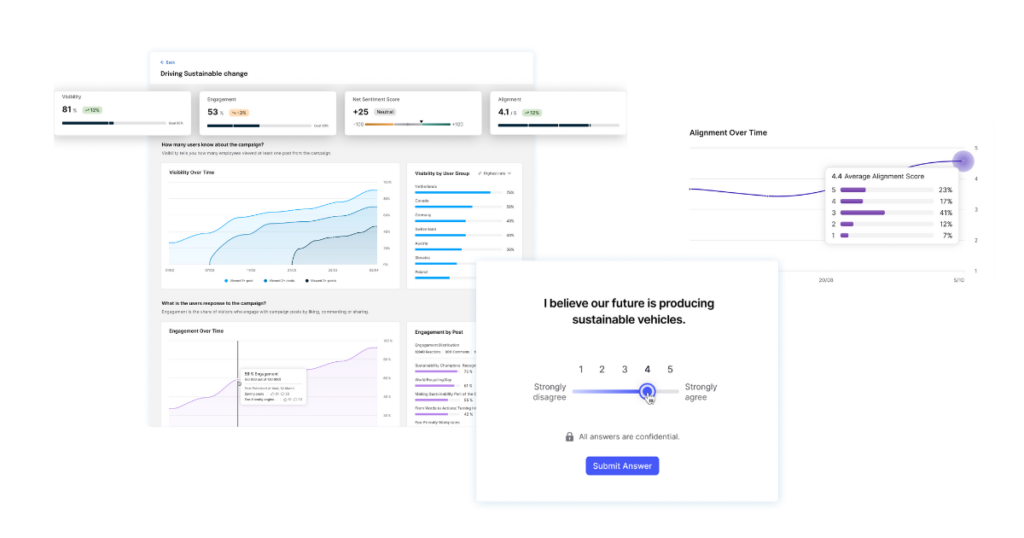 The Staffbase Smart Impact dashboard provides insights that go well beyond simple engagement metrics.
What an AI-powered intranet actually does: 4 real benefits
1. How does an AI intranet reduce information overload for employees?
AI-powered personalization cuts through the noise. Instead of sending every employee the same generic messages, it curates a focused feed tailored to their role, interests, and behavior. By analyzing interaction patterns and work habits, the intranet surfaces what matters most and helps critical updates reach the right people. The result is clarity instead of overload: employees get the context they need, and the cafeteria menu no longer competes with the safety bulletin for attention.
2. How does AI save time for communicators and employees?
Intelligent search and automated content management save time at every turn. Employees can find information instantly in natural language, or simply ask a question, while AI gathers results across the intranet and connected systems, within governance-defined scope, into a single, secure view. Behind the scenes, AI helps keep content fresh by flagging outdated material and recommending updates. The workspace stays organized, and communicators and employees can spend their hours on work that drives real outcomes instead of hunting for the right PDF.
3. What insights does an AI intranet give communicators and leaders?
AI-powered intranet analytics reveal what truly connects with people. By tracking how employees engage with messages across channels, communicators can see which stories resonate and where understanding drops off. Leaders gain visibility into communication health: what was sent, and also what was seen, understood, and acted upon. With that feedback loop, organizations can adapt in real time and refine their strategies to build stronger alignment and a deeper sense of connection across teams.
4. How does AI improve knowledge-sharing across distributed workforces?
AI helps employees find information without searching across systems. It connects information across silos, suggests relevant content and resources, and recommends experts or materials based on role, skill, and context. Whether employees are on the factory floor, in the office, or working remotely, they can find the insights they need quickly, which builds confidence, collaboration, and a culture of shared understanding.
One important limit: AI helps employees who know to look for an answer (pull). It does not create awareness of information they didn’t know they needed (push). The most important organizational communications, such as safety updates, crisis alerts, and strategic direction, require proactive multi-channel reach, and a better search box cannot supply that. An AI-powered intranet needs both: a reliable pull system for the questions employees think to ask, and a proactive delivery system for what they need to know regardless.
Staffbase Employee AI: how it works and what the evidence shows
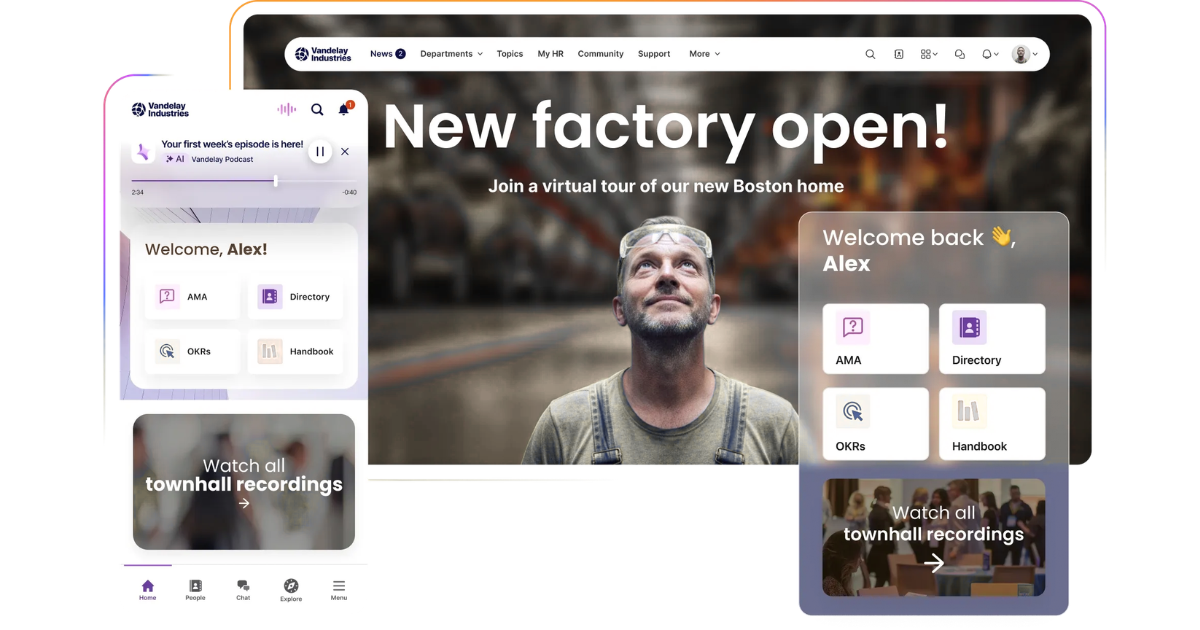 Staffbase Employee AI tailors the Staffbase experience to each person, so employees see what matters and find trusted answers. It works alongside Companion, which helps communicators create content, and AI Quality and Governance, which grounds every answer in trusted, permission-scoped knowledge. Data stays encrypted and is never used to train external models. Staffbase holds ISO/IEC 27001:2022 certification, and GDPR coverage is provided through a data processing agreement.
Companion, the writing assistant built into the Staffbase editor, helps communicators turn a blank page into a clear update. It adjusts tone, shortens or lengthens text, turns copy into bullet points, and drafts email subject lines and preview text, which helps less experienced editors publish professional updates. Smart Impact adds AI sentiment and engagement analytics that show what lands, where it lags, and how people feel over time.
The same personalization applies across every touchpoint: intranet, email, app, and beyond. It delivers relevant content automatically and gives employees conversational access to company knowledge through Navigator. Taken together, these capabilities automate repetitive work, keep sensitive data protected, and show communicators and employees where communication lands.
An assistant is only useful if people can reach it when it counts, and that is where the stories get specific. When the CrowdStrike outage took down Microsoft-based systems worldwide, a manufacturing customer with more than 200,000 employees across 55-plus locations saw usage of its Staffbase employee app go up. When Hurricane Beryl hit the southern US coast, a pharmacy chain with more than 330,000 employees across 750-plus Texas locations saw employee activity rise as well. And YAGEO Group rolled a governed, multi-language app out to a newly merged workforce of more than 40,000 employees across 38 localized regions in about four months, which suggests that reach and speed do not have to trade off against governance.
Independent analysts back this up. Gartner named Staffbase a Leader in the 2026 Gartner® Magic Quadrant™ for Intranet Packaged Solutions for the fourth consecutive year, and its report singles out Staffbase as the only Leader with a frontline-first strategy.
ClearBox Consulting, in its independent 2026 Intranet & EX Platforms Report, describes Staffbase’s approach to AI as “refreshingly measured,” implementing what brings genuine value. Staffbase is the only top-five scoring platform in that review to also hold the Frontline & Mobile Focus badge, and it holds the Comms Excellence badge as well.
Confidence in AI-led information is not universal, even among the people buying it. In the 2026 Staffbase Australia Executive Priorities Research, a survey of 104 Australian senior executives, 67% believed their employees were confident or extremely confident in the accuracy of AI-led information. Nearly a quarter felt their employees were only somewhat confident, and around 10% reported low or no confidence at all.
Ready to evaluate AI-powered intranets? Start here.
Understanding how content governance shapes AI answers is the first step. The right next one depends on where you are in the process.
If you’re still working out which AI capabilities matter, our guide to the key features of an AI intranet for enterprise organizations goes deeper on what each one does, and on how governance, trust, and frontline access turn AI into safe, actionable answers.
If you want to see what AI-powered intranets look like once deployed, modern intranet examples shows the range of what’s possible across industries, workforce types, and communication challenges.
If you’re ready to compare specific platforms, read the top AI-powered intranet platforms in 2026. It offers “best for” framing, a vendor breakdown, and evaluation criteria, and it is structured around three questions: how large is your organization, are you in a Microsoft 365 or Google Workspace environment, and what share of your workforce is desk-based versus frontline or mobile?
If you need to quantify the value before you evaluate, The Real ROI of Employee Experience gives you a framework for calculating savings across tool consolidation, operational performance, and employee engagement, grounded in independent research and real customer data.
Have more questions? Jump to our FAQ section.
When does this not apply to your organization?
This advice assumes your organization has content worth governing and employees who are hard to reach. It applies less if one of the following describes you.
If your policies and knowledge content have no clear owners, approval process, or review dates, fix that before you add AI. An assistant will surface the conflicts and gaps employees already run into, only faster and with more confidence, so adding AI first tends to cost trust instead of saving time. Assign owners, set approval workflows, and add expiry dates to the content the assistant will read, then switch it on.
If your organization is small, or your knowledge base is simple enough for one admin to keep accurate by hand, a shared document or a lightweight FAQ tool may cover the need without a governed, scoped platform.
You may also not need a separate AI-powered intranet if your whole workforce uses Microsoft 365 on corporate devices and your existing Copilot or Viva setup covers your needs. Staffbase complements Microsoft 365 and does not replace it, and the case for a dedicated intranet grows with the share of your employees who are deskless, mobile, or unlicensed.
This answer reflects the AI intranet market as of November 2026 and assumes a large, distributed enterprise with both desk-based and frontline employees.