How to choose an intranet using the 2026 Gartner® Magic Quadrant™ for Intranet Packaged Solutions and their Critical Capabilities report

Full disclosure: I work in analyst relations at Staffbase, which was named a Leader in the 2026 Gartner® Magic Quadrant™ for Intranet Packaged Solutions and in the first-ever 2026 Gartner® Magic Quadrant™ for Frontline Worker Communications Applications. This is an opinion piece. It reflects my interpretation of the reports, and the views here are mine and Staffbase’s, not Gartner’s. Gartner does not endorse Staffbase or any vendor mentioned here.
The short answer: The Gartner Magic Quadrant for Intranet Packaged Solutions is a good way to build a shortlist and a poor way to pick a winner, because each vendor’s dot averages strategy, execution and product across five use cases, and you buy for one or two. Start from the seven Leaders, rank your own use cases, check fit in the Critical Capabilities report, and test two or three vendors on your scenarios. If many of your employees are frontline, be especially careful because the evaluation lends toward desk-based work. However, Gartner now also publishes a Magic Quadrant dedicated to frontline worker communications applications, so you can read the two reports together.

Which vendors should I shortlist from the Gartner Magic Quadrant?
Start with the Leaders quadrant, but don’t let a dot’s exact position make the decision for you.
The 2026 Magic Quadrant evaluates 16 vendors, and seven sit in the Leaders quadrant: Appspace, Interact Software, LumApps, Simpplr, Staffbase, Unily and Workvivo by Zoom. Leader placement is a useful signal and nothing more. It tells you a vendor is credible at scale. It can’t tell you whether that vendor suits a 40,000-person manufacturer with most of its people on shop floors better than a 3,000-person professional services firm where everyone has a laptop.
Each of the seven has strengths that may or may not match what you need. Build a longlist from the Leaders, add anyone in the other three quadrants who matches a specific requirement, and narrow it with scenarios drawn from your own organization.
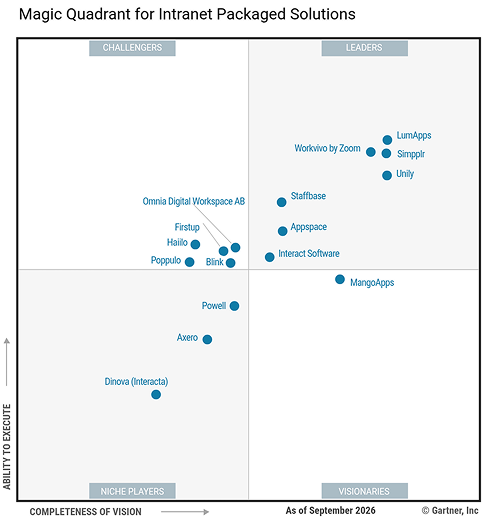 Magic Quadrant for Intranet Packaged Solutions. Source: Gartner (29 September 2026)
Does being further up and to the right mean a vendor is better?
No. A Magic Quadrant position is a composite, and your buying decision is not.
The Magic Quadrant plots each vendor on two axes, Ability to Execute and Completeness of Vision. One dot has to summarize strategy, execution and product across many use cases at once. That is useful for orientation. It isn’t designed to tell you which vendor is best for the particular mix of jobs you need done, and it doesn’t stack-rank vendors for your situation.
The Critical Capabilities report works the other way. It scores products against five use cases (employee engagement, employee and workplace services, knowledge services, work management and resource portal), built from 11 capabilities that each use case weights differently. Fit changes with the job. A vendor lower on the chart can be the better answer for one use case, and a vendor high and to the right can be a weaker match for the capabilities you weight most.
Before you read anything into the picture, write down the three to five things your intranet must do. If the interactive version of Critical Capabilities is available to you, reweight it to reflect your own priorities. No single report should carry a vendor decision.
What does a vendor’s position within the Leaders quadrant tell you?
Staffbase is a Leader built around a specific job: serving the whole workforce, including the people who never sit at a desk.
Four Leaders are plotted above Staffbase: LumApps, Workvivo, Simpplr and Unily. All seven Leaders share a quadrant, and the chart shows the other three quadrants sitting well apart from them. Position within the Leaders group is a narrow distinction, and it says little about fit for a particular use case. The differences between these vendors are differences of focus, not of credibility.
Staffbase’s focus is deliberate, and it shapes every product decision:
Frontline-first, for everyone. An “everything in one place” employee app for the whole workforce, with frontline managers as a primary persona and onboarding that doesn’t depend on corporate email.
Communications at the core. Editorial planning, campaigns and multichannel distribution, built on deep heritage in internal communications and now carrying knowledge and employee services in the same app.
Adoption at scale. Customer success, implementation services and a partner ecosystem built for large, distributed organizations.
Integration over duplication. Staffbase works with Microsoft 365, Teams, Slack and back-end systems through APIs and MCP instead of rebuilding them inside the intranet. Desk workers keep the tools they already use, and the intranet reaches everyone else.
Some buyers still think of Staffbase as a communications tool. That heritage is why its communications depth runs so deep, and the platform now extends well beyond it. A design choice isn’t a defect, and whether it fits depends on your use case.
Which Leader is best for my use case?
There is no single best Leader. Each leads with something different, so test two or three against your own scenarios.
Each Leader is built around a different strength, and every strength comes with a trade-off worth testing:
Platform-led (LumApps, Simpplr): Both sell flexibility, which suits organizations with varied use cases and a team to shape their own intranet. The test is whether it arrives as a working setup or a configuration project, and whether the experience stays coherent.
Portal- and community-led (Unily, Workvivo): Unily’s content and portal navigation suit knowledge-heavy use cases, and Workvivo’s social community suits culture-led engagement. The test is what surrounds that core: AI and analytics for Unily, native workflow and extensibility for Workvivo.
Frontline-first (Staffbase): Built for large, distributed, frontline-heavy organizations that want communications, knowledge and services in one mobile-first app, with tools for frontline managers. Its case is fit, not rank.
Three qualifying questions show whether Staffbase fits:
What share of your workforce is frontline or deskless?
Is your main need publishing and communications, knowledge access, or automating services across back-end systems?
Do your desk workers need a full collaboration workspace inside the intranet itself, or are they well served by Microsoft 365, Teams or Slack alongside it? Most organizations are in the second group.
Staffbase vs. LumApps vs. Simpplr vs. Unily vs. Workvivo: where does each lead?
Each of these vendors leads with something different. The useful comparison is what that choice means for your workforce.
Here is what each vendor leads with, and where that strength gets tested in a demo. Put the same kind of question to us.
Vendor | Leads with | Where that strength gets tested |
|---|---|---|
Staffbase | Frontline superapp; frontline manager as a primary persona; communications heritage; adoption at scale | Ask us to show a frontline employee and a shift leader getting value on day one, on a personal phone, without corporate email. This is the scenario the platform was built around. |
LumApps | Configurable platform; orchestration and extensibility; workplace services via Comeen | Flexibility can become complexity. How much configuration does it take to reach a working setup? How consistent is the experience across the acquired products? Show community, editorial and multichannel working in a real campaign. |
Simpplr | Customizable platform; configurable use cases | Customization shouldn’t replace completeness. Show a central comms team planning and running a full multichannel campaign. How does the native messaging experience work? Ask for references outside North America. |
Unily | Content management; portal-style navigation; federated search | Content depth only helps if the rest keeps pace. Which AI capabilities are live today and which are roadmap? How deep are employee analytics? Ask for references of your size and in your region. |
Workvivo | Social community; collaboration and messaging; employee insights; Zoom ecosystem | Social can crowd out work. How do native workflows, AI orchestration and extensibility work? How much of the experience is social, and does that fit your workforce? If you’re standardized on Microsoft, how does Zoom alignment affect you? |
If your priorities are communications reach, frontline managers and adoption at scale, run those scenarios side by side. That is where Staffbase’s design shows.
Which capability differences matter most?
A difference matters in proportion to how much weight your use case puts on it.
Every vendor invests where it expects its customers’ use cases to be. A platform built as a work hub for office teams invests in collaboration and workflow depth. A platform built to reach and engage an entire workforce invests in reach, communications and manager tools. Which design is right depends on the job:
Communications-led intranet (publishing, campaigns, frontline reach, knowledge access): in-app collaboration and deep back-end automation have little effect on outcomes. Reach, relevance and adoption decide them.
Work hub or automation layer across HR, IT and back-end systems: put multi-system workflow at the top of your proof of concept and make every vendor, Staffbase included, show it working. Staffbase connects to those systems through APIs and MCP, and multi-step process automation is a priority on its roadmap.
Decide which group you’re in before you shortlist.
Does the Magic Quadrant skew toward desk-based work?
Yes. The evaluation is built around how office-based employees work, which makes it a weaker guide for frontline-heavy or mixed workforces.
Frontline support is one specialized capability among 11, and most of the others are framed around the tools and routines of someone at a desk. That framing runs through the whole evaluation. In my view, that is part of why Gartner’s first Magic Quadrant for Frontline Worker Communications Applications matters. It evaluates frontline-focused applications on their own terms. Staffbase is a Leader in both reports, and the only vendor named a Leader in both.
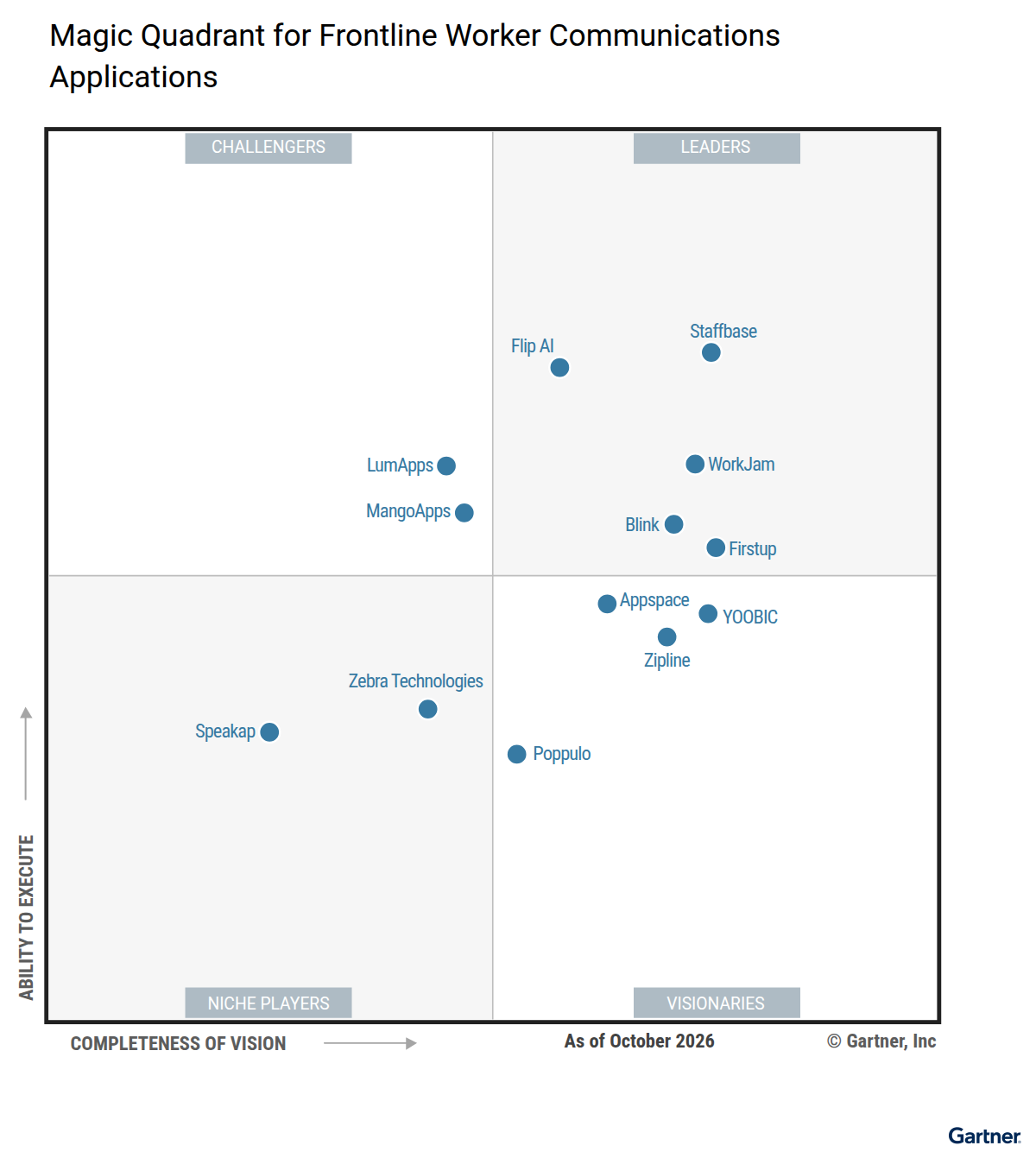 Magic Quadrant for Frontline Worker Communications Applications. Source: Gartner (16 November 2026)
There is a reason for this. A broad evaluation has to define each capability in terms that every vendor can be measured against, and those definitions naturally reflect the most common intranet user: an employee with a laptop, a corporate email address and a Teams or Slack account. The consequence is that a vendor can serve frontline employees exceptionally well and still be disadvantaged on several capabilities, because those capabilities describe forms of work characteristic of office employees.
Here is the assumption built into each area, next to what frontline work actually looks like:
Area a buyer will see evaluated | Built-in assumption | What frontline work often looks like |
|---|---|---|
Collaboration and messaging | Teams- or Slack-style persistent workspaces, file sharing, chat and meetings | Short messages, alerts and manager-to-team broadcasts, often on shared or personal phones |
AI assistants and agents | Individual knowledge work: finding information, organizing tasks, summarizing content | Quick answers at the point of work, on a phone, in the employee’s language |
AI orchestration and automation | Employees managing their own tasks and workloads | Operational workflows tied to shifts, safety, forms and checklists, led by a local manager |
Content management | Sites, pages, documents, repositories and metadata as the main content model | Short, mobile, multilingual content that must be read and acknowledged |
Resource portal and work management (use cases) | Navigating across applications; coordinating activities, status updates, requests and dashboards | Completing tasks and requests where the work happens, without opening several apps |
Four implications for buyers:
Make frontline enablement a core criterion in your own evaluation. Many vendors are still learning what frontline employees need, and a mobile version of office content isn’t the same thing as a frontline experience. If the reports don’t weigh this the way your workforce would, you should.
For frontline-heavy or mixed workforces, use this report to evaluate intranet capability and the Frontline Worker Communications Applications Magic Quadrant to evaluate frontline applications, and then test fit yourself. Neither report replaces testing your own scenarios.
Read positions with the skew in mind. A vendor built frontline-first may look less strong on capabilities defined around office work, and a vendor strong on those capabilities hasn’t thereby proven itself on the shop floor.
Capability on paper is not success in practice. Outcomes stand or fall on experience. Ask whether the vendor can show proven deployments at enterprise scale.
The skew cuts both ways. If most of your workforce sits at a desk, the reports’ framing probably matches your reality and you can lean on it more.
What is the best intranet for frontline employees?
For frontline-heavy workforces, start with Gartner’s new Frontline Worker Communications Applications Magic Quadrant, then test frontline scenarios yourself.
Nearly every intranet vendor now lists frontline support. The question is whether it’s native to the product or an extension of a desk-based platform, whether through a mobile layer, an acquisition or an add-on. Staffbase was built for the whole workforce: mobile-first, onboarding that doesn’t depend on corporate email, biometric login, Navigator for answers at the point of work, and the frontline manager as a primary persona, with insights, workflows and AI tools for shift leaders and supervisors. Staffbase is a Leader in the 2026 Gartner Magic Quadrant for Frontline Worker Communications Applications and the only vendor named a Leader in both that report and the Magic Quadrant for Intranet Packaged Solutions.
Here is what to test in any vendor demo or proof of concept:
What to test | What good looks like |
|---|---|
Getting people onboarded | Employees without corporate email or a company device can join quickly and securely |
Reaching shift workers | Messages reach the right people at the right time, including on shared devices and in multiple languages |
Supporting frontline managers | Shift leaders and supervisors have their own tools, insights and ways to relay information to their teams |
Getting answers at the point of work | Employees can find what they need on a phone, in their language, without launching a separate app |
Completing everyday tasks | Forms, checklists and requests work inside the same app, connected to the systems that matter to you |
Proof at your scale | The vendor can show enterprise-scale frontline deployments with real adoption numbers |
Frontline success depends on experience as much as features. A capability can exist on a feature list and still fail on the shop floor. Ask every vendor, including Staffbase:
Where are your enterprise-scale frontline deployments?
What was adoption among non-desk employees?
Who runs rollout and manager enablement?
For a wider look at the category, see our guide to frontline communication tools.
Staffbase or Unily for frontline support?
Decide on how each handles your frontline scenarios, starting with the manager.
Staffbase’s differentiator is the frontline manager as a primary persona, inside the same mobile-first app as everyone else. Ask Unily, and every other vendor, to run the scenarios in the table above with your own workforce profile, including a shift leader and an employee with no corporate email.
Which intranet platform has the best AI?
The best AI is the one your employees trust, and that starts with the knowledge underneath the assistant.
Every intranet vendor is shipping assistants and agents, and the assistant itself is quickly becoming table stakes. What separates one product from another is whether the answers are accurate, whether the content is governed, and whether the AI reaches every employee, including frontline workers and their managers.
Three shifts are reshaping intranet AI: a widening range of assistant options, AI for frontline workers who need to manage tasks without launching separate apps, and the rise of the “headless intranet.” The last matters most. If employees increasingly reach intranet content through assistants and other tools, differentiation will depend less on the front end and more on whether the information underneath is accurate and governed.
That is why Staffbase built for governed, searchable knowledge first. Navigator is our employee-facing assistant for conversational access. Relevance Engine turns interactions into searchable knowledge. Autopilot helps keep content current and governed, and AI Trust Hub gives administrators one place to control AI features. Staffbase also supports MCP, so other AI assistants can work with intranet content under the same governance. Navigator launched in Q2 2026, and support for bringing your own language model and multi-step guided actions are on the roadmap.
If you’re comparing Staffbase, LumApps, Simpplr, Unily and Workvivo on AI, run the same scenarios in each product, using your own content: a frontline employee asking a policy question on a phone, a manager asking for a team summary, and an administrator finding and fixing outdated content. Judge the answers on accuracy, trust and control, not on the length of the feature list.
How should I use the Magic Quadrant to choose an intranet?
Use Gartner to decide what to investigate, and use your own requirements, demos and references to decide what to buy.
Build the longlist from the Leaders, then add anyone outside it who matches a specific need.
Rank your use cases first, before you look at any vendor’s position.
Reweight. If the interactive version of Critical Capabilities is available to you, adjust it to reflect your own risk profile and priorities.
Read the full vendor commentary for every vendor you consider, including ours, and read the cautions as carefully as the strengths.
Run a proof of concept with two or three vendors, using real content, real users and a frontline scenario if you have a deskless workforce.
A report can focus your evaluation. It can’t replace it.
About the author
Lara George is Principal Market Strategist at Staffbase, and has been in the HR and employee experience software industry for over eight years. In her current role she leads positioning and analyst strategy at Staffbase and has contributed to four consecutive Gartner Magic Quadrant Leader placements.
Hear firsthand from our customers
Interested in what Staffbase customers have to say about our intranet? Take a look at our profile on Gartner Peer Insights™, where we have reviews from customers across different roles and industries.
Disclaimer
Gartner, Magic Quadrant for Frontline Worker Communications Applications, Alexandra Earl, Catherine Donnelly, Mike Gotta, Nov. 16, 2026.
Gartner, Magic Quadrant for Intranet Packaged Solutions, Mike Gotta, Helen Poitevin, Alexandra Earl, Sept. 29, 2026.
Gartner does not endorse any company, vendor, product or service depicted in its publications, and does not advise technology users to select only those vendors with the highest ratings or other designation. Gartner publications consist of the opinions of Gartner’s business and technology insights organization and should not be construed as statements of fact. Gartner disclaims all warranties, expressed or implied, with respect to this publication, including any warranties of merchantability or fitness for a particular purpose.
Gartner and Magic Quadrant are a trademark of Gartner, Inc., and/or its affiliates.
Book a demo
See the Staffbase intranet in action.