

The best ContactMonkey alternatives for internal email and employee communication in 2026
Outgrowing ContactMonkey? Explore the top tools for smarter internal comms, from email to mobile and beyond.


Looking for ContactMonkey alternatives? Whether you’re outgrowing its email-only capabilities or need a more comprehensive internal communication software solution, you’re in the right place.
The short answer
ContactMonkey is a strong option for organizations that need to optimize internal email, particularly when Outlook-based sending and email analytics are the primary requirement. But in 2026, many internal comms teams are looking for a tool that can adapt as their strategy evolves, not just a better version of the same email tool. They’re looking for a platform that can grow with them, because a purpose-built email tool only ever covers one segment of the workforce: the people who sit at a desk and check Outlook every day.
That gap shows up in a few predictable ways. Reach is the first: frontline employees who don’t have regular email access simply don’t get the message, no matter how good the open rates look. Consolidation is the second: teams end up running email alongside separate tools for intranet, chat, and signage, each with its own login, workflow, and analytics — adding cost and complexity instead of removing it. As a result, an email-only tool starts to run out of room, especially as strategy evolves due to M&A activity, a shift to multi-brand structures, or growing workforce diversity across geographies and business units. It wasn’t built to support the governance, scale, or cross-channel strategy that a more complex organization requires.
Not every team needs a full multichannel platform on day one, and email alone may be the right call for a while. But that doesn’t mean settling for a tool that’s built only for today’s needs. The best alternatives are the ones that are excellent at email in their own right while giving you room to scale into other channels only when your organization actually needs them, without switching platforms later.
This article is written by Staffbase, a Gartner® Magic Quadrant™ Leader for Intranet Packaged Solutions for three consecutive years, trusted by more than 1,500 enterprises and 15 million employees, including Siemens, ALDI, and Alaska Airlines. Staffbase also holds the ClearBox CHOICE 2026 Comms Excellence award, one of only three platforms recognized for communications management. Our perspective is clear, and we’ve tried to make the trade-offs transparent enough that you can evaluate every platform on this list, including ours.
Why are internal comms teams looking for ContactMonkey alternatives?
ContactMonkey has helped many organizations strengthen internal email, newsletter creation, tracking, and engagement analytics, primarily within Outlook and Gmail. That works well for teams whose comms need to stop at the inbox. It works less well as organizations grow and workforces become more distributed: frontline employees may not have a corporate email address or regular desktop access, and employees across locations, languages, and time zones don’t all engage with communications the same way.
This is where the gap tends to hide. Email open and click rates can look healthy while reach is quietly capped — a meaningful share of the workforce, especially frontline and non-desk employees, may never see a message at all, regardless of how it performs in the inbox. None of this means email is becoming less important; it remains a critical channel for most internal comms teams. But it does mean open and click rates alone can’t tell you whether a message actually reached everyone who needed it.
Most comparisons of ContactMonkey alternatives rank vendors by email features alone: templates, tracking, AI writing assistants. That misses the failure internal comms teams actually report once they outgrow single-channel tools, the moment they realize strong open and click rates don’t mean the message landed, because a meaningful share of the workforce never checks a corporate inbox at all. That’s the real question to ask of any alternative on this list: does it solve for reach, or just for a better inbox experience? Some tools below are built purely to replace and improve on ContactMonkey’s email functionality, which is a reasonable choice if your workforce is fully desk-based today. Others, including Staffbase, work as a standalone email tool while also reaching employees beyond the inbox, so the reach gap doesn’t force a platform switch later if your needs change.
Common limitations of ContactMonkey
Based on feedback from ContactMonkey customers evaluating a switch, a few limitations come up consistently:
No multichannel reach. There’s no native mobile app, no intranet, and no digital signage support. SMS is available as an add-on, but there’s no branded employee app in the app stores, so reaching employees who don’t have a corporate email address, or don’t check it, often means running a separate platform alongside ContactMonkey. One ContactMonkey customer described running three disconnected tools: a separate intranet, ContactMonkey for email, and an aging digital signage system, leaving 2,000 field employees on shared tablets effectively unreachable through the stack. That kind of fragmentation is common: customers report it leads to duplicate work and higher costs across tools that were never built to work together.
Analytics that don’t scale with the message. Tracking opens and clicks is solid at a small scale, but several organizations report that reporting becomes less reliable as sending volume grows, and that the data doesn’t go deep enough to show whether a message changed anything, only whether it was opened. If open rate is still the metric your team reports on, that’s a sign the tool is measuring effort, not outcome.
Design and personalization plateau as complexity grows. Feature depth that works well for a single, centralized comms team can feel thin once an organization needs to personalize content across multiple business units, brands, or newly merged teams.
Struggles to flex through organizational change. M&A activity, restructuring, or rapid headcount growth are exactly when comms tooling gets stress-tested, and email-only tools built for a stable, single-entity org chart often can’t keep pace with newly combined teams, brands, or geographies.
Why you should look for a ContactMonkey alternative in 2026
ContactMonkey is, at its core, an email tool. If your comms strategy needs to reach people who don’t sit at a desk all day, or measure engagement beyond opens and clicks, email alone won’t get you there. Here’s what to check for in any alternative — not every item is a must-have today, but several matter once your reach or complexity grows:
Native mobile reach. Look for a branded mobile app built into the platform, with push notifications and offline access, rather than a bolted-on add-on. This matters most for organizations with frontline, field, or deskless employees.
A true intranet, not campaign microsites. Branded microsites work for one-off campaigns, but they’re not a persistent, searchable home for company information. A platform-plus-integration setup, like ContactMonkey’s Appspace partnership, still means managing two systems, two logins, and two vendor relationships to reach employees without a corporate email address.
Analytics beyond email metrics. Segmenting performance by user group and content type, embedding two-way surveys, and exporting data for custom reporting matters more than raw open/click counts — it’s the difference between measuring activity and measuring outcomes.
Editorial multilingual support, not machine translation alone. Auto-translate is the standard; managing distinct, editor-approved language versions of the same content is a different (and more governable) capability.
Security certifications that match your industry. SOC 2 and GDPR are baseline; healthcare or defense-adjacent industries may need HIPAA, and European or automotive organizations may look for TISAX. Ask any vendor which certifications they actually hold, not just whether they’re “enterprise–ready.”
Integration depth, not just integration presence. What matters is whether a vendor surfaces content natively inside tools like Teams and SharePoint, or just links out to a web version.
One platform, not a stack of acquired tools. As comms needs expand, check whether a vendor offers one connected system or a set of separately acquired products still being integrated.
Proven at scale. A vendor’s track record with large, global organizations signals security maturity and operational stability under pressure; the bigger and more distributed your organization, the more that track record matters.
The best ContactMonkey alternatives in 2026
One caveat before the list: If your workforce is fully desk-based and open and click rates are all you need to measure, an email-only tool, including ContactMonkey, may already be enough. Some of the comparisons below are for teams whose reach or measurement needs have outgrown that; others are strong options even for email-focused teams looking for something better than ContactMonkey itself.
1. Staffbase — The best alternative for scalable internal email and multichannel communication
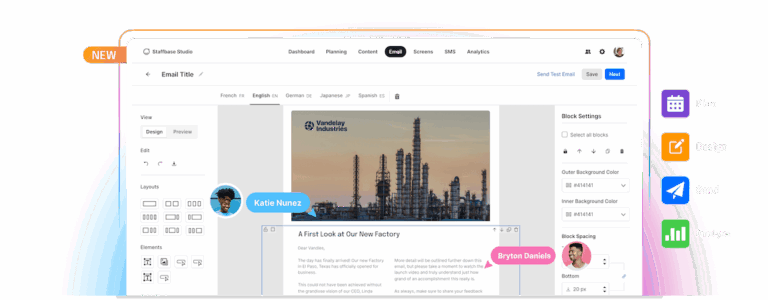 The new Staffbase Email
Best-in-class email built for internal comms
Staffbase offers two ways in. Staffbase Email is a complete, standalone product built on one idea: Sending an email isn’t the same as being heard. It covers the full lifecycle: planning on a shared content calendar, designing with AI assistance, targeting down to the individual group, and analyzing what actually landed, not just what was sent. For organizations that need more than email, Staffbase also offers a full platform where where Email, the Employee App, and Intranet run as one connected system, so a message reaches employees wherever they check. Teams can start with either option and move to the other later without switching vendors. Staffbase works with 1,500+ enterprise organizations worldwide, including Ford, Adidas, Alaska Airlines, and Walgreens, and holds Momentum Leader and Enterprise Leader status in G2’s Winter 2026 rankings.
Built for the employees email can’t reach
Most tools work for HQ and fail at the frontline. Staffbase doesn't: a native mobile app with push notifications, chat, and offline access reaches deskless and frontline employees who never check a corporate inbox. Navigator, an AI assistant, answers employee questions from verified company knowledge in 100+ languages, with every answer linked to its source. Staffbase On Air turns updates into audio briefings, and Staffbase Live powers secure live–streaming for town halls up to 100,000 participants. Live events and email work together directly: An email invite can carry a one–click join link, and recipients can RSVP right from the message, with calendar files attached automatically.
Proven adoption and engagement
A platform only matters if employees use it. Bellway Homes reached 94% adoption after rolling out Staffbase Email alongside a mobile app, with 19% lower voluntary turnover. ALDI Australia hit 99% registration and 94% monthly active users on its Staffbase-powered app, covering 16,000+ frontline employees who don’t check email at all. Lansing Building Products and MAX Burgers report similar results: 97% adoption and 97% registration. The pattern holds whether the entry point is email, mobile, or both: Staffbase consistently turns access into daily use.
One platform, not three separate trade-offs
Most vendors force a choice: a strong intranet with a weak app, a good app with no email, solid email with no intranet. Staffbase’s Intranet is built to be the persistent, searchable home for company information, not a set of campaign microsites, with modular, permission-based pages that adapt to each employee’s role automatically. Because Email, App, and Intranet share one editor and one dashboard, none of it comes at the cost of the others.
Microsoft integration that goes both ways
Staffbase is a certified Microsoft Build Partner: native publishing to SharePoint, a Teams Personal App, Outlook delivery, Viva Connections, Entra ID sync, Power Automate workflows, and Microsoft 365 Copilot access through the Staffbase Agent. SharePoint news, for instance, can be dragged straight into the email editor, so the same content reaches employees whether they check the Intranet or their inbox. Staffbase is also available on the Azure Marketplace, with purchases counting toward Microsoft Azure Consumption Commitments.
Pros
Complete standalone email tool today, full platform when you need it; no re-platforming required
Reaches every employee from one system: frontline, deskless, and desk-based alike
Unlimited user licenses; no per-seat cost to scale collaboration
Enterprise security by default: SOC 2, GDPR, and SSO
Proven at scale, backed by top analyst rankings and a strong reference-customer track record
Cons:
Teams with a narrow, email-only scope may not need the full platform depth right away (though it’s there when needed)
Enterprise-grade governance and features may come at a higher price point than lighter, email-only competitors
Full platform depth means more surface area to roll out and train teams on than a single-purpose email tool
The numbers
Gartner® Leader for Intranet Packaged Solutions (IPS) for three consecutive years (2023, 2024, 2025)
Trusted by 1,500+ enterprise customers, including Adidas, Alaska Airlines, DHL, MAN Truck & Bus, Whataburger
80%+ employee reach on a typical deployment
ALDI Australia: 99% registration, 94% monthly active, 84% weekly active across 16,000+ employees
ClearBox 2026: 4.5/5 rating in Communications Management, Mobile and Frontline Support, and Employee Experience
ClearBox 2026 Choice Awards: Top 5 Score, Comms Excellence, and Frontline and Mobile Focus
Who should consider Staffbase: large or fast-growing organizations with both office and frontline workers, especially those managing multiple regions, brands, or decentralized teams. It’s also a strong fit for comms teams that need to prove reach and impact, not just track opens, and for IT teams that need built-in governance and Microsoft 365 integration.
2. Poppulo— best for enterprise email campaigns and digital signage
Poppulo is an enterprise employee communications platform with a strong email and newsletter heritage, offering content creation, targeting, personalization, segmentation, governance, and analytics at scale. It has since expanded into digital signage and, through its acquisition of Sociabble, intranet and frontline mobile communications. Its enterprise heritage makes it well suited to large organizations with complex governance and high-volume communication needs. However, some users report a cumbersome email experience, particularly around content creation and template customization, while Poppulo continues integrating capabilities from four acquisitions in five years.
Pros:
Strong digital signage capabilities: hundreds of thousands of screens managed across thousands of customers, following its FWI and REACH Media Network acquisitions
24/7/365 support advertised across all plans
Deep, granular email analytics, including heatmaps, click maps, individual-level tracking, and dynamic content blocks within a single email
Cons:
Additional admin licenses and fees for services such as template changes can increase the cost of scaling
Assembled through four separate acquisitions in five years rather than built on one native architecture, which raises integration and consistency questions
Analytics are powerful but reportedly hard to use
Who should consider Poppulo: large organizations that specifically need enterprise email campaign management plus digital signage.
How Poppulo compares to ContactMonkey: far more robust reporting and signage, plus, with Sociabble, genuine intranet and frontline mobile capability, though still unifying two recently combined product lines.
Why choose Staffbase over Poppulo? One platform with unlimited admin licenses, versus Poppulo’s per-admin-license fees and a still-unbundled set of acquired capabilities.
🔗 Related reading: The Best Poppulo Alternatives for Internal Communications | Staffbase
3. Workshop — best for fast, low-lift email design
Workshop is built for internal communicators who want polished email without IT involvement. It has extended delivery into Teams, Slack, and SMS, but remains structurally an email-first tool, with no native intranet or branded mobile app.
Pros:
Very fast, low-friction adoption with minimal IT involvement, ideal for small comms teams
Strong editorial calendar and content planning tools, with pre-loaded templates
Clean, communicator-friendly email analytics (opens, clicks, read time) that non-technical users find accessible
Cons:
No native mobile app or intranet, so it can’t reach frontline or deskless employees who don’t check email
Some capabilities cost extra, with features like Pages as paid add-ons, so the real cost of a fuller setup runs higher than the base price suggests
Smaller integration footprint than more established email tools
How Workshop compares to ContactMonkey: Workshop prioritizes fast setup and clean, easy-to-read design over deep configurability. Segmentation, translation, and HRIS integrations are gated to Workshop’s higher (Premium) tier.
Who should consider Workshop: small to mid-sized comms teams focused exclusively on email newsletters with no near-term plan to reach frontline or deskless employees.
Why choose Staffbase over Workshop? Workshop covers email well; Staffbase adds native reach for frontline and deskless employees who don’t check email at all.
4. Cerkl Broadcast — best for AI-personalized email newsletters
Cerkl Broadcast focuses on personalized employee communications, using AI to tailor content to employee behavior and preferences, with a strong heritage in email and newsletters. Broadcast has since expanded into SharePoint, Teams, Slack, mobile, and microsites, helping organizations deliver relevant communications across channels.
Pros:
Native mobile app for deskless and frontline employees, syncing the same personalized content across channels
Integrates with common enterprise tools, including Outlook, Gmail, Slack, Microsoft Teams, and HRIS systems like Workday and ADP
Low barrier to entry, with a free–forever “Foundations” plan for small teams
Cons:
Pricing may be steep for smaller organizations
More advanced permissioning, workflow, and branding controls may only be available on higher tiers, which matters for larger or more regulated organizations
Smaller public track record than some larger platforms, which may matter for very large, complex, multi-brand organizations
How Cerkl compares to ContactMonkey: both send natively through Outlook and Gmail with no separate inbox, but Cerkl goes further, layering in a native mobile app and deeper AI personalization on top of email, while ContactMonkey offers a larger named HRIS integration library.
Who should consider Cerkl: teams that want AI-driven, personalized content delivered natively through email, mobile, and chat tools like Teams and Slack, without needing a full intranet.
Why choose Staffbase over Cerkl? A true intranet and deeper enterprise governance, the one significant gap in Cerkl’s otherwise broad channel coverage.
5. JungleMail — best for newsletters built inside Microsoft 365
JungleMail is an internal newsletter solution built natively for Microsoft 365, integrating directly with SharePoint and Microsoft Entra ID rather than operating as a separate tool.
Pros:
Built natively for the Microsoft ecosystem, which streamlines workflows for organizations already standardized on Microsoft.
Easy-to-use builder and reusable templates make it simple for non-technical teams to create professional-looking newsletters quickly.
Solid engagement analytics, tracking opens, link clicks, and other engagement data to help comms teams understand what’s landing and refine future campaigns.
Cons:
Narrower scope than full comms suites. It’s focused primarily on internal newsletters and mass email
Some users report emails being blocked by certain providers, which can require extra troubleshooting even with responsive support.
A few users mention that fine control over layout (like spacing in bulleted lists or tables) can feel clunky compared to more modern editors.
How JungleMail compares to ContactMonkey: both are email-first tools with no native mobile app or intranet, but JungleMail goes deeper into the Microsoft ecosystem specifically, pulling content and audiences directly from SharePoint and Entra ID, while ContactMonkey supports a broader range of HRIS systems beyond Microsoft’s own.
Who should consider JungleMail: organizations already standardized on Microsoft 365 and SharePoint that want newsletters tightly integrated with that environment, with predictable, usage-based pricing.
Why choose Staffbase over JungleMail? A full employee app, intranet, and multichannel reach, where JungleMail stays scoped to Microsoft 365 newsletters.
6. PoliteMail— Best for intuitive email design with cross-channel support
PoliteMail is a Microsoft Outlook plug-in that layers email measurement, responsive design, and list management tools directly into a communicator’s existing inbox. It tracks not just opens and clicks, but how long people actually engaged and how attentive they were, giving comms teams data to justify strategy to leadership without leaving Outlook.
Pros:
Detailed reporting that helps comms teams demonstrate impact and justify strategy changes to leadership
Native Outlook/Microsoft 365 experience, so communicators send from the tool they already use daily, lowering the learning curve and avoiding workflow disruption
Rich engagement analytics that go beyond opens and clicks, including time spent reading and “engaged” versus skimmed content
Cons:
Value is closely tied to the Microsoft ecosystem, making it a less natural fit for organizations on other email platforms
Some users report occasional technical friction, like glitches or Outlook sync issues, though usually resolved quickly
Measurement has natural limits, since metrics can be affected by recipient privacy settings, image blocking, or security gateways
How it compares to ContactMonkey: both are Microsoft-native, email-first tools with no mobile app or intranet, but PoliteMail leans further into attention-based analytics, like read-time and engagement scoring, while ContactMonkey offers broader distribution through Teams, SharePoint, and SMS on top of email.
Who should consider ContactMonkey: mid-size to large enterprises, particularly in regulated or data-sensitive industries like healthcare, financial services, and manufacturing, that need to demonstrate the effectiveness of internal communications to leadership.
Why choose Staffbase over PoliteMail? Native mobile reach and a persistent intranet for employees who don’t work from Outlook all day, not just deeper analytics on the emails they already get.
ContactMonkey alternatives at a glance
Platform | Best for | Email capabilities | Analytics | Reach beyond email | Analyst recognition |
Staffbase | Turning email into part of a whole-workforce strategy | Drag-and-drop design, AI drafting, real-time collaboration, deep personalization by group and language, unlimited admin licenses | Open and click rates, read time, clickmaps, device and geographic insights, audience-level analysis, engagement trends, and CSV reporting | Mobile app, Intranet, digital signage, SMS, Staffbase Live | Gartner® Leader for Intranet Packaged Solutions (2023, 2024, 2025), plus the 2026 ClearBox Comms Excellence award |
Poppulo | Enterprise email plus digital signage at scale | Advanced targeting, personalization, governance, multilingual support, and analytics | Deep email analytics, but reportedly needs a data background | Digital signage, app, with social intranet arriving via Sociabble | 2026 ClearBox Highly Commended award |
Cerkl Broadcast | AI-personalized content across channels | AI personalization by role, location, and behavior | Real-time centralized dashboards | Mobile app plus integrations with SharePoint, Teams, and Slack | No specific communications awards yet |
Workshop | Fast, polished email without IT involvement | Clean design tools with AI-assisted creation, automated distribution, and personalization | Clean, easy-to-read metrics like opens, clicks, and read time | Posts into Teams, SharePoint, and Slack, though as distribution rather than native reach | No specific communications awards yet |
JungleMail | Newsletters built inside Microsoft 365 | Personalized dynamic newsletters, drag-and-drop design, and detailed analytics | Solid basics like opens, link clicks, and engagement data | Stays email-only, with deep ties to SharePoint and Entra ID | No specific communications awards yet |
PoliteMail | Measuring email effectiveness inside Outlook | Targeting, personalization, branded templates, and engagement analytics | Rich, attention-based metrics like read time and engagement scoring | Stays within Outlook and Microsoft 365 | No specific communications awards yet |
Before you switch: two objections worth answering upfront
IT: “How does this integrate, and who controls access?” Staffbase is a Microsoft-certified partner with integrations into SharePoint, Teams, and Power Automate, plus governance controls and unlimited admin licenses so IT isn’t gating access by seat count.
HR: “How do we keep adoption from fading after rollout?” This is a fair concern with any platform switch, ContactMonkey alternatives included. The stronger answer isn’t a feature — it’s reach data: Bellway Homes reached 94% adoption across its dispersed, non-desk workforce after switching to Staffbase, giving HR and comms a concrete benchmark to track post-launch rather than guessing at adoption.
Why Staffbase is a top ContactMonkey alternative in 2026
ContactMonkey remains a strong choice if your team’s needs stop at email, and it’s fair to ask whether a broader platform means paying for channels you’ll never use. But that’s a choice, not a requirement. Staffbase Email works as a complete, standalone product on its own, with the option to expand into mobile, Intranet, or Chat only if and when your organization actually needs to. The question worth asking isn’t whether you need everything today — it’s whether your next alternative can grow with you without forcing a second switch down the road.
🚀 Beyond the inbox → While ContactMonkey is focused solely on Outlook and Gmail, Staffbase offers a full internal communication platform with email, employee app, intranet, push notifications, surveys, and more — all working together.
📧 Enterprise-ready email → Staffbase’s built-in email tool isn’t just an add-on. Drag-and-drop design, AI-assisted drafting, targeting, and analytics, plus unlimited admin licenses, so growing comms teams don’t pay per seat to collaborate.
📱 Designed for frontline reach → Unlike ContactMonkey, which stops at email, the Staffbase intranet helps you connect with every employee — even those without desks. A branded mobile app with push notifications, offline access, and two-way chat connects deskless and frontline employees who don’t check a corporate inbox.
📊 Built-in insights and strategy tools → From open rates to sentiment tracking, Staffbase goes far beyond basic analytics. Plan campaigns with editorial calendars, check alignment across teams, and get real-time feedback — all from the same platform.
🔗 Seamless Microsoft & enterprise integration → Staffbase is a Microsoft-certified partner, offering deep integration with SharePoint, Teams, and Power Automate — essential for IT teams looking to simplify and scale.
🏆 Trusted by leading brands → Staffbase is consistently ranked as a top internal comms platform by G2, Gartner, and Clearbox. Organizations around the world trust Staffbase to deliver communication that drives engagement and impact.
Ready to move beyond email-only communication?
Discover how Staffbase helps you connect every employee, across every channel — with the tools and insights to prove your impact.