

How can you reach employees without email access in 2026 — and keep them engaged?
Enterprise companies reach employees without email access through a mobile employee app that delivers personalized content and operational services, such as shift schedules and payslips. This article explains how you create relevance — and in doing so, strengthen reach and employee engagement.

How can you reach employees without email access in 2026
Enterprise companies reach employees without email access most effectively through a mobile employee app that combines personalized information with practical services such as shift schedules, payslips, and training opportunities.
The reason is simple: in their tightly scheduled workdays, frontline employees only invest time in information when the operational benefit outweighs the effort required to open a digital tool. For this audience, internal communication only works if it isn’t perceived as an additional obligation. It needs to be a tool that makes the workday easier.
An employee app fulfills this exact role by respecting the “currency of time,” creating relevance through personalization, and minimizing the time employees spend searching for information.
Staffbase customer Diakonie-Klinikum Stuttgart demonstrates what this looks like in practice. With over 1,600 employees, the hospital faced the challenge that two-thirds of its workforce had no email access. The solution was the launch of the employee app “DIAKnow!”.
The app put an end to the tedious “pull-principle” (such as walking to the bulletin board in the cafeteria). It didn't just deliver news; it became a daily companion through practical content like menus, training offers, and an internal housing market. As a result, over 70% of the workforce is now actively connected — because the app offers genuine value instead of just time consumption.
Why can’t I reach my employees? The “Watering Can” principle
Most people believe that reach is a matter of technical equipment: “As long as the information for my frontline employees is digitally available somewhere — be it via SMS, on monitors, or in an app — we’re good.” But the mere existence of a channel is no guarantee that your messages will actually land. The real problem isn't technical delivery; it’s irrelevance.
Many companies use digital channels as little more than an extension of the physical bulletin board: They send every piece of unfiltered information that seems important to the entire workforce. At Staffbase, we call this the “Watering Can” principle. In doing so, organizations often forget that reach is a matter of relevance, not delivery.
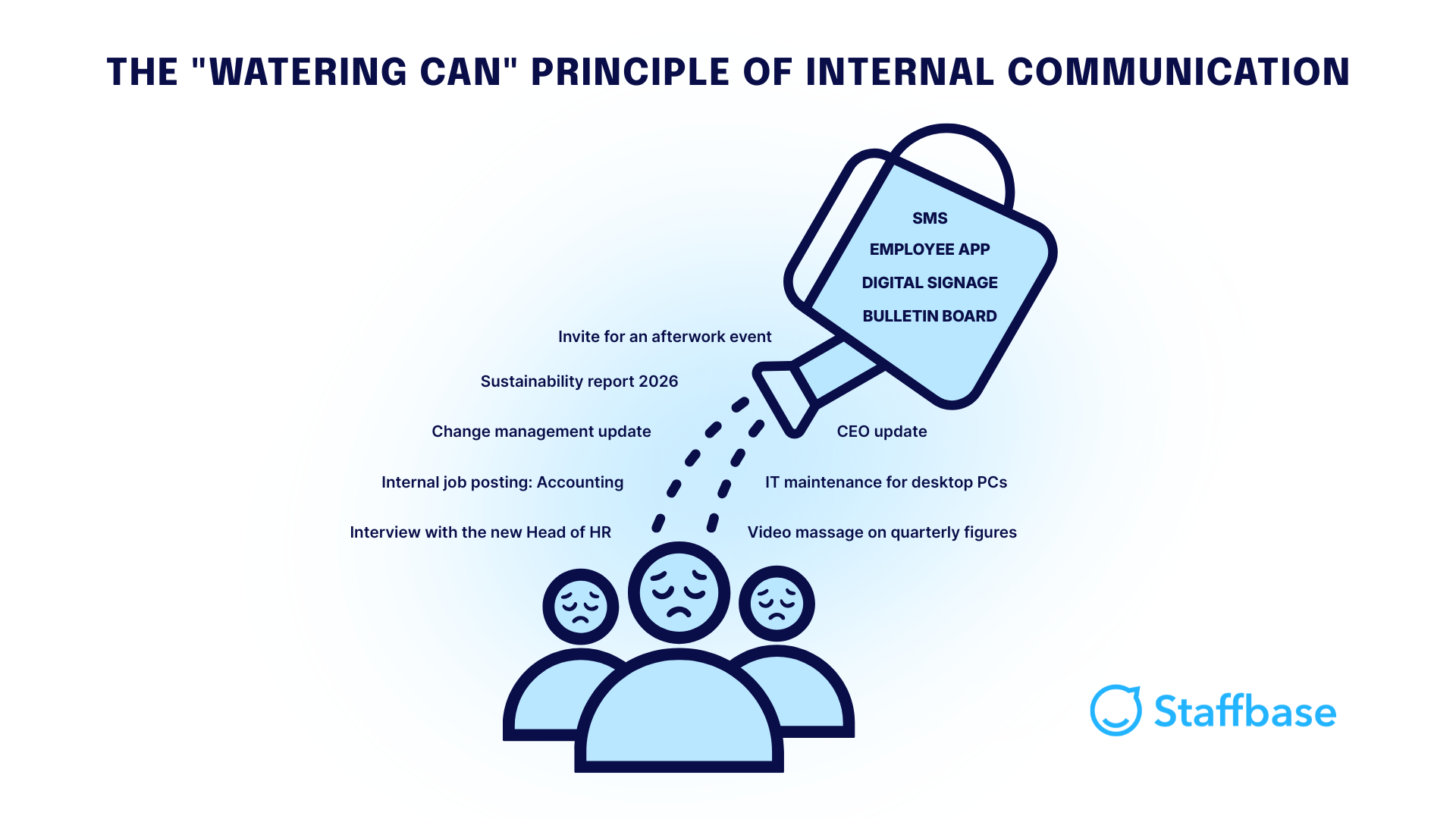 Imagine the daily routine of a frontline worker. They often have only tiny windows during the day to absorb information. If this time is spent flooded with content that has no relevance to their roles — such as strategic messages from the sales team or news from distant locations — they eventually opt out of investing their time.
The result: Your employees become blind to your content. They quickly learn that internal communication is more likely to steal their valuable time than to help them with their work, which erodes the channel's credibility. When you finally do need to send a truly critical piece of information, it gets lost in the noise.
Your goal, therefore, should not just be to broadcast to people, but to eliminate the digital noise so that truly relevant messages actually reach the frontline.
Why do employees without email access often feel left behind?
When employees lack access to central communication channels, they are more than just uninformed. They are isolated from the social and strategic pulse of your company.
This isolation has a direct impact on the employee experience. When information only reaches them with a delay — via the internal grapevine, physical bulletin boards, or cascade communication through direct supervisors — a sense of being “second-class” arises. Employees without access to email or other digital channels begin to believe that their opinion matters less and that they are merely cogs in the machine rather than part of the bigger picture.
This quickly creates a dangerous dynamic:
Frustration: The feeling of always being the last to know what’s happening eats away at motivation.
Loss of morale: Those who aren't aware of the company’s strategy and successes fail to develop a bond with the brand.
Higher turnover: Employees who do not feel valued or included have a significantly lower threshold for remaining and are more likely to leave the company at the next opportunity.
For example, the 2025 Employee Communication Impact Study from Staffbase and YouGov found that 63% of employees who are considering leaving their jobs cite poor internal communication as a contributing factor.
Not only is this a loss of talent, but high turnover among frontline employees ultimately causes massive costs for recruitment and onboarding. Furthermore, a lack of information leads to errors in production or service, as safety instructions or process changes arrive too late or in a distorted manner.
In sectors like healthcare, high turnover remains a critical challenge. City & County Healthcare faced this issue firsthand and made employee retention a strategic priority.
In a LinkedIn Live interview, Sarah Tarnowski, Head of Culture, Communications & Strategy, explains how the organization improved both employee satisfaction and retention by introducing an employee app alongside stronger recognition practices. You can hear her story below.
Why should employees install an app on their private phones?
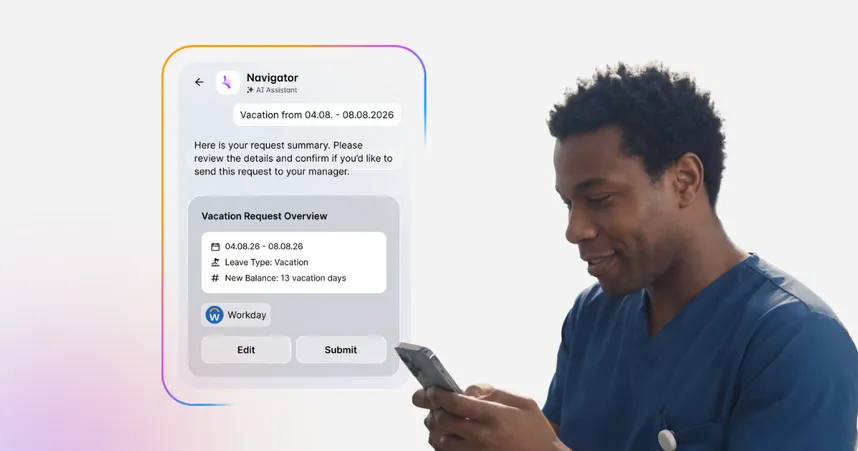
Employees without email access will install an app when it makes their workday easier — not simply to receive more information. When checking a shift schedule, submitting a leave request, or viewing a pay slip takes seconds on a smartphone instead of minutes at a shared terminal, the benefit is immediately clear.
Here are 3 reasons why BYOD (Bring Your Own Device) works when the value is right:
Time savings instead of time theft: If you position the employee app as a “personal assistant,” it won’t be perceived as an intruder. Anyone who wants to check their Monday morning shift on a Sunday evening appreciates the convenience of their private phone. The currency of time works in your favor here.
Separation of work and private life: Unlike WhatsApp or SMS, a dedicated employee app allows for a clear boundary between professional and personal life. We recommend that communication teams establish clear rules for push notifications (e.g., no push notifications on weekends) to avoid disturbing employees in their free time.
Inclusion instead of a two-class society: Without email access, frontline workers often feel like second-class staff. Having the app on their own phone gives them, for the first time, the same voice and the same level of information as colleagues at a desk.
Our data shows that personal utility is the key driver of adoption. Three out of four Staffbase customers achieve an active usage rate of over 70% — meaning more than two-thirds of employees open the app at least once within a defined period.
This level of usage indicates that employees are willing to use their private devices when the app clearly gives time back instead of adding friction. For communication teams, this creates obvious advantages: daily routines can be simplified through practical services, strategic messages reach a receptive audience, and urgent updates can be delivered within seconds via push notifications.
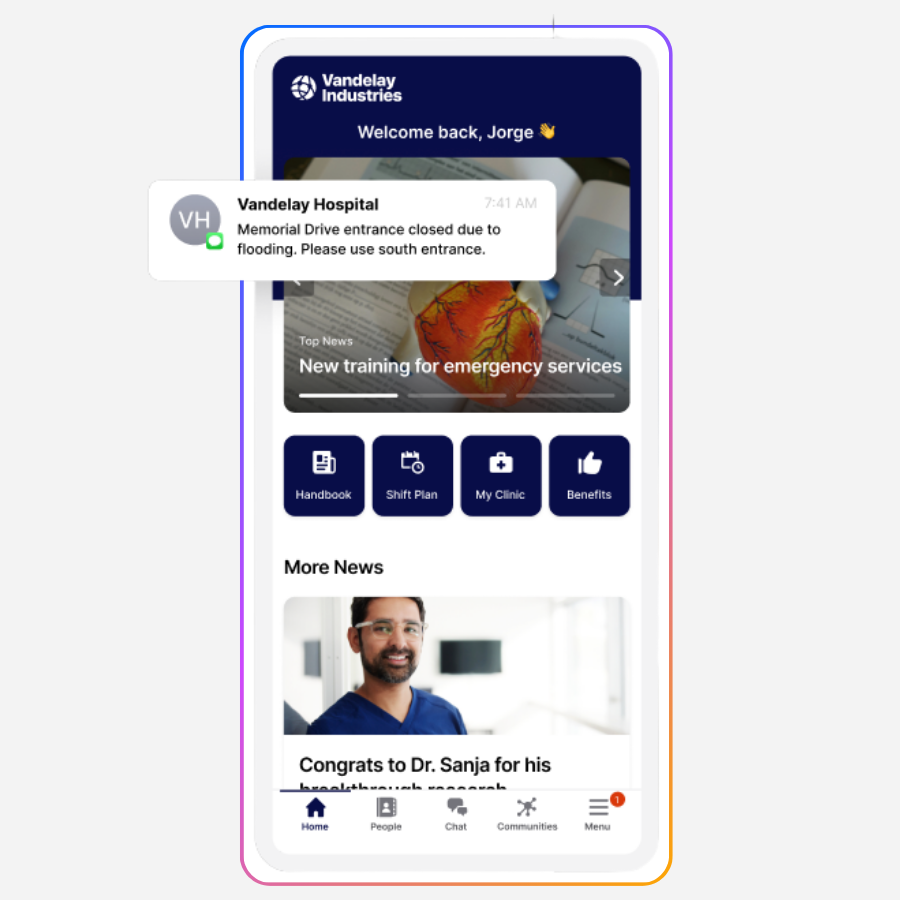 When employee apps give time back instead of creating friction, ROI follows naturally. Our blog article “7 ways an AI-native employee experience platform pays for itself” shows how high adoption turns everyday use cases into measurable cost savings and business impact.
Which content actually draws employees without email access into the app?
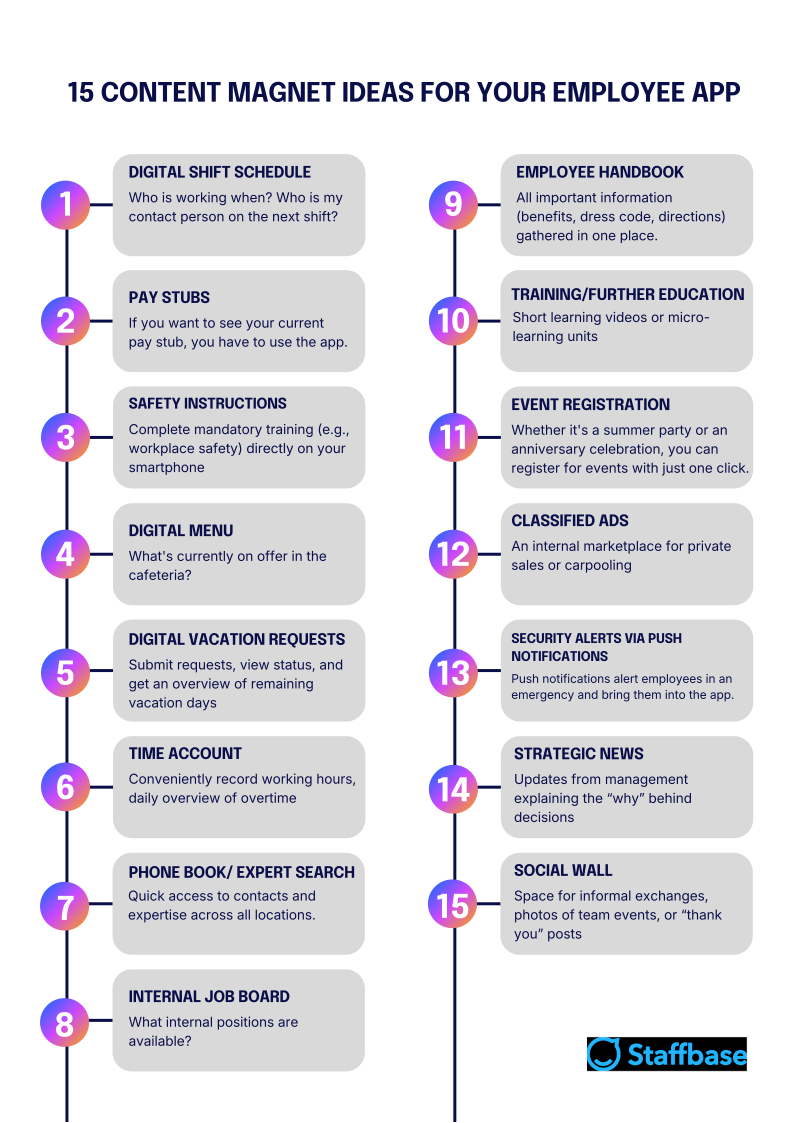
In conversations with communicators, we consistently see a clear pattern: Apps that integrate operational services (such as digital cafeteria menus or sick leave reporting) regularly exceed 90% active user rates. In contrast, apps that rely solely on news often reach only a fraction of the workforce.
Wuppertaler Stadtwerke, for example, achieved a decisive breakthrough by providing digital pay slips on their company app. Anyone who wants to view their documents can only find them within the app. Similarly effective are exclusive services such as the cafeteria payment registration MyTheresa offers its employees, or the shift schedules and restaurant guides Weber Food Technology provides workers.
Even career planning can be integrated for employees: Team Cowabunga (Domino’s Pizza) uses a “Career Map” directly in the app to show frontline employees their path into management and offers corresponding training. In all scenarios, it’s clear that employees come for the personal utility — and end up staying for the community.
To help visualize which employee app aspects have the most utility, we summarized the 15 most popular “Content Magnets” — as we call them at Staffbase — in the following graphic:
 Personalization filters the noise
To avoid the aforementioned “Watering Can” principle, personalization is your most important tool. It functions like an umbrella that deflects unnecessary noise and only lets through what truly matters. There are two levels to this that work hand in hand:
1. Targeted delivery (top-down)
Your communications department acts as a filter. Instead of emptying the “watering can” over the entire company, you use Smart Targeting.
For example, a mechanic in Hall 3 receives safety alerts for his specific area via push notification, but is not burdened with the cafeteria menu from the headquarters 500 kilometers away. Strategically important content can also be delivered specifically to relevant employees, reaching them much more reliably than with a broadcast approach.
2. Individual selection (bottom-up)
Your employees can partially shape the content in their employee app themselves. For instance, they can decide which communities they want to subscribe to voluntarily. Those interested in the internal soccer tournament or the housing market get the updates — everyone else is spared this noise.
Through this double filtering, you ensure that your employees' limited time is respected. The app thus becomes an indispensable tool that provides exactly the relevance required in a demanding daily work routine.
How fast is the login process for an employee app without a company email?
If your employees don't have their own corporate email address, they can complete a one-time registration and then use the app as usual. At Staffbase, we distinguish between two phases: the one-time onboarding and quick daily access.
Secure registration without company email: User onboarding for staff without company email access works by sending a unique username and a one-time password to the employee. This can be sent to a private email address or — if that isn't available — delivered in person or by mail. Upon opening the app for the first time, users enter these credentials and set their own permanent password. This ensures the account is secure and can be activated quickly by the end user.
Accessing information in seconds during the daily routine: Once registered, the hurdle disappears. Your employees can either stay logged into the app or sign in using their self-selected password, fingerprint, facial recognition, or their device’s passcode.
At Staffbase, we naturally use our own employee app for our internal communication. I have been logging in daily for nearly four years because the barrier to entry is so low and the content is vital to my daily work. Since I stay permanently logged in, I simply unlock my phone, open the app, and I’m right in the loop.
How do I know if my messages are actually getting through?
The first step in finding out if your messages are truly landing is to look at your usage rate. For example, as an admin in the Staffbase employee app, it’s possible to see exactly how many employees have registered and are actively using the app. That is the foundation of employee engagement.
But as we know, just because someone opens the app doesn’t mean they have truly internalized the message. To find out if your strategy is actually working, you need to look a little closer. Staffbase Smart Impact provides this clarity by focusing on three decisive pillars:
Visibility & interaction: You don’t just measure the reach of your posts; you see how your employees interact with the content.
Sentiment: What do your employees think about the messages? Are they reacting positively, skeptically, or not at all?
Alignment: This is the ultimate goal. Do your employees perceive your narrative positively? Is everyone pulling in the same direction?
Instead of just posting “news,” you can create targeted campaigns for your strategic goals. Through integrated alignment surveys, you can measure directly whether the target group has understood the core messages and supports them.
These insights already enable over 2,000 Staffbase customers to continuously improve their communication. You can see exactly whether your frontline employees have already internalized the company’s messages and where you might need to create more relevance.
Is a single digital channel enough to reach all employees?
An employee app is your strongest lever for reliably reaching staff without email access, as it offers several decisive advantages over other channels like SMS or digital signage:
Two-way communication: Only in the app can your employees interact, like, comment, or participate in surveys. SMS and screens are purely one-way streets.
Personalization: While a screen in the cafeteria shows the same content to everyone, content in the employee app can be delivered to each individual.
Measurability: Only here — thanks to Staffbase Smart Impact — you truly know whether a message was not just sent, but also understood.
Nevertheless, there are situations where supplementary channels make sense to further boost reach:
Digital signage: In production areas or break rooms, large screens catch the eyes of those who don’t have their phones at hand. They focus attention on important updates and serve as a teaser: “Find more details now in the app!”
SMS: In real emergencies, SMS is unbeatable alongside the app's push notifications. If, for example, a hall needs to be evacuated or a location closes at short notice, you can reach your employees in a matter of seconds.
What do I do with employees who don’t own a smartphone?
You can reliably reach employees without a smartphone by creating hybrid “information hubs” in the physical workspace that mirror the digital content of the employee app. This is crucial because inclusive communication only works if the choice of technology (or lack thereof) does not determine an individual's sense of belonging to the company.
To achieve this, you can use three proven bridge technologies:
Terminals: Permanently installed kiosk systems in break rooms or at central hubs allow access to the intranet without a personal device. Our customer, Mytheresa, successfully implements this approach to maintain equal opportunity in accessing information.
Digital signage: Large screens in production areas act as teasers. They display the most important news headlines and operational updates, which can then be read in more detail on the intranet.
SMS: For critical safety warnings or urgent messages, we consider SMS the lowest common denominator. It reaches even older mobile phones without app functionality and ensures that alerts reach every employee simultaneously.
Responding to internal objections
Your IT department might object that hybrid communication channels (app, terminals, digital signage, and SMS) create a patchwork of individual solutions, leading to high maintenance costs and security risks. With Staffbase, this complexity is eliminated because all channels are managed through a single Employee Experience Platform. Instead of isolated silos, IT gets a highly secure “Single Source of Truth” that centrally manages all endpoints, making individual workarounds obsolete.
At Staffbase, we believe no one should be left behind because of their choice of technology. A professional communication strategy uses the app for 95% of the workforce but ensures that the remaining 5% receive the same level of information via terminals, screens, and SMS. This is how you prevent the dreaded “two-class society” within your company.
Conclusion: Communication is not an end in itself
Reaching employees without email access is not achieved simply by maximizing technical reach, but by making relevance the standard. When you respect the limited resource of your frontline employees' time and transform internal communication from a tedious “obligation to seek” into a genuine tool, the “two-class society” within your company disappears almost naturally — and you can rest assured that your most critical messages will reliably reach your staff.
Frank Weberheinz, Head of Corporate Communications at Diakonie-Klinikum Stuttgart, sums up why this approach works in practice:
Thanks to our internal communications platform DIAKnow! by Staffbase, we have the opportunity to inform every single employee, even if they don't have computer access at their workstation. We receive great feedback for this modern and direct way of communicating.”
Every company has its own individual structure and specific content magnets. Let’s find out together which content and services will truly draw your frontline employees into the app and how to make the login process as seamless as possible for your teams.

Validity Note: This article reflects the Staffbase POV and enterprise market conditions as of February 2026.