
Employee superapp: one simple way to stay informed, find trusted answers, and get things done

Philipp Scherber in Employee App
It’s 12:40, and Lena, a nurse at a busy hospital, has 20 minutes left of her lunch break. She’s been on her feet since seven, and she’s finally sitting down on a bench outside with a coffee and her sandwich.
Her phone buzzes. It’s the company app with a reminder: only three unused vacation days can be carried over into the new year. Under the message is a confirmation button that says “I’ve read this.” She taps it.
Then she pauses. How many days does she actually have left?
She doesn’t have a company laptop, and the charge nurse is still on the ward with patients. So she taps the AI assistant icon in the same app and asks out loud: “How many vacation days do I have left this year?”
The answer comes back in seconds: “You have seven vacation days left this year.”
Seven. Only three can move into January. “Okay,” Lena says. “Then book me a week off in the second week of November.”
The assistant checks the dates and replies: “Done. I’ve submitted a vacation request for November 9 to 13 in the HRIS. Your manager will get it for approval. After that, you’ll have two days left.”
Lena puts her phone back in her pocket. The whole thing took less than two minutes, and her break isn’t over yet.
 What is an employee superapp?
An employee superapp is one app where every employee, including people without a desk or a company email address, can stay informed, find trusted answers, and get things done. It replaces the scatter of separate apps for company news, HR, scheduling, and requests with one place people open every day.
The value lies in the connection between those three jobs. An announcement raises a question, the question needs a trusted answer, and the answer leads straight to the next step. When those steps live in different tools, employees drop off at every handoff. When they’re connected, a message becomes a completed task, and that everyday usefulness is the reason people keep opening the app without mandates or training.
Choose an employee superapp if a large share of your workforce is frontline and non-desk, works in shifts, or is hard to reach through email and the intranet. If everyone works at a desk with full Microsoft 365 access, a well-run intranet may be all you need.

Why are companies bringing the superapp idea into the workplace now?
Companies are adopting the superapp idea because almost every employee carries a smartphone, yet very few use their employer’s app. Gartner research found that only 23% of employees report using an organizational mobile app (36% for Gen Z), even though mobile apps had an outsized impact on aligning employees with company strategy. (Emily Earl, Gartner, 2026).
Gartner now advises communications leaders to “adopt a superapp mindset” and notes that “the employee communications market is shifting toward workforce superapps — single platforms that aggregate miniapps for communications, HR, and operations” (Emily Earl, Gartner, 2026).
Companies are investing in an ever more complex, AI-powered digital workplace, from HR systems and ticket workflows to Microsoft tools, but much of that value never reaches the employees who need it. That final stretch is the last mile and an employee app earns its place only if it carries that value to every employee, as trusted answers and completed tasks, not just news.
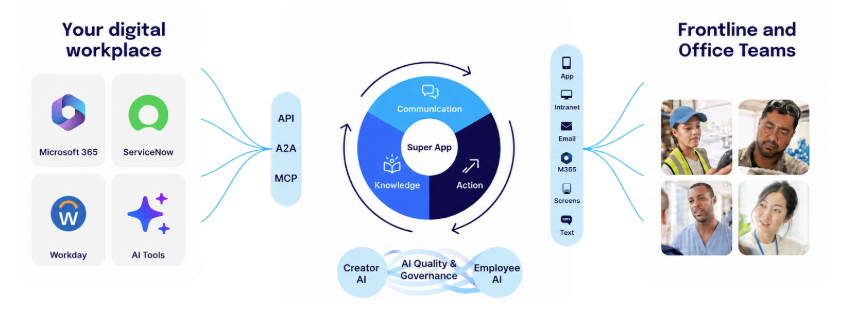 What makes an employee app an employee superapp?
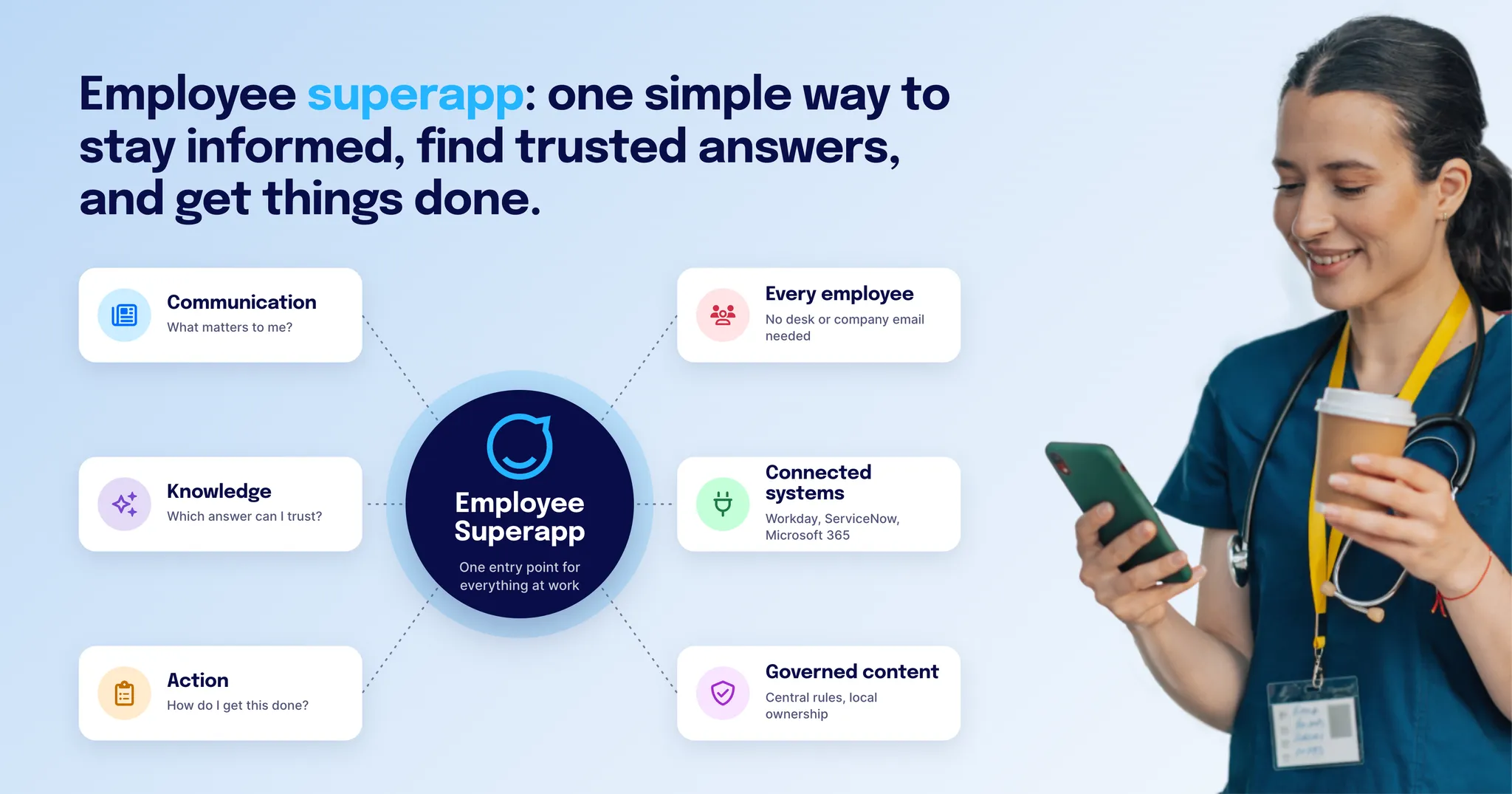
An app qualifies as an employee superapp when it answers the three questions every employee has during a working day, and connects the answers.
Job | The employee’s question | What it means in practice |
|---|---|---|
Communication | What matters to me? | The right information reaches the right person, in their language, at the right moment, and you know it arrived. |
Knowledge | Which answer can I trust? | Employees ask in their own words and get a current, sourced answer that fits their role and location. |
Action | How do I get this done? | Employees confirm, submit, request, or report from the same place, without needing to know which system sits behind it. |
Take annual leave as an example of all three jobs connecting. The company announces this year’s process and deadlines, targeted by country and role. An employee asks, “How many vacation days do I have left?” and gets an answer with its source, without waiting for a manager or HR. Then they request leave, see their balance, and get approval, connected to the HR system, without leaving the app. Shift swap, onboarding, a policy change, and IT help follow the same pattern.
A quick test you can apply to any product:
Can an employee go from an announcement to a completed task without switching apps?
Are answers grounded in your own governed company content, with a visible source, and scoped to the person asking?
Do people open it voluntarily and often enough that you can measure it?
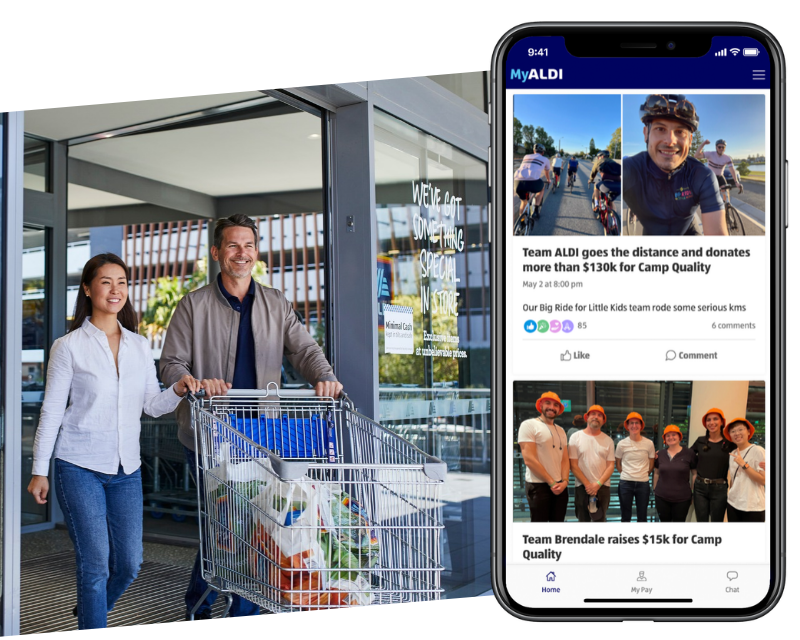 What good looks like. ALDI Australia gives more than 16,000 largely deskless employees across 580+ locations one branded app, MyALDI, for payroll, rostering, benefits, feedback, and training. The company reports 99% registered users, 94% average monthly active users, and 84% average weekly active users. Before the app, information and admin tasks fell to one dedicated store manager per location.
“Shaping the narrative with our employees and driving productivity through shared purpose has been at the heart of why we moved to an app. And the benefits you get from the HR systems that can be plugged into it lead to cost efficiencies and a better employee experience.” — Adrian Christie, director of communications at ALDI Australia.
How is an employee superapp different from an intranet, an employee app, or a frontline app?
An employee superapp differs from the other three in where it starts (every employee, with the frontline as the hardest case) and in connecting communication, knowledge, and action instead of focusing on one of them. The categories overlap more every year but buyers should still pay attention to the platform architecture.
Starts from | Strong at | Typical gap | |
|---|---|---|---|
Intranet | Desk-based employees and structured content | Knowledge, pages, navigation, collaboration links | Rarely reaches people without a laptop or company email |
Employee communications app | Reaching deskless employees with news | Push notifications, feeds, targeting | Stops at communication, so usage fades once the news is read |
Purpose-built frontline app | Operational tasks such as shifts and checklists | Shift management and task execution | Less depth in knowledge management, company-wide communication, and governance |
Employee superapp | Every employee, with the frontline as the hardest case | Connecting communication, knowledge, and action in one place | Depends on how well it connects to the systems behind each action |
Most intranet suites now extend to mobile and some purpose-built frontline apps that prioritize shift management and task execution offer limited communications features. Platforms that are recognized for their excellent mobile and frontline reach and their enterprise intranet at the same time are the exception.
How to decide: Choose an employee superapp if you need one experience for desk and frontline employees that the business can govern centrally. Choose a purpose-built frontline app if you only need to solve a single operational use case and company-wide communication is secondary. You should also check whether the employee app vendor offers a path to scale into an enterprise intranet or a multichannel employee experience platform. For a broader look at the options, see our overview of frontline communication tools.
Why does AI make the employee superapp more urgent?
AI makes the employee superapp more urgent, because without one, most of AI’s value stops at the desk. AI assistants are arriving inside office productivity suites, and frontline, shift-based, and mobile employees rarely have access to them. Office employees, meanwhile, work across so many systems that they don’t know where to ask.
AI assistants will increasingly become the main point of entry as employees skip landing pages and portals and ask for what they need directly.
That shift raises the bar for trust. A general AI assistant is a great workbench: broad, flexible, and the person checks the result. An employee asking “How many vacation days can I roll over into the next year?” between two tasks needs something different: one answer that’s right for their country, contract, and role, with a source they can check. A policy for the wrong country sounds just as confident as the right one. So the answer has to come from governed company knowledge, and the assistant should only see what that employee is allowed to see.
The implication: an employee superapp is how AI reaches every employee in a form they can rely on. It brings the answer to the place where the next step happens.
Won’t an employee superapp become one more app nobody uses?
It will if it’s not designed for the frontline reality and if it doesn’t provide incentives to open it daily because it is so useful in everyday work. Adoption is the real constraint in this category, and it has to be designed for from the start.
Design for the hardest conditions in your company: no desk, no corporate email, no training, and about 90 seconds between tasks. If the app works there, it works for everyone. In practice, that means sign-in without a company email address, content in each employee’s language, and pages such as safety guidelines that work offline. (We go deeper on this in how to reach employees without email access.)
Most of our employees are on the front line. They don’t need complex setups — just a user profile — and they’re connected.
Marta Romeo, Assistant Communications Manager at Transdev Sydney Light Rail
Transdev Australia reports an 85% engagement rate and 89% satisfaction with the app.
To know whether it’s working, track adoption and active users, message reach, task completion in the app, and how many employees keep using it over time.
Does an employee superapp replace your HR, IT, and operational systems?
It shouldn’t. Workday, ServiceNow, Microsoft 365, and your other core systems keep running the business. An employee superapp carries their value to every employee, including the ones who never log in to those systems directly.
This matters for IT, because consolidation can create a new dependency. Superapps should allow for interoperability and corporate ownership of data.
Questions IT should ask any vendor:
Does it connect through open APIs and standards such as MCP, so you can add or swap systems later?
Who owns the employee data, and can you export it?
How is access controlled (single sign-on, automated provisioning, role-based permissions)?
When the AI takes an action, does it act as the signed-in employee, so people only see their own data?
Can frontline employees get access without a full Microsoft 365 license?
How does Staffbase approach the employee superapp?
We build the employee superapp frontline-first, so it works for every employee. Four principles shape how we build it:
Simple for every employee: Staffbase started on the factory floor. We still test every feature against employees who have no desk, no company email, no time for training, and only a few minutes between tasks. Office employees benefit as well, because they face the same information overload in a milder form.
Powerful for the enterprise: Many frontline apps are easy to use but stop at communication, with limited knowledge management, governance, and connections to company systems. Many intranets offer that control but are built for people at a desk. An employee superapp needs both. If employees don’t find it useful, they won’t open it. If IT can’t govern it, it won’t scale beyond a pilot.
Central governance and local ownership: A store manager or shift lead knows what their team needs this week, so they can publish for their own people. Central teams define the branding, security, audiences, and approval rules that apply across every country and site.
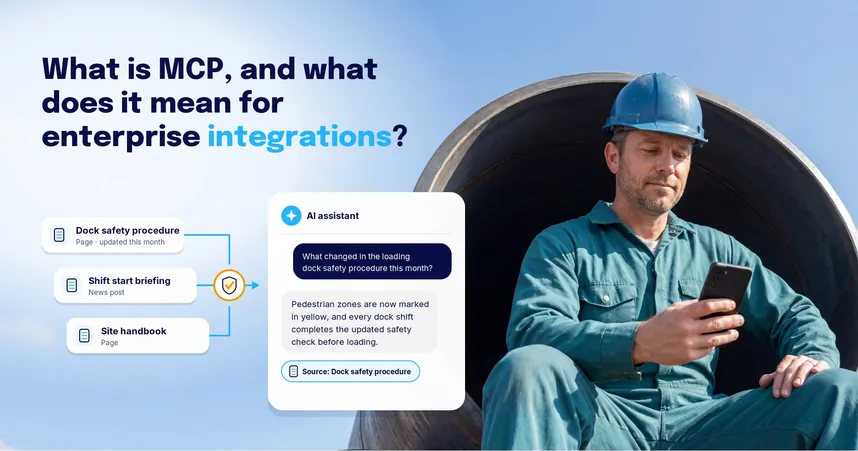
Open by design: Staffbase connects to Workday, ServiceNow, Microsoft 365, and other systems through open interfaces, including APIs and the Model Context Protocol (MCP), an open standard that lets AI assistants work with company systems. Employees can use those systems from the app, and if your company uses other AI assistants, they can draw on your approved Staffbase content too.
Behind The Employee Superapp sits one governed content system. What you publish once can also reach employees in email, Microsoft 365 (Teams, SharePoint, Outlook), on screens, or by SMS, so no one is missed and everything traces back to a single source.
Independent analysts recognize this approach. Staffbase was named a Leader for the fourth consecutive year in the 2026 Gartner® Magic Quadrant™ for Intranet Packaged Solutions. In the ClearBox Intranet and Employee Experience Platforms report 2026, Staffbase holds three CHOICE badges (Top 5 Score, Comms Excellence, and Frontline & Mobile Focus) and is the only platform to hold both Top 5 Score and Frontline & Mobile Focus.
What does the Staffbase Employee Superapp include?
The Staffbase Employee Superapp is the one place where every employee can stay informed, find trusted answers, and get things done.
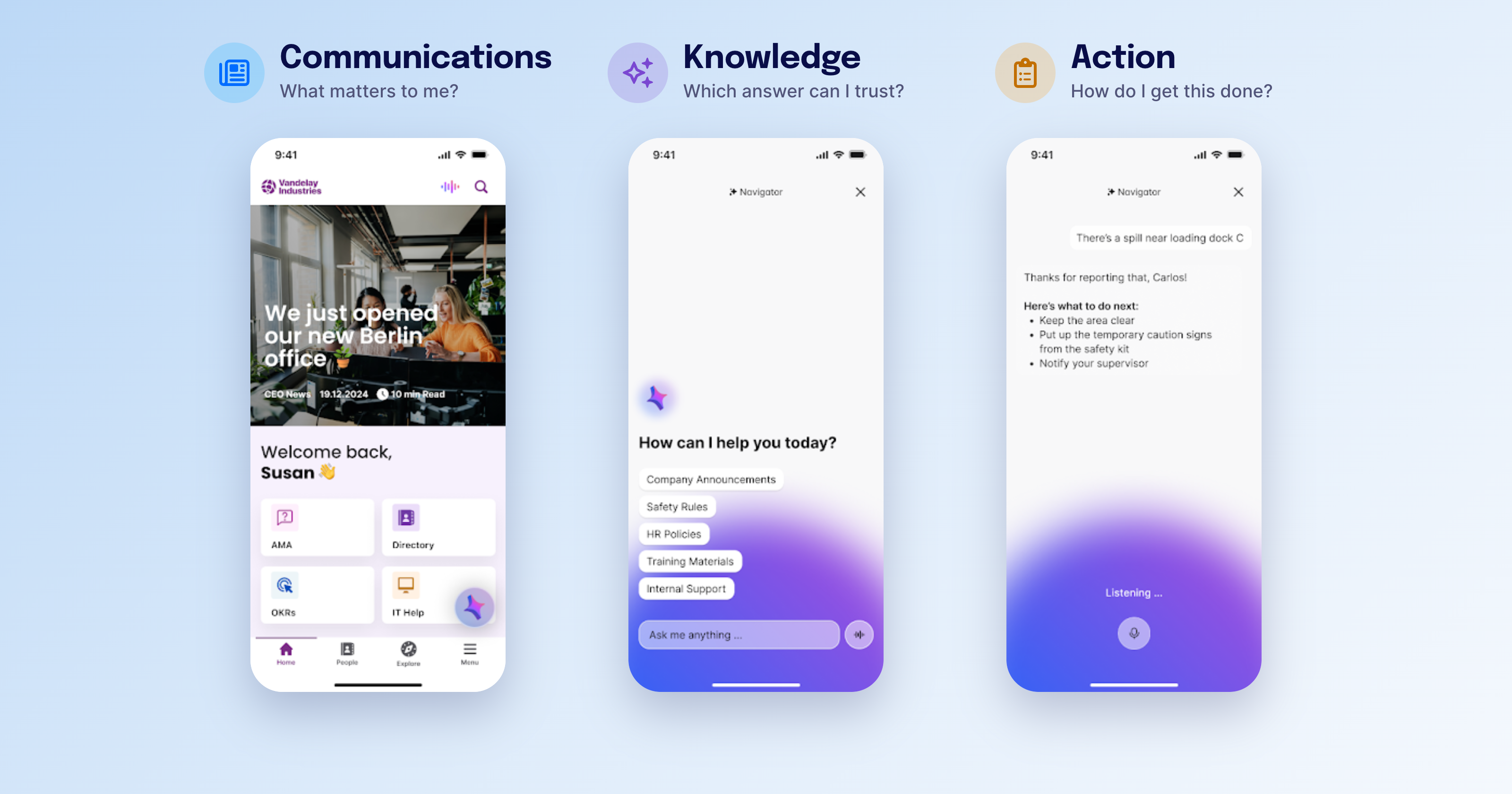
Communication: a fully branded app with targeted news that reaches each employee in their language. If someone misses a critical post, the app automatically follows up with them, and read confirmations show you the message arrived. Secure chat and communities build belonging across sites and shifts. Employees connect with colleagues around shared interests, and they can ask questions without moving to a personal messaging app.
Knowledge: the information employees look for, such as safety rules, HR policies, or store procedures, live in pages that each have a named owner and a review cycle, so content stays current. Employees can open them through personal quick links, find them with search and AI answers, or ask Navigator, an AI assistant that answers from your verified company content, links to the source, and fits each answer to the person’s role and location. Other AI assistants can draw on the same approved content through the Staffbase MCP server.
Action: HR self-service, forms, tasks, and read confirmations in the same app. Navigator can help employees take the next step in connected systems like requesting time off, checking employees into a shift in Workday, filing a ServiceNow ticket, or finding a Jira issue, always as the signed-in employee.
 Local editors in each department, region, or subsidiary can publish for their own teams in their own Spaces, so a site manager or shift lead can share what matters this week without waiting on headquarters. Central teams set the rules for branding, security, audiences, and approved workflows, and role-based permissions control who can publish what. Built-in AI helps editors write and refine news that stays compliant and on-brand.
When is an employee superapp the wrong place to start?
An employee superapp might not be the best fit if your entire workforce works at a desk, has a company email address, and lives in Microsoft 365. Your main problem is probably knowledge and findability, and a well-run intranet with a mobile view will serve you better.
Look at a workforce management tool first if your core need is shift scheduling, time and attendance, or labor planning. An employee superapp can surface those processes for employees, but it doesn’t replace the system that plans the shifts.
Use a dedicated document management system if your main need is controlled documents with formal review and approval cycles, as in heavily regulated quality or safety documentation.
Next steps
Want to see the Staffbase Employee Superapp in action?
Have more questions about employee superapps? Jump to the frequently asked questions on the topic.
Note: This answer reflects the market as of October 2026 and assumes a large, distributed organization with a mix of desk-based and frontline employees.