


What is MCP, and what does it mean for enterprise integrations?
MCP lets AI tools ask other systems for information in one common format. Here’s how MCP integrations work, why the platform behind the server matters most, and what it means for employees and IT.

Marina Petro in AI
MCP, short for Model Context Protocol, is an open standard that lets AI tools such as Copilot and Claude ask other systems for information or actions in one common format. MCP integrations allow employees to access trusted information only when the platform behind the server (where the content actually lives) is governed. The protocol itself only offers a standard way for an AI tool to call other systems for information. MCP can identify who is asking, but it doesn’t decide what that person may see, who owns a piece of content, or whether it is current. Deciding those things is the job of the platform that holds the content, such as an intranet.
The Staffbase MCP Server works as the signed-in employee, so an AI tool retrieves only what that person can already see in Staffbase, with permissions checked on every request. The answers employees get in Copilot or Claude are accurate, current, and trusted, since that content comes from one governed content system. With the Staffbase MCP Server, employees get company news, policies, and answers inside the AI tool they already use, so they don’t have to switch between apps or search one system after another to find them.
What is an MCP server, and how do MCP integrations work?
An MCP server is a connector that lets an AI tool look things up in a company system. Think of USB-C: any device with the right plug works with any charger. An MCP server does the same for AI tools. It sits in front of a system, such as an intranet, and answers requests in one standard format. Copilot, Claude, or any other AI tool that supports MCP can then ask it for information, with no separate connection built for each tool. An MCP integration is that connection in use: an AI tool linked to an MCP server.
Before MCP, every AI tool needed its own custom integration with every system. With MCP, the system that holds the content provides one server, and any compatible AI tool can connect to it. That system applies its own permission, so employees see only what they are already allowed to see. MCP, the Model Context Protocol, is an open standard, meaning its specification is published for anyone to use, so no single vendor controls how it works. You can read the full specification at modelcontextprotocol.io.
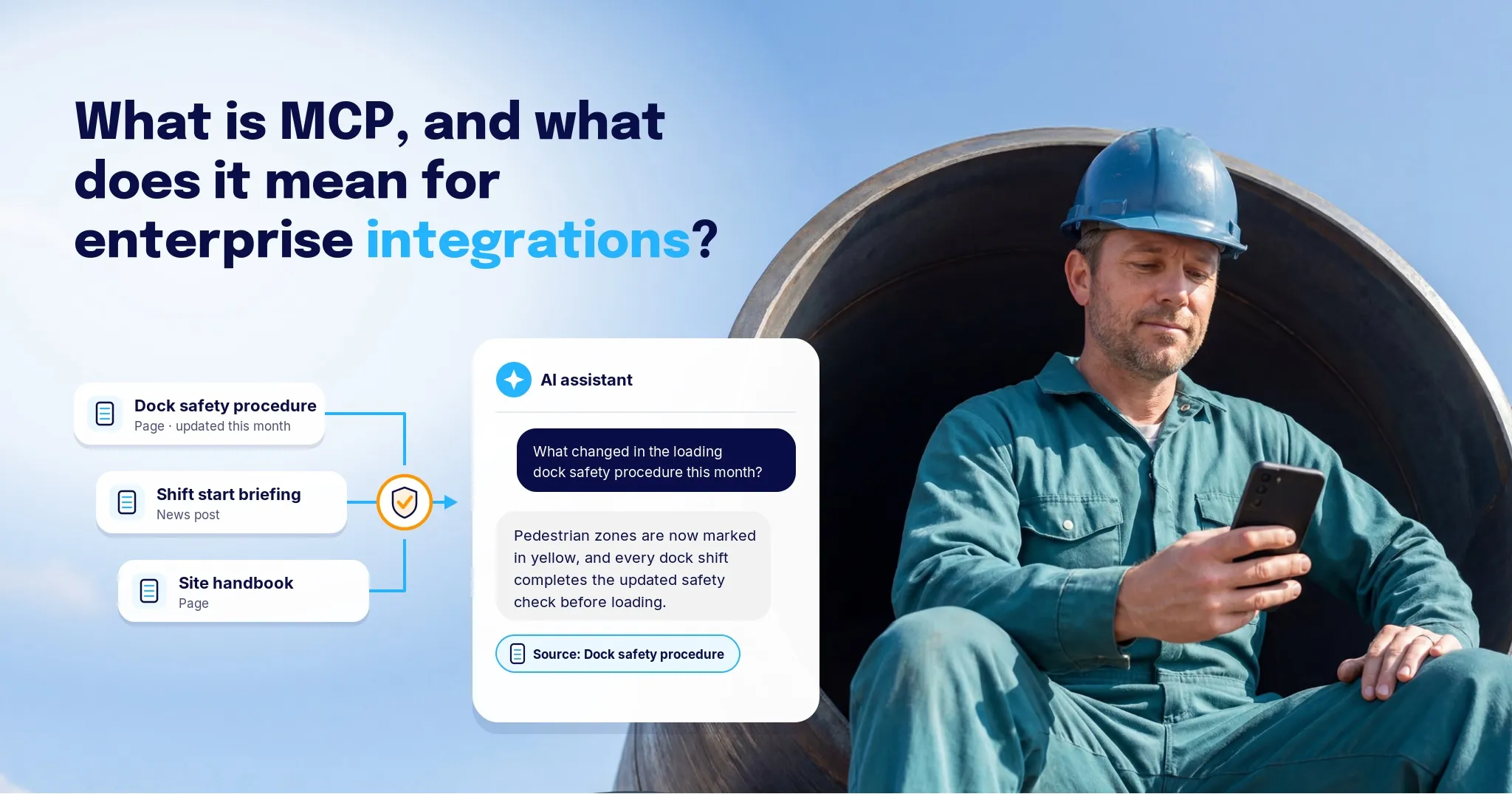
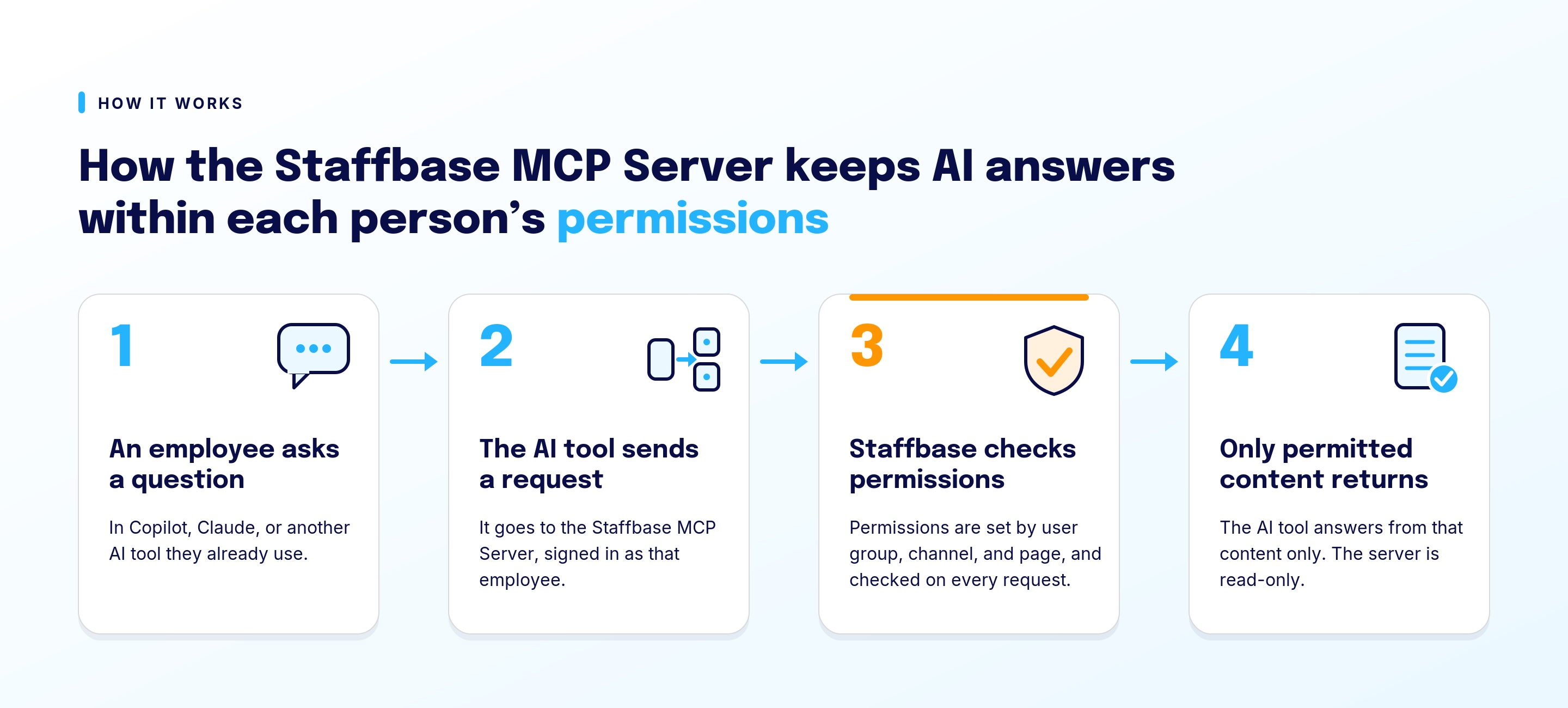
The practical result is that an employee can ask an AI tool a question and get an answer drawn from company content. Take a warehouse team lead starting a shift who asks an AI tool, “What changed in the loading dock safety procedure this month?” The tool is built on a large language model (LLM), the AI model that writes the answers. It recognizes that it needs company information and sends a request to the MCP server. The MCP server sits in front of the company’s intranet, where the updated procedure is published. It passes on who is asking, and the intranet returns only the content that the team lead is allowed to see. The AI tool then writes its answer from that content.
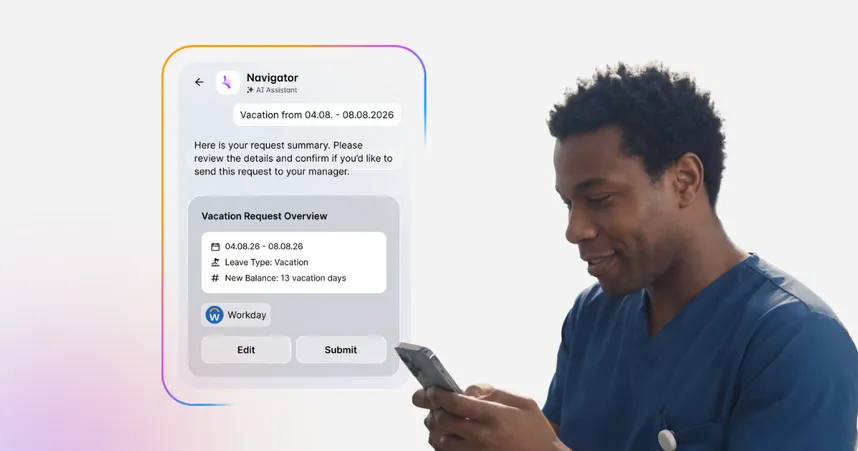
 MCP works in two directions. An MCP server offers information or actions, and an MCP client is the AI tool or app that asks for them. Copilot and Claude act as clients when they connect to the Staffbase MCP Server. Navigator, the AI assistant built into Staffbase, acts as a client when it connects to other company systems such as ServiceNow, Microsoft 365, and Atlassian. The rest of this article covers the server side.
MCP also differs from an API (application programming interface), the way one piece of software talks to another. Each API is different, so each connection used to be its own project. MCP gives AI tools one standard way to discover what a system offers and use it, and the MCP server typically calls the system’s API underneath.
What do typical explanations of MCP integrations leave out?
Many explanations of MCP integrations cover who is allowed to connect to a system, but not whether the answers an AI tool gives from it can be trusted. They typically use a CRM (customer relationship management system) or a finance database as the example, then list the controls: sign-in, access scopes, audit logs. Those controls matter, and they are enough when data has one clear owner and a fixed shape, like a customer record or an invoice.
Company knowledge doesn’t work that way. A policy page, a news post, or a supervisor handbook has an author, an approval status, an intended audience, and a point at which it goes out of date. A protocol can’t see any of that. Put an MCP server in front of a shared drive with stale files and loose permissions, and an AI tool will retrieve those files quickly and present them with confidence.
The question for IT isn’t only who may connect, but whether the content behind the connection is owned, approved, and current. AI tools are already where employees ask questions, so IT has to settle that on purpose. General AI assistants are good workbenches, but employees also need a reliable service: an answer they can trust in the moment of work, because the content was owned and approved before the AI tool ever retrieved it. The Staffbase MCP Server connects AI tools to content that already has owners, review cycles, and permissions in Staffbase.
How does the Staffbase MCP Server work?
The Staffbase MCP Server lets AI tools retrieve content from Staffbase on behalf of a signed-in employee, and it returns only what that employee has permission to see. An admin sets up each AI tool once, with no custom development, and each employee then signs in. Admins can find the overview in the Staffbase support article on the MCP Server and the setup steps in the developer guide for connecting an AI client.
Once connected, the AI tool can search and retrieve Staffbase content such as news, pages, profiles, media, and emails. It can also retrieve data points from the Studio Analytics dashboard across those channels. Staffbase checks permissions, which are set by user group, channel, and page, on every request.
The server is read-only today. AI tools can retrieve content from Staffbase but can’t create, edit, or delete it, and drafting and publishing are planned.
The Staffbase MCP server is available with the Staffbase Intranet, the Employee Superapp, and the Employee Communications Platform. Staffbase has tested and verified it with Claude, Microsoft Copilot Studio, and Microsoft Copilot in Teams, and other tools that support MCP, such as ChatGPT, can connect too.
What do MCP integrations mean for employees and enterprise IT?
MCP integrations give employees verified company answers inside the AI tool they already work in, and they give IT one governed connection instead of one custom build per AI tool. Questions we hear from customers and prospects include whether Claude or Copilot can read their Staffbase content, whether their own HR or operations agent can use it, and how restricted pages stay restricted.
What are IT’s options for connecting AI tools to company knowledge, and how do they compare?
Choose an MCP server in front of governed content when several AI tools need the same company knowledge, because one server serves all of them and the permissions already exist in the source. Choose a custom connector only when one AI tool needs access and your team can maintain the build.
An MCP server can also be placed in front of ungoverned content, such as a company drive full of years of HR documents. It will work technically, and employees can ask an AI tool about those files, but this is the weak choice because the AI tool retrieves whatever is on the drive, whether or not it is current or approved, so the answers will only be as good as the drive.
The table below compares all three approaches.
Approach | What it is | Where permissions come from | Who keeps content current | Best when |
|---|---|---|---|---|
Custom connector | A purpose-built link between one AI tool and one system | IT rebuilds the permission rules inside the connector | The content owners, if anyone | Only one AI tool needs access and IT can maintain the build |
MCP server in front of ungoverned content | A standard connection to a shared drive filled with years of documents, such as old HR files, with no clear owners | Whatever the source happens to allow | Often nobody | A short-term test before the content is cleaned up |
MCP server in front of a governed knowledge system | A standard connection to content that has owners, approvals, and permissions | The source system, checked on every request | Named content owners and review cycles | Several AI tools need the same trusted company knowledge |
A custom connector, an MCP server, and the platform behind it work at different layers: the MCP server accepts requests, and the platform decides what comes back.
How can MCP improve the employee experience?
MCP puts verified company answers inside the tool an employee is already working in, so they don’t have to hunt for a page or switch windows. Max Rugen, a solutions engineer at Staffbase, leases a bike through Staffbase and wanted to know what happens when the contract ends. Instead of searching through countless intranet pages for the right answer, he asked Claude, and it returned the exact policy details from Staffbase. He then wrote a follow-up email in the same tool.
The same connection supports using the answer, not only reading it. In the Meet the Makers episode on the MCP Server, Max describes a local branch where a news post announces a policy change. An employee can ask their AI tool to update a Word handout with the published details. Staffbase then supplies the verified content, and the AI tool edits the employee’s own document. Staffbase itself stays read-only.
Max sees AI tools as an additional way for employees to reach company information.
I personally believe it’s more of a new channel that you have to access company information and to create things as well.
For a company, that means the right policies and news can reach employees in the place they already ask questions.
How can Copilot and Copilot Studio use Staffbase content?
For companies in the Microsoft ecosystem, Copilot and Copilot Studio can both use Staffbase content through the MCP Server, in two distinct ways:
Copilot: an employee asks Copilot in Teams a question and gets an answer drawn from the Staffbase content they are allowed to see, such as a policy or an announcement.
Copilot Studio: a team creates an agent, for example for HR or operations, that uses Staffbase content in the same way, so the agent answers from material that subject matter experts create and maintain.
See how Staffbase works with Microsoft 365.
What about employees without an AI tool license?
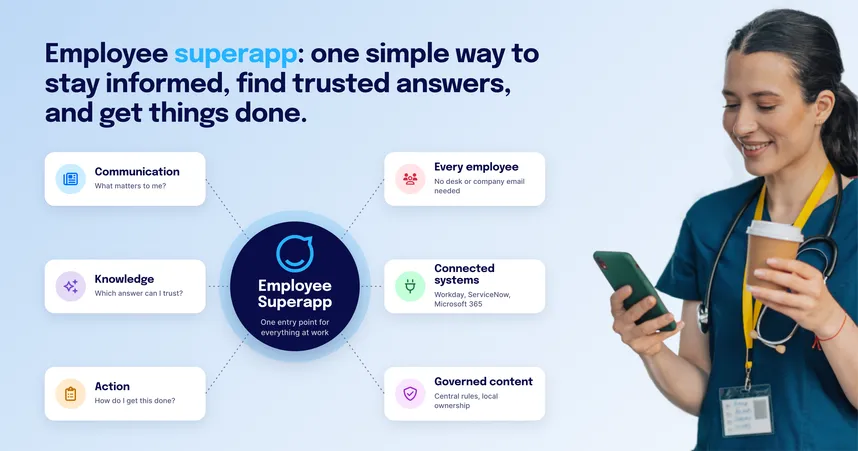
Employees without an AI tool license aren’t left out, since Navigator is built into the Staffbase app and intranet. Frontline, shift-based, and mobile employees often don’t have the AI tools that are arriving at the desk. Navigator, part of Staffbase Employee AI, answers from the same governed Staffbase content, respects the same visibility settings, and shows source references. A frontline employee gets the same answer in the app that a desk-based colleague gets through Copilot or Claude. Our guide to when an intranet with an AI assistant drives real impact covers how Navigator fits.
How do different teams use MCP integrations?
Each team uses the same governed connection for a different job, and no team needs custom development:
IT: sets up access once and keeps identity and permissions in the source system, so the AI tools the company has chosen work for every employee without a separate connector for each. See Staffbase for IT.
HR: gives employees trusted policy answers in the AI tool they already use, so HR answers fewer repeat questions.
Internal Communications: Announcements and news appear as answers where employees already ask questions, so published content keeps reaching people after it leaves the feed.
Frontline supervisors: turn a published policy change into an updated handout without retyping it, which keeps branch materials in line with the source.
How can AI tools safely access company knowledge through an MCP server?
Staffbase keeps AI tools within what a signed-in person may see by checking permissions on every request, not only at sign-in. The AI tool signs in as the employee, not as a service account, so it never has more access than that person. Max Rugen explains it this way: “every single request that you make to the Staffbase service will look at these governance settings that are in place.”
Picture two employees who ask the same AI tool about a new overtime procedure. The procedure sits on a page that only plant shift supervisors can see. The shift supervisor gets the answer. The finance analyst doesn’t, because that page is never returned for that person, so the AI tool has nothing to retrieve. The scenario is illustrative, not a customer example.
Permissions say who may see content, but they don’t say whether it is current and correct. Staffbase Content Pro scans pages for outdated, duplicate, and contradictory content and for missing owners, so content teams can fix problems before an AI tool retrieves the page. Hear how Content Pro and Navigator work together in the Meet the Makers episode. What an AI tool does with content after it retrieves it depends on that tool’s own settings and your company’s policy for it.
Permissions have limits, and the next section covers the cases where an MCP integration isn’t the right move yet.

When does an MCP integration not fit your organization?
Skip an MCP integration for now in two situations.
Skip it if your workforce has no access to company-approved AI tools. An MCP server connects AI tools to company content, so without an approved tool there is nothing on the other end. Decide which AI tools your IT team will support first.
Skip it if there is no maintained and governed source of content to put behind the server. If policies sit on pages with no owner or review cycle, an MCP server passes outdated answers to AI tools faster than before. Fix ownership and review cycles first, then connect. Our look at AI in employee experience covers why governance comes first.
See how Staffbase brings trusted company content into the AI tools your employees already use.
The answer above reflects the Staffbase MCP Server as of October 2026 and assumes an organization where employees use at least one approved AI tool, such as Copilot or Claude.