


When does an intranet with an AI assistant drive real impact — and when does it not?
An intranet with an AI assistant can reduce HR tickets, speed up onboarding, and improve frontline operations — but only when governance, ownership, and permissions are built into the foundation. Here’s what separates a high-impact intranet chatbot from an expensive experiment.

The short answer
An intranet with an AI assistant improves business performance only when answers are treated as a managed product, not a byproduct of document storage. The most important feature of an AI intranet in 2026 is governance — ownership, review cycles, permissions, and lifecycle controls that define what's authoritative. Without that foundation, conversational assistants, personalization, multilingual delivery, and analytics don't create clarity. They accelerate confusion because AI will confidently reuse whatever messy, duplicated, or outdated content it can access.
→ Governance is what turns search into resolution. Without it, an AI assistant is just a faster way to retrieve the wrong answer.
Why adding an AI chatbot to a messy intranet usually fails
The most common mistake organizations make when implementing an intranet AI assistant is assuming AI will fix a broken search experience. It won't. An AI assistant can only retrieve and synthesize what already exists. If the knowledge base is disorganized or outdated, the assistant scales those problems rather than solving them. This is the hallucination trap.
The difference shows up immediately in outcomes.
High governance: A frontline employee asks, "How do I reset the cooling valve?" The assistant returns a concise, cited answer from the current 2026 Safety Manual. The result is immediate resolution and zero downtime.
Low governance: An employee asks, "What is the holiday policy?" The assistant retrieves three handbook versions and presents conflicting guidance. The result is more HR tickets, manual clarification, and lost trust.
How AI amplifies structural weaknesses
Deploying an AI assistant without a governance foundation exposes architectural gaps that traditional search had previously hidden. Four structural limits determine whether AI helps or hurts.
Structural weakness | What AI does with it |
|---|---|
Weak information architecture | Surfaces the same ambiguity faster, eroding trust after the first conflicting answer |
No content ownership | Uses unowned documents anyway, and when they're wrong, employees blame the system |
Version conflicts | Cannot determine which policy is authoritative, delivering confident but contradictory answers |
No publishing controls | Amplifies expired, draft, or irrelevant content, increasing noise instead of reducing it |
What structural conditions does an intranet AI assistant need to deliver real impact?
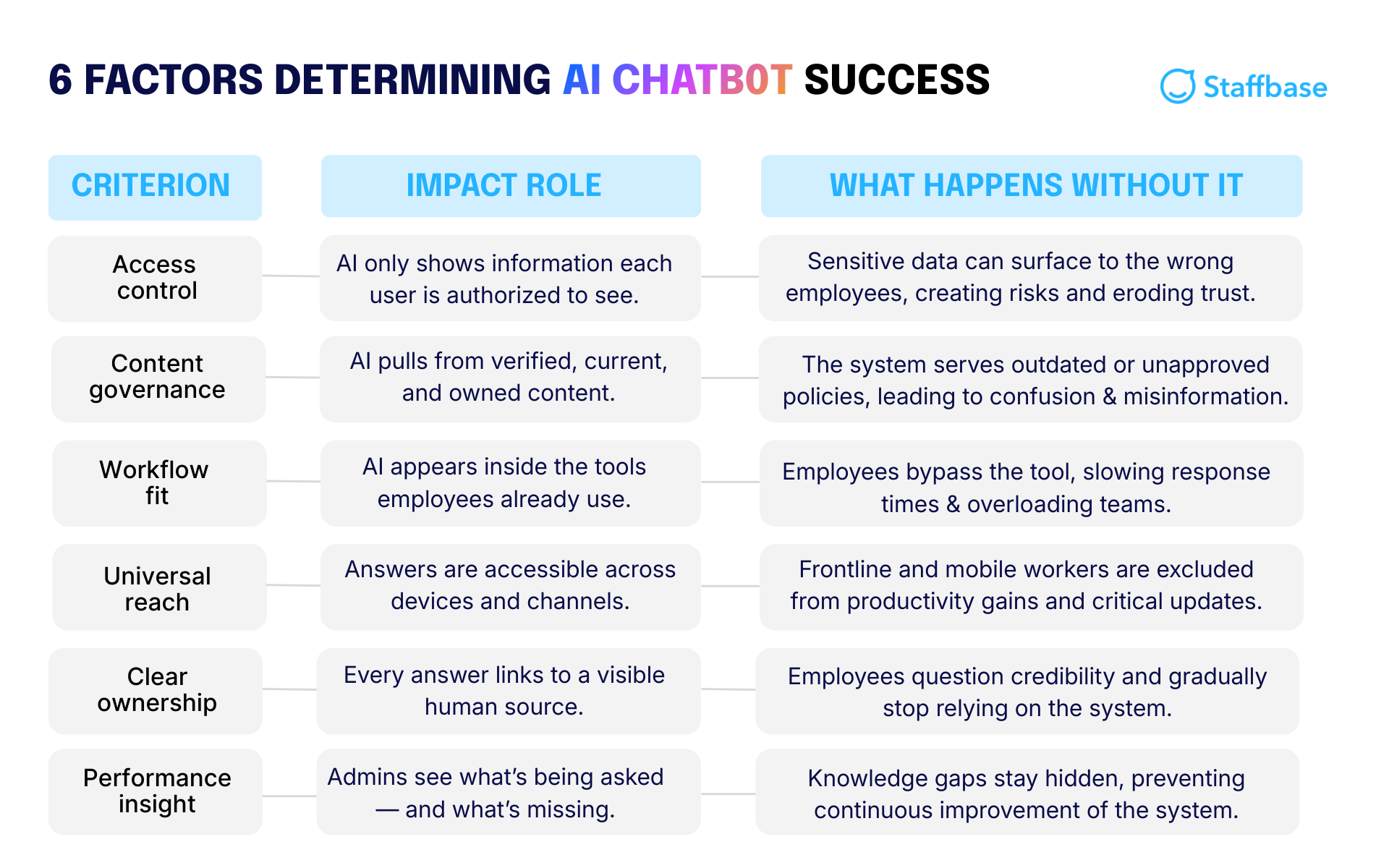
Six structural conditions determine whether an intranet AI assistant delivers real impact or creates new problems. Each one addresses a different way in which ungoverned content undermines AI reliability.
Together, the conditions expand on what’s needed for a company’s AI assistant to become a trusted source for employees' questions — including the hard-to-reach frontline.
1. Clear content ownership
The structural condition: Every article, policy, and knowledge page needs a designated human owner.
Why it determines impact: AI assistants don't create authority. They reference it. When an employee asks a question, the assistant must point to a verified, accountable source. Without assigned ownership, content has no accountability, and AI has no reliable authority signal to work from.
What happens if it's missing: Unowned content doesn't disappear from the index. AI uses it anyway, and when it's wrong, employees don't blame the document. Instead, they lose trust in the system. A 2025 study by Stanford University and BetterUp Labs found that 40% of U.S. desk workers received AI-generated work that appeared credible but was incomplete or missing critical business context. For a 10,000-person company, that translates to an estimated $9 million in lost productivity each year spent correcting flawed outputs.
2. Enforced governance workflows
The structural condition: Content must have automated expiration dates and mandatory review cycles.
Why it determines impact: AI cannot distinguish between outdated and current information unless the platform defines the rules. Governance workflows, including review reminders, expiration dates, and approval processes, ensure that only verified, maintained content is eligible for retrieval. Fresh data builds trust. Stale data creates confident mistakes.
What happens if it's missing: Without enforced governance, AI surfaces whatever it finds. That might mean referencing a 2022 travel policy instead of the updated 2026 version, or citing a retired process that no longer meets regulatory standards. The impact goes beyond confusion. It introduces compliance risk, financial waste, and operational delays.
Enforced governance in action: Before launching its intranet, Bethany Children’s Health Center relied on siloed emails that didn't always reach the right teams. By centralizing communication in one governed platform with the help of Staffbase, they ensured critical updates, from policy changes to emergency alerts, reached all 1,000+ employees consistently, creating a single, reliable source of truth.
3. Permission-aware architecture
The structural condition: The AI assistant must automatically inherit and enforce existing intranet permissions.
Why it determines impact: A manager and an intern asking the same question should not receive identical responses. In regulated industries like healthcare, finance, and manufacturing, salary data, compliance documentation, acquisition strategy notes, and HR case files must remain segmented by role. AI must inherit that logic automatically, not apply it retroactively.
What happens if it's missing: AI without permission-awareness creates two major failure modes. If it ignores access controls, it risks exposing sensitive data. If it over-restricts answers to avoid that risk, it becomes irrelevant. Real impact requires the AI to respect role-based permissions and return only what each employee is authorized to see.
Permission-aware architecture in action: Alaska Airlines faced a structural challenge as its workforce expanded across flight crews, ground staff, and corporate teams, each with different information needs and access rights. By implementing structured permission groups and role-based targeting via Staffbase, they ensured employees only see content aligned with their function, location, and authorization level. Pilots don't see ground operations procedures. Corporate employees don't see restricted crew documentation. The result was 99% employee registration and a platform that employees trust because it respects access boundaries by design.
4. AI inside the communication platform
The structural condition: The AI must live inside your primary communication hub, not as a bolt-on tool.
Why it determines impact: When AI is integrated directly into the intranet or employee app, it works with context. It knows who the employee is, what department they belong to, where they are located, what language they use, and what content they are permitted to access. Employees don't need to explain their role or copy and paste policies into a separate tool because the system already understands the environment in which the question is being asked.
What happens if it's missing: Bolt-on AI creates behavioral drag. It requires logging into another interface, switching tabs, or manually providing background information. Over time, that friction leads to app fatigue. Employees revert to old habits, emailing HR teams or searching scattered tools, and adoption stalls.
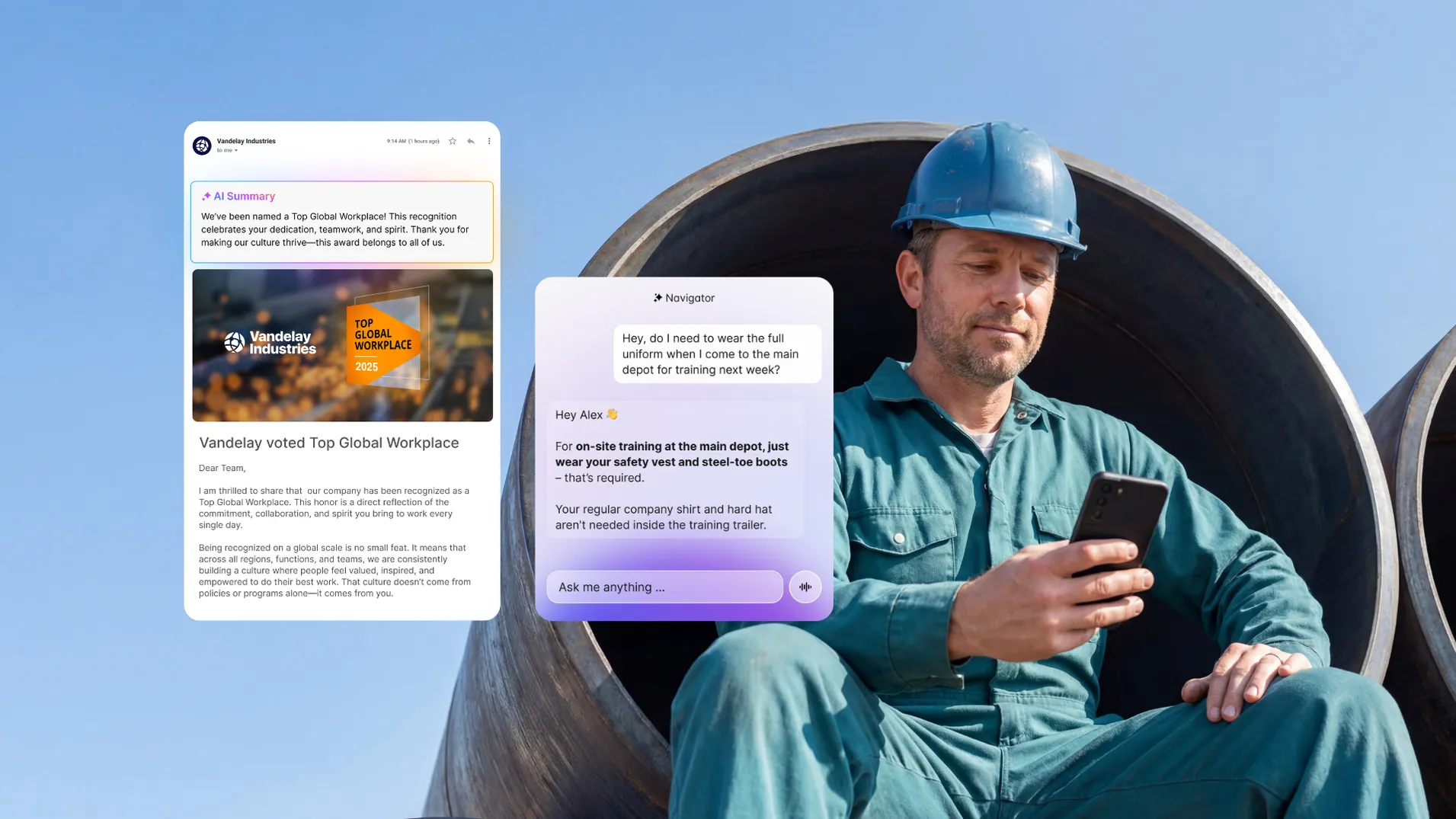
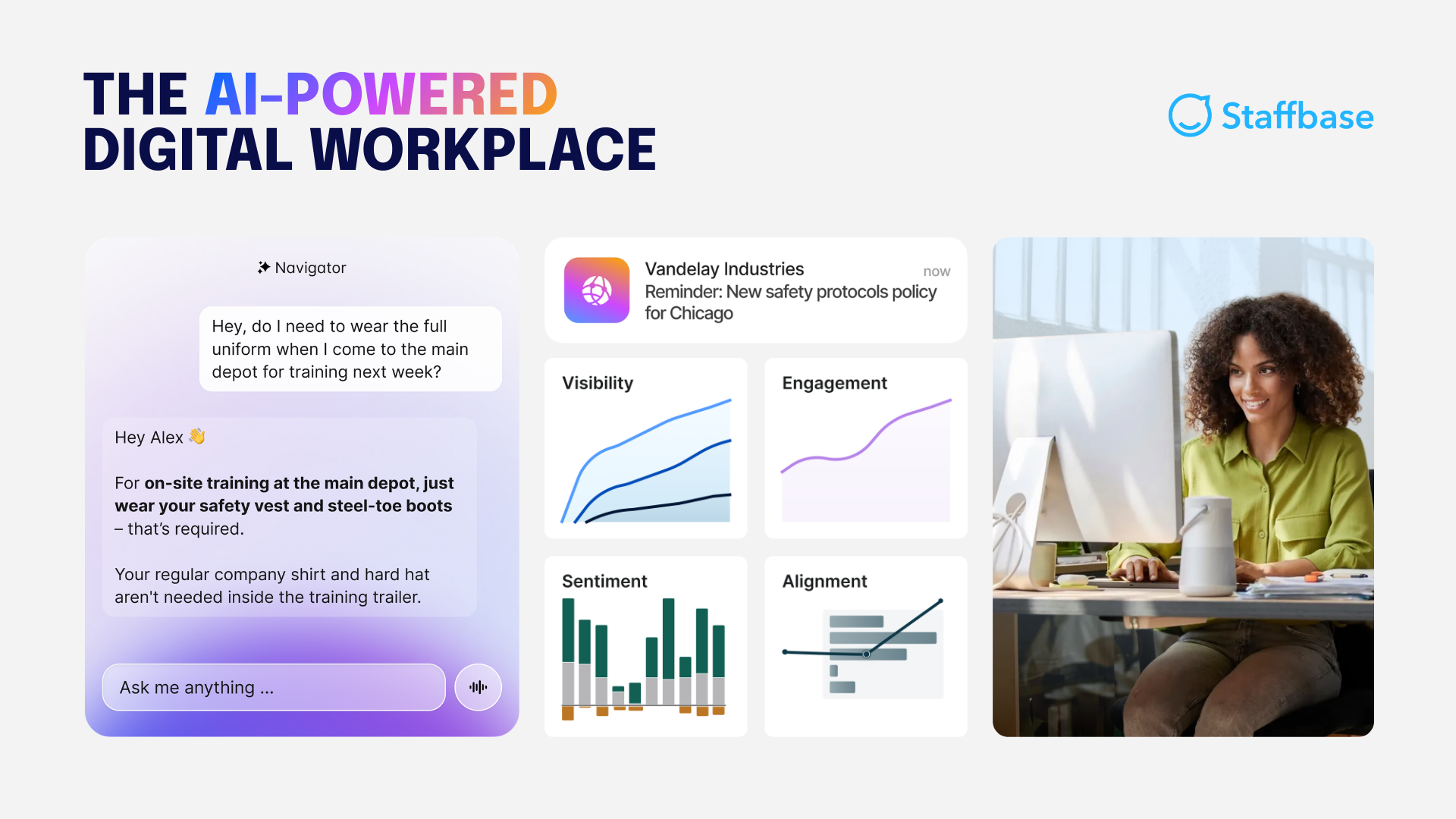
AI in action: An AI assistant like Staffbase Navigator supports real-world behavior because it operates in context. Employees ask questions in natural language and receive answers grounded in governed, permission-aware content, each one linked back to where it came from, without leaving the communication environment they already use. That covers quick shift questions, policy clarification, change updates, and frontline lookups in the moment.
 5. Cross-channel and mobile reach
The structural condition: AI-powered answers must be accessible on every device, including intranet, mobile app, and collaboration tools.
Why it determines impact: AI has no impact if it only serves the desktop workforce. If answers are trapped inside a web portal, office staff benefits while frontline teams remain disconnected. A frontline worker needs answers instantly during a shift, not only when they happen to check a desktop portal.
What happens if it's missing: A 2025 study by Staffbase and YouGov found that only 9% of non-desk employees report being very satisfied with internal communication, while 38% rate their communication quality as fair or poor. The gap is measurable in crises, too. Among employees who use a mobile employee app as their primary information source, 68% rate crisis communication as good or excellent, compared to a 52% average among those without mobile access. Without reach, AI becomes a benefit for the few rather than an operational tool for the whole organization.
6. Adoption visibility & analytics
The structural condition: AI usage, answer accuracy, and query gaps must be tracked in a centralized analytics dashboard.
Why it determines impact: An intranet AI assistant improves over time only if teams can see how it's performing. Organizations need visibility into which questions are recurring, which answers are being trusted, where responses fail, and which content is outdated. Without that, there's no way to close gaps or demonstrate value. Navigator adds answer-level signals. Employees rate answers with a thumbs-up or thumbs-down, and admins can review conversation logs to spot a bad answer pattern before it becomes a trust problem.
What happens if it's missing: Without adoption tracking and answer-level visibility, an intranet AI assistant becomes a black box. Leaders assume it's working because responses are instant, but ticket volume may remain unchanged. Employees receive answers that sound correct but are pulled from duplicate or outdated sources. The hidden cost accumulates quietly: low trust, low adoption, and no measurable efficiency gains. You can't optimize what you can't see.
Adoption visibility in action: ALDI Australia achieved a 99% employee registration rate on its Staffbase-powered platform, but visibility didn't stop at adoption. Using built-in analytics, the team tracks which updates are opened, where engagement drops, and which recurring questions indicate content gaps. When store-level updates underperform, communicators adjust format and timing. When repeated policy questions appear in search data, content owners are prompted to clarify or update guidance. The intranet evolves based on real employee behavior, not assumptions.
What measurable results should you expect from an AI intranet assistant?
An intranet AI assistant should do more than speed up search. When connected to governed, permissioned content, it reduces repetitive questions and helps employees resolve issues in the flow of work. Microsoft’s 2025 Work Trend Index found that 48% of employees and 52% of leaders say their work feels “chaotic and fragmented.” A well-governed AI assistant reduces that friction directly.
Measurement should focus on resolution, not just usage. Here's what to track across the three areas where impact shows up first:
Use case | What good looks like | KPIs to track |
|---|---|---|
HR self-service | Employees ask direct policy questions and get current, permission-aligned answers without contacting HR | Ticket deflection rate, time-to-answer, fewer clarification requests |
Onboarding | New hires resolve "how do I" questions independently without interrupting managers | Reduced ramp time, fewer escalations, increased onboarding task completion rate |
Frontline and operations | Employees find the correct procedures on mobile without leaving the worksite | Reduced downtime, fewer process deviations, increased compliance adherence |
Two additional KPIs apply across all three:
Resolution rate: Track whether employees receive a usable answer, not just whether they clicked a result. Resolution is the true performance metric.
Top query and gap analysis: Identify recurring and unanswered questions. This tells content owners where governance needs attention and helps teams continuously refine what the assistant can reliably answer.
Is an intranet AI assistant safe for the entire enterprise?
An intranet AI assistant can be safe for enterprise use if it meets the same standards as any core enterprise system: inheriting permissions, using controlled sources, and supporting auditability. Different stakeholders will raise different concerns. Here's how to address the most common ones:
Stakeholder | Common concern | What actually resolves it |
|---|---|---|
Internal Comms | "Will this create more noise?" | A well-governed assistant returns one verified, permission-aware answer instead of ten links. Fewer clarification emails and duplicate announcements mean less noise, not more. |
HR | "What if it gives out private data?" | The assistant should inherit existing role-based access controls automatically. If a document is restricted to managers, it cannot be surfaced to frontline staff. |
IT and Security | "Is our data training public models?" | Enterprise-ready AI must operate within a secure tenant environment. Internal data should not feed back into public models or train external systems. |
What IT should evaluate before approval
Before rolling out an intranet AI assistant, IT teams should validate four structural safeguards:
Safeguard | What it ensures |
|---|---|
Permission-aware architecture | The assistant automatically respects existing intranet permissions and audience targeting |
Auditability | Administrators can review which questions were asked and which governed documents were generated for each response |
Controlled knowledge sources | The assistant retrieves answers only from approved company sources, such as intranet content or connected systems like Workday, not the open web |
Compliance alignment | The vendor meets enterprise standards such as SOC 2 and GDPR |
When an intranet AI assistant is optional — and when it backfires
An intranet AI assistant isn't automatically a smart investment. Impact scales with complexity. The more roles, locations, policies, languages, and frontline employees you support, the more an AI assistant can reduce friction across HR, onboarding, and operations.
If your organization is small, centralized, and stable, with a tight knowledge base, clear owners, and employees already finding what they need, a traditional intranet experience may be good enough. Adding an AI assistant in that context creates a change effort without gains meaningful enough to justify it.
The bigger risk is deploying before the foundation is ready. If ownership is unclear, review cycles aren't enforced, and multiple policy versions exist, an AI assistant won't fix what's broken. It will accelerate the mess. Employees get faster answers, but not reliably verified ones, and trust erodes quickly.
Practical rule: If leadership isn't prepared to stand behind AI-delivered answers as official guidance, and IT can't point to governed sources, permissions, and auditability, fix governance first. When evaluating vendors, focus on structure, not demo performance.
 How Staffbase structures its AI assistant to meet these conditions
Staffbase builds its AI assistant, Navigator, inside a unified employee communication platform rather than as a separate tool. That means the assistant inherits the same content ownership, governance workflows, and permission-aware access controls that the intranet already uses. Answers are grounded in maintained sources, aligned to existing roles, and shaped by the same publishing controls teams already manage.
Navigator works in the Staffbase Intranet and Employee Superapp, on desktop and mobile, by voice or text, so it supports desk-based and frontline employees where work actually happens.
An AI assistant is only as reliable as the data it touches. Fix the foundation first, and AI becomes an accelerator. Leave it broken, and AI makes it visible faster.

Validity Note: This article reflects the Staffbase POV and enterprise market conditions as of October 2026.
Frequently asked questions (FAQs)
Still deciding whether an intranet with an AI assistant is the right move for your organization? The FAQs below cover the most common enterprise questions — from security and governance to adoption, frontline reach, and measurable impact — so you can validate fit before you invest.