Which intranet software is best for your organization in 2027?
The best intranet platform in 2027 is the one that reliably answers employee questions and reaches the entire workforce by default. This guide evaluates 10 enterprise platforms on adoption architecture, governance enforcement, and AI accountability.

Key insights
Utility: An intranet gets used when it’s useful. Even when nearly every employee has access, many intranets lose people to low engagement. A polished homepage doesn’t create sustained use; operational utility does. Employees return when the intranet helps them do their job, and that gap rarely shows in a demo. It shows months after launch, in the usage data.
Trusted answers: Finding a trustworthy answer is the new test of a good intranet. Many employees now ask the intranet instead of hunting through pages, and they act on the first answer. Governed AI is only as reliable as the content beneath it, so insist on owned, current, source-attributed knowledge.
Delivery, not publishing: Published isn’t the same as read. Content that sits on a page and waits gets skimmed or missed, so the platform has to deliver the right update to the right people and then show whether it actually landed. Targeted, proactive delivery and reach analytics are what turn a message that was sent into one that was read.
Communications ownership: An intranet stays current only when the comms team can publish, target, and measure without an IT ticket, while IT governs the guardrails. That autonomy is the difference between keeping pace with the business and always running a step behind.
Stack, not silo: Microsoft 365, ServiceNow, and Workday run the business, so the intranet’s job is to connect to them, not compete with them. An open intranet with deep, bi-directional integrations pulls content and actions from those systems and carries their value to every employee, including the frontline workers.
The short answer: Which enterprise intranet platform should you choose?
The best enterprise intranet software in 2027 is the one employees actually use, because it helps them work: a single place to find a trustworthy answer, get something done, and stay informed without hunting across systems. In practice, three things decide that. Governed AI that answers only from owned, current, source-attributed content, so people can trust what they are told. Second, your communications team can publish, target, and measure without waiting on IT, so the intranet stays current. Third, the platform reaches the whole workforce, including employees without a corporate login. It carries the value of systems like Microsoft 365 to all of them instead of adding another silo. Platforms that layer AI over unmanaged content, or lean on IT for every change, look fine in a demo and often fall behind within months.
How does AI change your intranet requirements in 2027?
AI has moved the intranet from a place employees search to a place that answers. Where people once scanned a list of links and decided for themselves what looked right, they now ask a question and act on the single answer they get back. The shift that matters is not that intranets added AI, it’s that employees have started to trust it.
That trust raises the stakes on everything behind the answer. When the intranet returns one response instead of ten links, there’s no margin for outdated or conflicting content. No one is left to weigh the sources. People simply act on what they’re told. So the quality and control of the underlying content stops being a maintenance task and becomes the thing that decides whether the AI can be trusted at all. That is the real question to ask of any intranet in 2027: not whether it has AI, but whether that AI is governed.
What does governed AI actually require?
Governed AI means AI that can only answer from approved, current, owned company knowledge. The test is one demo question: What is your AI allowed to read? The answer you want is “only governed sources with a named owner and an active lifecycle.” If it includes unmanaged folders, legacy PDFs, drafts, or content with no owner, the platform will eventually return confident answers from conflicting or outdated sources.
Governed AI treats these as system rules, not best practices:
Required ownership: Every source has a named owner.
Enforced lifecycle: Reviews and expiry are automatic.
Active detection: The platform surfaces outdated, duplicate, and unowned pages automatically. Nobody has to stumble on them.
Traceable answers: every response links back to an approved source.
Make this your benchmark in every evaluation: Can the platform show you the health of its content, flagging what is outdated or unowned, and prove its AI answers come from owned, current, source-attributed knowledge?
Is there a structural difference between platforms built for the whole workforce and those built for desk workers first?
Yes. Desk-first platforms assume employees already live inside corporate systems; whole-workforce platforms assume many don’t. That single assumption decides whether adoption is realistic or just aspirational, whether a message gets through in a critical moment, and whether AI reflects the whole organization or only its digitally connected slice.
What happens when you deploy a desk-first intranet to a distributed workforce?
Desk-first platforms carry their assumptions into every layer of the experience. The navigation assumes browsing. Authentication assumes a corporate email address. Push is often optional, not governed by infrastructure. Mobile is often a compressed desktop experience, not a product designed for employees between tasks on a personal device.
For frontline and distributed teams, the outcomes are predictable: low adoption, inconsistent engagement, and reliance on unofficial channels. But the cost is not only at the frontline. Even desk employees with full access tune out a platform that waits to be visited instead of delivering what matters, which is why engagement so often stalls a few months after launch. The fix is structural, not a matter of better promotion. A platform that cannot reliably reach and serve every employee by default will never become the place people trust for answers, and the AI built on it inherits the same gap.
Why do most intranet deployments fail to achieve adoption?
Many intranets miss adoption because they’re built around who has an email address, not around day-to-day work. Launch metrics can look strong, but sustained usage depends on operational utility: employees return when the platform helps them do their job, not just read news.
Early success can look convincing (registrations, a polished homepage, a launch-week spike), but those signals mostly reflect employees who were already digitally connected. The real test comes months later: does the platform stay useful across roles, shifts, and environments? When a forklift operator checks a shift schedule or a nurse verifies a sanitization protocol, the intranet becomes part of real work, and that is what builds habit. Without embedded utility, even “advanced” capabilities like AI remain peripheral.
Adoption also sets the ceiling on what AI can do. An answer engine is only as representative as the workforce that actually uses the platform: if a large part of your people rarely open it, its AI reflects only the digitally connected part of the organization. So low adoption is not just an engagement problem; it quietly narrows what the AI can see and say.
Do you still need an intranet if you already use Microsoft 365?
For most organizations, yes, and the reason is not capability but what employees actually experience. Microsoft 365, SharePoint, and Teams are built around the desktop and the corporate login: independent benchmarking of SharePoint intranets (SWOOP Analytics, 2026) found that 89% of intranet visits happen on desktop and just 1.7% on mobile. That device split tells you who a SharePoint intranet is really built for: people at a desk. Employees away from a desk, and those without a Microsoft license or company device, many of them frontline, are structurally hard to reach, and even desk employees who do have access often can’t find a trustworthy answer in the sprawl. Whole-workforce reach is a separate measure, total employees reached rather than where they log in, and it is the one that matters here. Staffbase’s own deployment data, across 30 diverse organizations spanning office, retail, factory, and deskless workforces, shows 80% or more of employees reached.
The better framing is the stack. Microsoft, ServiceNow, Workday, and your AI tools run the business; the intranet is the last mile that carries their value to every employee. A whole-workforce platform complements those systems and increases the return on them, rather than replacing them. In practice that means surfacing SharePoint and Teams content for licensed users inside a branded app they will actually use, while still reaching employees who have no Microsoft license through native content built for the whole workforce. It also means staying open by design through APIs and an MCP (Model Context Protocol) server, so information and actions flow in from your stack and trusted content is available to your other AI assistants and agents, including bring-your-own-AI.
Staffbase is a certified Microsoft Build Partner with deep, bi-directional integration across Teams, SharePoint, Outlook, Microsoft Entra ID, and Viva Connections. More than 90% of Staffbase customers also run Microsoft 365, and the platform is available on the Azure Marketplace, so it can be purchased against an existing Microsoft commitment. One licensing point worth raising in any demo: surfacing Microsoft content to unlicensed frontline workers can create licensing exposure, so ask each vendor how they handle it within Microsoft’s terms.
Which intranet platform is right for which type of organization?
The “right” intranet platform depends on workforce structure and governance risk, not demo polish. This guide evaluates platforms on five structural criteria that determine long-term success:
Sustained adoption: Will employees keep using the platform because it helps them work, not just at launch? This matters across the whole workforce: desk employees who have access but tune out, and employees without a corporate login or company device.
Governance and AI reliability: Does the content model enforce ownership, lifecycle controls, and source hierarchy so AI answers remain auditable and reliable at scale?
Scalability under complexity: Can the platform scale across regions, languages, and business units without creating parallel systems of policies and guidance?
Operational independence: Can communications teams manage publishing, targeting, and analytics daily without constant IT dependency?
Digital-workplace fit and extensibility: Does the platform carry the value of the systems you already run, such as Microsoft 365, ServiceNow, and Workday, to every employee, or does it add another silo? Look for deep, bi-directional Microsoft integrations, an open architecture with APIs and an MCP server that make trusted content available to other AI assistants and agents, and support for bring-your-own-AI.
Some platforms are engineered for complex, distributed enterprises. Others are optimized for predominantly desk-based organizations. A few excel at delivery but are not designed to function as a durable System of Record.
The top 10 intranet software platforms of 2027, evaluated
The right choice depends on workforce structure and governance requirements, not on which interface feels the most polished in a controlled demonstration. The breakdown below helps match platform architecture to operational reality.
1. Staffbase
Staffbase is more than an enterprise intranet. It closes the last mile to every employee: it reaches each person in the channel they actually use, from one governed content system, including the employee app, intranet, email, digital signage, M365, and SMS. It is built for large-scale, regulated organizations with complex, distributed workforces.
Staffbase was built as a mobile-first solution for frontline employees. But, in 2026, Staffbase has also been named a Leader in the Gartner® Magic Quadrant™ for Intranet Packaged Solutions for the fourth consecutive year., and it holds three ClearBox CHOICE 2026 badges: Top 5 Score, Comms Excellence, and Frontline & Mobile Focus.
Key features
Targeted multichannel delivery. Publish once and reach employees across the app, intranet, email, Microsoft 365, SMS, and digital signage, with audience segmentation and push so the right people actually see each update, not just the ones who go looking
Open by design and Microsoft-ready. Certified Microsoft Build Partner with bi-directional Teams, SharePoint, Outlook, Azure AD, and Viva Connections integration, plus open APIs and an MCP server that make trusted content available to other AI assistants and agents
Content Pro. AI-powered content governance that keeps the intranet accurate and trustworthy, flagging outdated, duplicate, or unowned pages, enforcing review and ownership, and giving admins one dashboard to manage content health at scale.
Employee Superapp. A fully branded, native mobile experience that reaches non-desk workers without corporate email
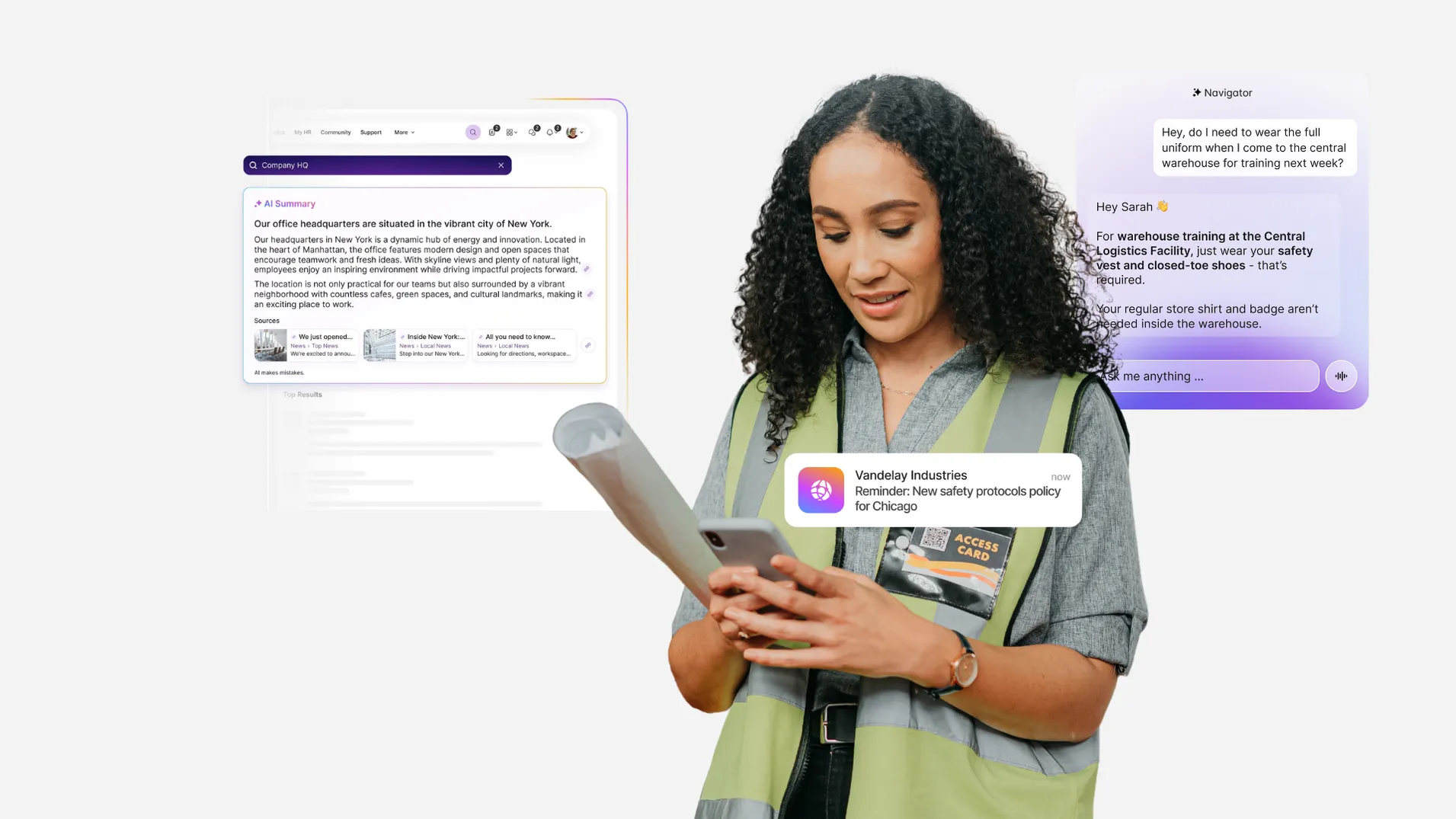
Employee AI. Tailors the experience to each employee with tools like Navigator, an AI assistant that allows employees to ask questions by voice or text in 100+ languages and execute tasks in connected systems such as Workday, ServiceNow, and Atlassian
Smart Impact. Advanced analytics dashboards that track reach, engagement, and sentiment across all channels to prove intranet ROI
Spaces. Local teams get their own area to create, publish, and measure content autonomously, while central administrators keep and set the rules, so a global organization stays consistent without duplicating “truth.”
Enterprise governance and security. Enterprise-grade controls that satisfy IT, security, and compliance teams, including ISO 27001 certification, GDPR compliance, single sign-on and automated user provisioning, role-based permissions, regional data hosting, and audit logging across the platform
Pros
Governed AI that answers from owned, current content, so employees get answers they can trust
Publishing, targeting, and measurement across every channel without IT
One platform for the whole workforce, desk and frontline, with unified cross-channel analytics
Cons
Favors structured, templated pages over fully open-ended design, which trades some layout flexibility for consistency and governance
Built for enterprise scale, likely more than a small, single-site desk team needs
Not a document management system; Staffbase is the communications layer on top of tools
2. Unily
Unily is a feature-rich intranet platform built for large, complex organizations. Known for its deep Microsoft 365 integration and high degree of customization, it’s well-suited to enterprises that need advanced governance, knowledge sharing, and flexible design options to support communication at scale.
Key features
Highly configurable intranet with widgets and a Feature Store
Microsoft 365 and Google Workspace integrations, including a Graph Connector for Copilot
Advanced enterprise search with filters and people search
Pros
Deep Microsoft 365 integration
Deep configurability, with flexible widgets, layouts and a Feature Store
Advanced search with instant results, filters, actions from results and people search
Cons
More complex implementation and setup; It can be overwhelming for small teams
Heavy customisation can make upgrades difficult and keeps routine changes dependent on IT
The default mobile app carries Unily’s branding, a fully branded app costs extra, and the frontline experience is adapted from desktop
3. Simpplr
Simpplr is a modern intranet and employee experience platform known for its clean design, ease of use, and AI-powered personalization.
Key features
Clean, intuitive, modern UX
Native recognition with a built-in Rewards Store
EX Agent for HR and IT self-service in natural language
Pros
Fast set up
Document Library gives mobile-first access to shared and personal files
Native 1:1 and group chat in a dedicated Messaging tab
Cons
Templated approach limits layout and design flexibility
Branded app isn’t standard, and the default app carries Simpplr’s branding
Mobile still maturing, with no offline access and no AI audio briefings
4. LumApps
LumApps is a cloud-based employee intranet and digital workplace solution designed to enhance internal communication, collaboration, and engagement within organizations.
Key features
Rewards and recognition module
100+ connectors and micro-apps in an extensibility framework
Employee advocacy programme for sharing company content on social media
Pros
Deep Microsoft and Google Workspace integrations
Journeys tool for onboarding and other employee lifecycle moments
Strong extensibility through custom widgets and out-of-the-box integrations
Cons
Complex setup due to vast customization options
Default app carries LumApps’ branding, and white-labelling costs extra
Email is a lightweight newsletter tool, with no AI email generation
5. Workvivo
Zoom acquired Workvivo, an enterprise social network, in 2023. Instead of functioning as a traditional intranet, Workvivo takes a social media-inspired approach, allowing employees to share updates, recognize peers, and stay connected across teams.
Key features
Social-style activity feed with peer recognition
Catch Me Up, AI summaries of missed chats, livestreams and feed activity
Integrations with Zoom and Microsoft Teams
Pros
Great for fostering community, recognition, and culture
Intuitive, consumer-style design that drives adoption
Rich multimedia content, including podcasts and video
Cons
Users report that critical updates can get buried in a busy social feed
Microsoft 365 integration relies more on APIs and custom configuration, as its depth is Zoom-first
Chat, digital signage and advanced analytics are paid add-ons
6. Interact Software
Interact is an enterprise intranet with a strong focus on governance, personalization, and compliance, enabling targeted communications and driving employee engagement through tailored experiences and collaboration tools.
Key features
Flexible block editor with granular page customisation
AI authoring tools: writing assistance, image generation and metadata tagging
Recognition, rewards, communities and ideation in one platform
Pros
Deep Microsoft 365 integration, plus connectors for Workday, ServiceNow and Salesforce
100+ configurable reports with raw data access via API
Real-time AI translation into 150+ languages
Cons
Email newsletter tool is newer and still maturing, with formatting and multimedia limits
Flexibility brings complexity, and page editing can feel less intuitive
G2 reviews have shared that Interact are slow to act on customer feature requests
7. Firstup
Formerly SocialChorus, Firstup is a workplace communications platform that delivers personalized, automated messaging across multiple channels. While it is categorized as an intranet solution by some analysts, it focuses less on content hubs and navigation and more on targeted delivery.
Key features
Intelligent Delivery Engine, which picks channel and send time per employee
Visual Journeys builder with decision trees and recurring triggers
Audience Builder that creates dynamic segments from HRIS data
Pros
Mandatory Auto-Follow stops employees opting out of critical topics
HR integrations (Workday, SAP SuccessFactors, Dayforce) let employees submit time off and view payslips in-platform
Campaign performance reporting across channels, especially strong for app and intranet
Cons
Not ideal for structured internal knowledge sharing
Default app carries Firstup’s branding, and a branded app costs extra
Limited social and community features
8. Haiilo
An employee communications platform that blends internal news with social networking features. Designed for community and culture, with strong roots in employee advocacy.
Key features
Employee advocacy module (formerly Smarp) with gamification and analytics
AVA, an AI assistant that writes, summarises and answers repeat questions
Social timeline, communities and customisable Kudos recognition badges
Pros
Intuitive, social-style interface that’s easy for employees to use
Mobile app with chat, communities and a Launchpad linking to HR and scheduling systems
AI sovereignty and privacy designed around EU regulations
Cons
White-label app is a paid add-on, built 6–8 weeks after purchase
Microsoft 365 integration is a paid add-on that needs IT setup
Advanced survey tool replaced by a basic poll widget
9. MangoApps
MangoApps is a versatile platform that combines intranet, communication, knowledge management, and project tools.
Key features
Central intranet hub with knowledge sharing
Task and project management functionality
Surveys, polls, and feedback tools
Pros
A broad suite of 70+ workflow apps on one platform foundation
HITRUST CSF, SOC 2 Type II and ISO 27001 certifications
Cost-effective at smaller scales
Cons
Branding implementation and SSO or integration setup assistance are add-ons
Limited analytics and reporting capabilities compared to other intranet vendors
Some G2 reviewers find the feature set complex and overwhelming, with a learning curve
10. Akumina
Akumina offers a modern intranet and employee experience platform that creates a personalized digital workplace by integrating tools like Microsoft 365 and SharePoint to centralize content, improve internal communications, and enhance employee collaboration across devices.
Key features
Intranet 365, a quick-deploy digital workplace for Microsoft customers
AI-powered search
Multichannel delivery across intranet, mobile app, email, alerts and digital signage
Pros
Many options to create personalized content and experiences based on individual employee profiles
Deep Microsoft 365 and SharePoint integration for organizations committed to that ecosystem
Reviewers praise personalisation and targeted employee communications
Cons
Weaker analytics features than other intranet vendors
SharePoint updates can occasionally affect Akumina functionality, requiring coordination between platform teams
Dependence on Microsoft 365 may limit compatibility for businesses not invested in the Microsoft ecosystem
What does whole-workforce adoption actually look like in practice?
Whole-workforce adoption is proven when the intranet works without corporate email, across languages, and under operational pressure. In practice, it requires three architectural strengths: Proactive Delivery, Governed Proximity, and reliability under pressure. The deployments below show what that looks like.
1) Reaching employees without corporate email (Transdev Australia and New Zealand)
Architectural job: Proactive Delivery
The challenge: Most employees did not have corporate email addresses. Critical safety updates reached supervisors, but not the frontline workers performing the work.
What changed the outcome: A mobile-first enrollment model removed email as the identity anchor. Push delivery ensured updates reached drivers directly, not indirectly.
The result: Transdev Australia confirmed reach, not just send volume, achieving 85% engagement and 89% employee satisfaction.
Why this matters: Low engagement is often treated as a motivation problem. In distributed environments, it is usually an access problem: people cannot act on what never reaches them. When reach is built in rather than assumed, adoption follows.
2) Preventing fragmentation during rapid growth (YAGEO Group)
Architectural job: Governed Proximity
The challenge: YAGEO Group expanded to 40,000 employees across 100+ locations through acquisition. Each business unit brought its own tools, norms, and languages. The organization chart showed one company; the communication structure showed many.
What changed the outcome: A single platform enabled centralized governance with distributed publishing rights. Local teams could publish in their own language within defined boundaries.
The result: YAGEO unified communication within four months, reducing parallel systems and reinforcing a shared identity.
Why this matters: In mergers and acquisitions, fragmentation is the real risk. Adoption holds when the platform prevents multiple “sources of truth” from emerging.
3) Remaining reliable during operational pressure (Alaska Air Group)
Architectural job: Reliability under pressure
The challenge: Alaska Airlines' previous intranet failed under high traffic. In aviation, peak demand coincides with disruption: weather events, operational changes, safety updates.
What changed the outcome: A structured rollout built trust early. Distributed publishing gave local leaders ownership of their content while maintaining central oversight.
The result: 99.5% adoption in year one. The internal goal of 50% adoption was exceeded within two months.
Why this matters: The true test of adoption is not steady-state usage. It is performance during disruption. The platform must remain reliable when demand spikes, not collapse under it.
Takeaway: Whole-workforce adoption isn’t a launch metric. It’s the result of architecture that holds in the hardest conditions: enrollment without email, governed local publishing, and reliable performance under pressure. With that lens, here’s how the major platforms tend to fit different enterprise needs.
Best intranet software for different organizational needs: which platform fits which use case?
There isn’t one “best intranet” in 2027. There’s the best fit for your operating model. The match comes down to what you’re optimizing for: enterprise scalability, frontline reach, multilingual governance, compliance controls, analytics depth, crisis delivery, or simplicity for desk-based teams.
Here’s how the major platforms tend to align with the most common enterprise needs.
Which platform handles enterprise scalability best?
What matters most: Scaling governance and publishing across regions without creating parallel systems of policies and guidance.
Staffbase: Whole-workforce adoption combined with governed local autonomy at a global scale
Unily: Deep configuration flexibility for desk-heavy enterprises with strong IT support
LumApps: Google Workspace alignment with strong global communication capabilities
Which platform achieves the broadest whole-workforce adoption?
What matters most: Designing for the most constrained employee first, not extending downward from a desk-based core.
Staffbase: Frontline-first architecture that scales upward to the full organization
Workvivo: Consumer-grade mobile experience that drives strong adoption, with lighter intranet and governance depth
Firstup: MAutomated multichannel retargeting at large scale, best paired with a separate intranet for content and knowledge
Which platform gives employees the most trustworthy AI answers?
What matters most: AI that answers only from owned, current, source-attributed content, so employees can trust and act on the first answer they get.
Staffbase: Governed content (Content Pro) feeding a dedicated AI quality and governance layer, so answers trace back to approved sources
Simpplr: AI-first assistant with a strong desk-user experience
Unily: AI search and assistant layered on a highly configurable intranet
Which platform is strongest for global and multilingual organizations?
What matters most: Maintaining global consistency while enabling local publishing autonomy without duplicating content.
Staffbase: Governed global framework with distributed local publishing
LumApps: Multilingual employee experience with strong design flexibility
Unily: Complex multi-site structures with many publishing stakeholders
Which platform handles security and compliance requirements best?
What matters most: Enforced publishing controls, traceable ownership, and AI answer accountability.
Staffbase: Enterprise security posture with AI answer traceability
Unily: Structured governance models for regulated environments
Interact: Strong compliance tooling with a leaner admin footprint
Which platform works best for manufacturing organizations?
What matters most: Shift-based relevance, frontline reach, and unambiguous safety communication.
Staffbase: Plant-to-HQ communication with governed safety delivery
MangoApps: Operational workflows and task management for shift-based and deskless teams, in one feature-dense hub
Haiilo: Engagement-focused environments where knowledge depth is secondary
Which platform provides the best analytics and measurement?
What matters most: Proving reach, identifying drop-off, and connecting delivery to engagement across channels.
Staffbase: Unified analytics across intranet, app, and email
Unily: Benchmarking adoption and engagement against peers
Interact: Governance-layer insights tied to publishing controls
Which platform is best for crisis communications?
What matters most: Speed, segmentation, and confirmation of reach under pressure.
Staffbase: Multichannel urgent delivery with verified segment reach
Firstup: Automated omnichannel re-targeting at massive scale
MangoApps: Mobile-first group-based distribution environments
Which platform makes the most sense for smaller, desk-based organizations?
What matters most: Simplicity, speed of deployment, and low governance overhead.
Simpplr: Fast time-to-value with clean admin ownership
SharePoint (well-governed): Sufficient for smaller, Microsoft-centric environments
What should you look for in an intranet platform when your organization is growing or acquiring companies?
Growth is the fastest way to break an intranet that relies on informal governance. As publishing stakeholders and policy volume expand, the platforms that hold up are the ones with enforced accountability, global alignment without duplication, whole-workforce inclusion, and clarity under AI pressure.
Platforms that function with 2,000 employees can begin to fragment at 20,000 if governance and accessibility are not structurally enforced. The platforms that hold under pressure share four characteristics:
Governance and accountability at scale. As publishing rights expand, so does the risk of conflicting guidance. Cascading permission models, approval workflows, and traceable content ownership prevent regional or departmental updates from contradicting global mandates.
Global alignment without duplication. A single strategic update should localize across markets without spawning parallel “truth systems.” Structured translation workflows and role-based targeting maintain consistency while preserving local relevance.
Whole-workforce inclusion. If expansion adds employees who fall outside the original access model — whether due to device type, IT infrastructure, or role — the intranet must still reach them. Accessibility must scale with workforce complexity.
Signal clarity under AI pressure. As communication volume grows, so does noise. Platforms built on governed content environments become more reliable as they scale. Platforms built on content accumulation degrade, and that degradation directly affects AI answer quality.
Growth doesn’t require more features. It requires structural resilience.
When this comparison doesn’t apply
This comparison is for enterprises with distributed workforces and real communication risk — not small, single-site, desk-only teams. If you have fewer than 300 employees, are fully desk-based, and operating inside Microsoft 365 daily, a well-governed SharePoint or Teams/Slack setup may be sufficient. At that scale, informal communication resolves questions faster than structured publishing systems, and the governance overhead of a full enterprise intranet may not yet justify the investment.
The case for a dedicated platform becomes clear when communication risk becomes real:
A compliance update wasn’t confirmed as delivered.
A crisis message missed frontline employees.
Managers received guidance that operational staff never saw.
AI surfaced conflicting policies.
At that point, the intranet stops being a content hub and becomes operational insurance.
Final perspective: the three questions that actually determine the right intranet software platform
If you only remember three evaluation questions, make them these: sustained adoption, AI reliability, and operational independence. Feature checklists won’t predict success in 2027. These three variables determine whether the intranet becomes a trusted part of daily work or another content layer employees ignore.
Sustained adoption: Will employees keep using the platform because it helps them work, or drift away once the launch buzz fades? The platforms that hold are built for how people actually work, including those without a desk or corporate login, not extended outward from a desk-based core. This won’t show in a demo; it shows six months after launch, in segmented adoption data.
AI reliability: When employees rely on the system for policy, safety, or compliance answers, can the organization stand behind the output? Without governed content ownership and lifecycle control, the honest answer is no.
Operational independence: Can your communications team run the platform daily, publishing, targeting, and analyzing, without IT bottlenecks? Platforms that require IT for routine operations slow decision-making and dilute accountability.
See how a governed, whole-workforce intranet architecture works in practice. Explore how Staffbase unifies intranet, app, email, and AI into one system built for enterprise scale.