
What is an AI-powered employee experience platform — and how do you choose one that actually works?

Melisa Eser in AI
The direct answer
An AI-powered employee experience platform is one where AI improves how employees access information, communicate with their organization, and get work done — across every role, channel, and device. But the meaningful difference isn’t which vendors say “AI-powered.” It’s whether the AI is built into the platform’s architecture or added on top of a product designed for a different era.
Choose a platform where AI is foundational — not a feature — because only that architecture can deliver trustworthy AI output at enterprise scale. AI that’s bolted on can help a communicator write faster. AI that’s built in governs every output — what gets created, what gets answered, what gets delivered — across the entire workforce, including the 2.7 billion people globally who work on the front line.
This is exactly how Staffbase is built. The AI Quality Layer governs every output across five dimensions — Employee Context, Scoped Knowledge, Organization Voice, Content Quality, and Learning Loop — so organizations can trust what gets created, answered, and delivered at scale.
What does an employee experience platform include?
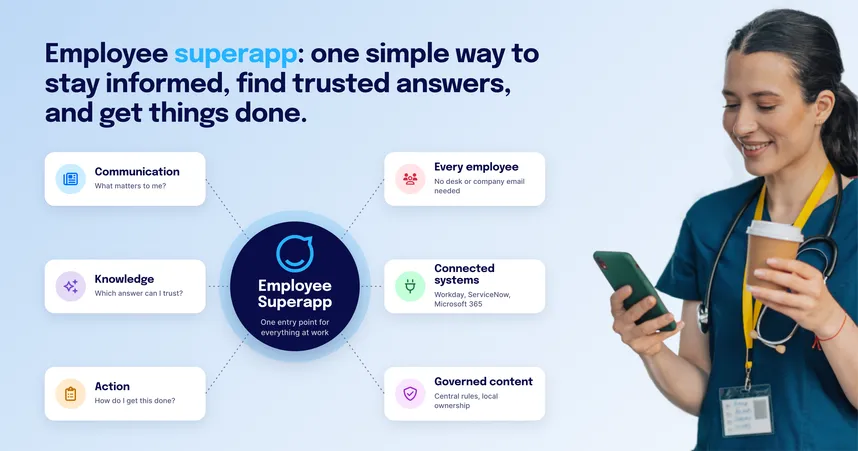
“Employee experience platform” now describes a wide range of products making overlapping claims. A modern platform combines seven functional areas. In each of them, AI can be absent, bolted on as a feature, or built into the architecture — and the difference matters more than whether AI is present at all.
Area | What it covers | How AI enhances it |
|---|---|---|
Communications | Company news, leadership updates, campaigns, crisis messaging — across app, intranet, email, SMS, and digital signage | AI drafts on-brand content, translates into 75 or more languages with unified analytics, converts updates into personalized audio briefings for employees who can’t read during their shift |
Knowledge | Policies, handbooks, procedures, and structured organizational knowledge employees can find and trust | AI governance tools continuously monitor content health — flagging outdated pages, broken links, and contradictions before they produce bad AI answers |
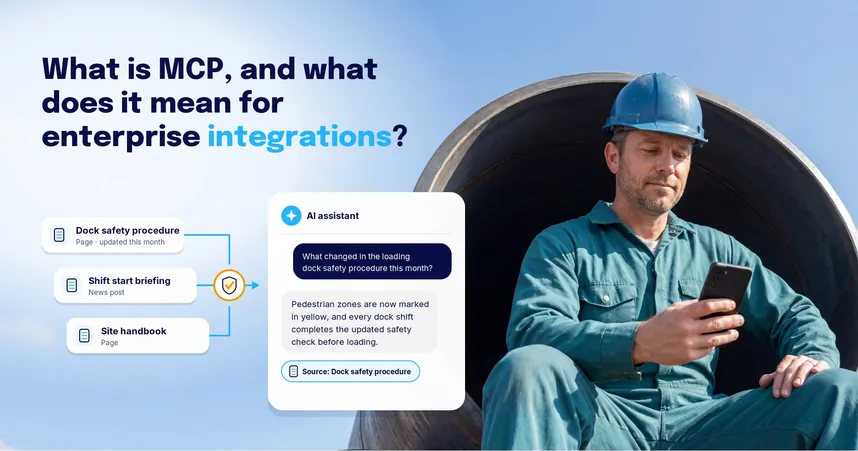
Answers | Direct responses to employee questions, without requiring search or navigation | AI assistants scoped to authorized content give employees a single trusted answer instead of a list of documents to scroll through |
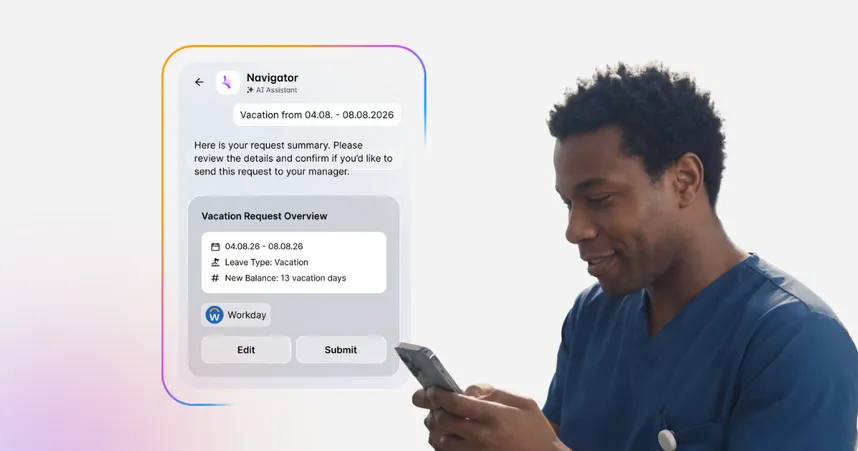
HR self-service | Leave requests, payslips, onboarding sequences, surveys, and HRIS connections | AI automates lifecycle communication sequences and deflects routine HR queries — answering policy and benefit questions without routing to a ticket |
Engagement | Community spaces, social features, peer recognition, and connection | AI sentiment analysis surfaces how employees actually feel about communications — not just whether they opened them |
IT self-service | Helpdesk access, ticketing, and knowledge bases for issue resolution | AI assistants integrated with service management tools deflect IT requests and surface knowledge articles directly in the employee app |
Analytics | Measurement of whether communications landed, were understood, and changed behavior | AI-powered sentiment analysis moves measurement from output (open rates) to outcome (alignment, understanding, motivation) |
Why most AI comparisons use the wrong lens — and what the right question is
Feature lists evaluate what AI is present. They don’t evaluate whether that AI is trustworthy at enterprise scale.
A platform designed for search tolerates ambiguity — give employees ten results and the human picks the right one. AI doesn’t work that way. When an employee delegates a question to an AI assistant, they expect the answer, not a list. If the underlying architecture stores everything — every draft, every version, every outdated policy — the AI has no way to distinguish what’s authoritative. It will summarize what’s there, including the parts that are wrong.
The shift is from discovery to delegation. The employee is no longer browsing. They are trusting the system to get it right. That demands a different architecture than traditional search ever required — one where content governance, employee context, and knowledge scoping are infrastructure, not configuration.
“Almost right is wrong at work. At work, almost right creates risk. It erodes trust. It makes people stop using the tool altogether.” — Martin Böhringer, CEO Staffbase (VOICES 2026)
Gartner named “AI slop” — unchecked AI-generated content polluting knowledge bases — the dominant enterprise AI risk of 2026. McKinsey finds only a third of organizations have begun scaling AI across the business. The bottleneck isn’t the model. It’s trust.
AI-powered capabilities across the employee experience
The table below maps how Staffbase delivers AI-powered capabilities across each team — not just the communications channel. These are live features, not roadmap items.
Team | AI-powered capability | What it changes |
|---|---|---|
Communications | AI writing assistant with on-brand rewrites (Companion Editor) | Drafts content in the organization’s voice; eliminates the blank page without losing brand compliance |
Communications | AI translation across 75 or more languages with unified analytics | One piece of content, every language, with a single engagement view across all versions |
Communications | AI audio briefings (On Air) | Converts written updates into personalized audio for employees who can’t look at a screen during their shift |
Communications | AI sentiment analysis (Smart Impact) | Measures how employees felt about a communication, not just whether they opened it |
Employees | Conversational AI assistant with voice commands (Navigator) | Answers questions directly from authorized content, hands-free for factory, logistics, and retail environments |
Employees | Organizational knowledge layer for Microsoft 365 Copilot | Brings trusted organizational knowledge into Copilot for desk-based workers already in Microsoft 365 |
HR | Automated lifecycle communication (Journeys) | Surfaces the right content to the right employee at every role transition without manual editorial work per segment |
HR | Pulse surveys with AI sentiment analysis (Smart Impact) | Connects survey response data with campaign engagement data for a fuller picture of employee sentiment |
HR | AI assistant for HR self-service queries (Navigator) | Answers leave, benefits, and policy questions directly — without routing every query to an HR ticket |
IT | Centralized AI governance dashboard (AI Trust Hub) | Single control panel for every AI feature: what’s enabled, what data it can access, where it’s applied |
IT | AI assistant integrated with service management (IT Connect + Navigator) | Surfaces IT knowledge, ticket workflows, and notifications inside the employee app — reducing helpdesk volume |
IT | AI-powered content governance (Content Pro + Autopilot) | Continuously monitors knowledge base health and flags content that would produce bad AI answers |
Not every EX feature needs AI to be valuable. Community spaces, peer recognition, employee chat, HR self-service for payslips — these matter and most platforms include them. But they work because they’re useful, not because they’re AI-powered. When evaluating vendors, it’s worth asking which capabilities are AI-powered in a meaningful sense — and which are labeled AI because the market expects it.
How to choose an AI-powered employee experience platform: a practical evaluation framework
Most platform evaluations fail because they evaluate features in isolation. A better approach is to evaluate five criteria in sequence — each one is a prerequisite for the next. A platform that fails criterion 1 shouldn’t be on the shortlist regardless of how well it scores on criteria 2–5.
Criterion 1: Reach — Does it actually get to every employee?
This is the foundation. AI running on a platform that can’t reach frontline workers, deskless employees, or people without corporate email addresses is AI with no audience.
Analysis of 70 or more enterprise intranet deployments by Hirschtec found SharePoint-based intranets typically reach 30–40% of employees, even in well-managed organizations. A platform that misses 60–70% of your workforce isn’t an employee experience platform — it’s a knowledge worker intranet.
What good looks like
Mobile-first app available without corporate email or laptop
Multiple authentication options: QR code, employee ID, passkey
Branded app in app stores under the company’s name
Deployment data showing 80% or higher employee reach across mixed workforces
Red flags
Login requires a corporate email address or SSO only
No offline mode — frontline workers in low-connectivity environments can’t access content
App is distributed under the vendor’s brand, not the employer’s
Reach metrics limited to “active users” or desk-based populations
The question to ask: “Show us your average employee reach across customers with a workforce mix similar to ours — desk-based and frontline combined.”
Criterion 2: AI architecture — Is AI built in or bolted on?
Once reach is confirmed, the architecture question determines whether the AI can be trusted at scale.
A platform where AI was added to an existing product will typically offer AI features that work in isolation — a writing assistant, a translation button, a chatbot. A platform where AI is architectural governs every output: it knows who is asking, draws only from authorized and current content, and improves over time based on actual usage.
What good looks like
AI assistants can be scoped to specific knowledge domains, locations, or employee groups
The platform knows who is asking before formulating an answer — role, location, language, history
Content governance runs continuously — flagging outdated, broken links, and contradictions automatically
AI respects existing content permissions — users only receive answers based on content they already have access to
A feedback loop exists — administrators can see which AI answers were unhelpful and why
Red flags
AI searches the entire content corpus with no scoping controls
AI gives the same answer to a new hire and a plant manager asking the same question
Content governance is a manual process or periodic audit
AI can surface content regardless of who published it or whether it’s current
No analytics on AI output quality; only usage metrics
The question to ask: “If an employee asks your AI assistant about a policy and there are two conflicting versions in the knowledge base — one from last year and one from last month — what does the AI return, and how does the platform flag that to an administrator?”
Criterion 3: Content quality — What is the AI actually drawing from?
AI is only as good as its source content. This criterion is frequently skipped in vendor evaluations — and it’s where most enterprise AI deployments quietly fail.
ClearBox’s Sam Marshall has observed that AI is now surfacing content problems organizations ignored for years: outdated policies with no owner, contradictory procedures across regions, broken links, duplicate pages. Without a content governance layer, the AI confidently delivers wrong answers — and employees stop trusting the system.
What good looks like
Automated content health monitoring: pages with no recent updates flagged, review cycles enforced
AI detects content gaps — topics employees ask about that aren’t adequately covered
Analytics show which content is generating unhelpful AI answers
Clear content ownership model — every page has an owner and a review cadence
Red flags
Content governance is entirely manual — no automated flagging or expiry
No connection between AI assistant queries and content gaps
AI output quality is invisible to administrators
Content is published with no assigned owner or expiry date
The question to ask: “How does your platform tell a communicator that a piece of content is producing bad AI answers — and what does the remediation workflow look like?”
Criterion 4: Governance and security — Can IT control and audit it?
For IT leaders, the AI governance question is different from the AI quality question. Governance is about control, auditability, and compliance. Quality is about output. Both matter — but they require separate evaluation.
What good looks like
Centralized control panel showing every AI feature in use, where it’s applied, and what data it can access
Customer data is never used to train AI models
All data processing on a certified cloud provider (e.g., Microsoft Azure) with documented data residency
EU AI Act compliance framework in place for European deployments
AI respects existing content permissions — no content surfaces to users who shouldn’t see it
Red flags
AI features are enabled globally with no per-feature or per-audience controls
No clear data processing statement — or model training on customer content is not explicitly excluded
Data residency is unclear or unspecified in the contract
No documented AI Act compliance roadmap for EU-based organizations
Permissions and AI access are managed separately, creating gaps
The question to ask: “Show us the AI governance dashboard. What can an administrator enable, disable, and audit — and at what level of granularity?”
Criterion 5: Measurement — Does the platform tell you whether any of it is working?
The last criterion — and the one most platforms treat as an afterthought. A platform that can reach every employee and deliver trustworthy AI but can’t tell you whether employees understood the message or changed their behavior hasn’t closed the loop.
What good looks like
Sentiment analysis on communications — not just open rates, but how employees felt about the content
Measurement segmented by team, location, or role — revealing gaps, not averages
AI assistant analytics showing which queries are going unanswered — feeding back into content creation
Cross-channel analytics — email, app, intranet, and SMS in a single view
Red flags
Analytics limited to delivery metrics: opens, clicks, views
Aggregate metrics only — no way to see that a specific site or team isn’t being reached
AI usage metrics exist; AI quality metrics don’t
Each channel has its own analytics dashboard with no unified view
The question to ask: “If I send a company-wide update about a major operational change, how does your platform tell me whether employees in a specific region understood it — and what action does that trigger?”
The evaluation scorecard
Run every platform on your shortlist through the five criteria below and score each one 1–3:
3 — Fully meets the standard; evidence provided
2 — Partially meets; gaps exist or feature is roadmap
1 — Does not meet; significant gap
Criterion | Weight | What to look for | Staffbase (example) | Your shortlist |
|---|---|---|---|---|
1. Reach — Gets to every employee, including frontline | 30% | Reach across mixed workforces; mobile-first; no corporate email required | 3 — 80%+ reach across desk and frontline; mobile-first, no corporate email | |
2. AI architecture — Built in, not bolted on | 25% | Scoped knowledge, employee context, continuous content governance | 3 — AI Quality Layer across five dimensions; governs every output | |
3. Content quality — Governance layer protects AI output | 20% | Automated flagging of outdated/conflicting content; content ownership model | 3 — Content Pro + Autopilot monitor health continuously | |
4. IT governance — Control, audit, compliance | 15% | Centralized AI control panel; data residency documented; EU AI Act compliance | 3 — AI Trust Hub; Azure; EU AI Act compliant; ISO 27001 | |
5. Measurement — Outcomes, not just outputs | 10% | Sentiment analysis; segmented by location/team; unified cross-channel view | 3 — Smart Impact; segmented analytics; single cross-channel view | |
Weighted total | 100% |
Reach is weighted highest because it’s a binary prerequisite: a platform that can’t reach your workforce fails the evaluation regardless of its AI capabilities. AI architecture comes second because it determines whether everything else — quality, governance, measurement — can actually deliver on its promise.
How Staffbase performs against each criterion
1. Reach — 80% or higher employee reach across mixed workforces
Staffbase deployment data across 30 diverse organizations — spanning manufacturing, retail, logistics, and knowledge work — shows 80% or higher employee reach as a typical outcome. The platform is mobile-first, requires no corporate email address, supports QR code and employee ID login, and works offline. It delivers as a branded app under the employer’s name, not the vendor’s. Hirschtec analysis of 70 or more enterprise intranet deployments found SharePoint-based intranets reach 30–40% of employees by comparison.
2. AI architecture — The AI Quality Layer, built in from the start
Staffbase is the only employee experience platform with a formalized AI quality framework. The AI Quality Layer operates across five dimensions before any AI output reaches an employee: Employee Context (the AI knows who is asking — role, location, language, history); Scoped Knowledge (AI assistants are purpose-built for specific knowledge domains, not the entire content corpus); Organization Voice (AI outputs are governed by the organization’s own tone, terminology, and communication guidelines); Content Quality (Autopilot continuously monitors the knowledge base and flags content that would produce bad AI answers); and Learning Loop (every Navigator conversation generates analytics that improve the system over time).
3. Content quality — Autopilot runs continuously, not periodically
Content Pro and Autopilot monitor every published page in the platform for staleness, broken links, contradictions, and content gaps — automatically, in the background. Administrators see a governance dashboard showing which pages are generating unhelpful AI answers, which content has no owner, and which topics employees are asking about that aren’t adequately covered. This is not a configuration task or a periodic audit — it runs as infrastructure.
4. IT governance — AI Trust Hub with full per-feature control
The AI Trust Hub gives IT administrators a centralized control panel for every AI feature in the platform: what’s enabled, what data it can access, which audiences it applies to, and a full audit trail. All data processing runs on Microsoft Azure. Customer content is never used to train AI models. The platform respects existing content permissions — users only receive AI answers based on content they already have access to — and operates under the T.R.U.S.T. framework: Transparency, Responsibility, User-in-the-loop, Security, Traceability. Staffbase is EU AI Act compliant and holds ISO 27001 certification.
5. Measurement — Smart Impact moves from output to outcome
Smart Impact tracks visibility, engagement, alignment, and AI-powered sentiment analysis across every communication — not just whether employees opened it, but how they felt about it. Analytics are segmented by channel, team, location, and role, so communicators can see which sites or populations aren’t being reached rather than relying on aggregate averages. Navigator analytics show which queries are going unanswered — feeding directly back into content creation priorities. All channels — app, intranet, email, SMS — report into a single analytics view.
What the data says about getting this wrong
In the 2025 International Employee Communication Impact Study — a survey of employees across six countries (n=3,574), conducted by YouGov for Staffbase:
Poor internal communication ranked among the top three drivers of employee turnover in every country studied — alongside salary and supervisor relationship
In Australia, employees rating communication quality as “excellent” were 94% likely to stay — compared to 21% for employees rating it “poor.” A 73-percentage-point retention gap, driven by communication quality alone
Across all regions, internal communication quality has “some or great influence” on motivation (67%), understanding of company vision (65%), and overall productivity (63%)
AI doesn’t close these gaps on its own. But a platform that uses AI to make communication more accurate, more personal, more reliably delivered, and better understood — across every employee, including those on the factory floor — can move these numbers in the right direction.
What independent analysts say
ClearBox Consulting’s 2026 intranet and employee experience platform report — a 946-page vendor-neutral analysis of 21 platforms — described Staffbase’s AI approach as “refreshingly measured”: implementing AI where it brings genuine value rather than for marketing purposes. Staffbase holds three ClearBox CHOICE 2026 badges — Top 5 Score, Comms Excellence, and Frontline & Mobile Focus — and is the only top-5 platform to hold the Frontline & Mobile Focus badge.
Staffbase is a Gartner Magic Quadrant Leader for Intranet Packaged Solutions for three consecutive years (2023, 2024, 2025) and recognized by G2 as a Leader for Employee Intranets.
Skip this if...
This article addresses enterprise organizations with over 1,000 employees, mixed workforces, and an existing or planned employee experience platform strategy. If you’re a startup or small business, a standalone newsletter tool is likely the right starting point. If your primary use case is IT helpdesk automation specifically, evaluate a dedicated ITSM platform first — though the integrated Staffbase + ServiceNow model is worth considering where communications and service delivery need to reach the same frontline workers.
See Staffbase in action
More than 2,000 organizations — including Adidas, Alaska Airlines, DHL, and MAN Truck & Bus — use Staffbase to reach every employee and measure whether communication actually changes anything.
See how Staffbase is built for every employee, including your frontline workforce

Sources and references
All data current as of June 2026. Sources: Staffbase/YouGov Employee Communication Impact Study 2025 (n=3,574 employees, four regions); ClearBox Consulting, Intranet and Employee Experience Platforms V5.1, May 2026; Hirschtec intranet reach analysis (70 or more deployments, 150,000 or more active users); McKinsey AI adoption data 2025; Gartner Magic Quadrant for Intranet Packaged Solutions 2025.